


7 best POS systems for bars in 2025
Get Started with a Free Demo
New Lead: Ravzora
Synergy Landing Page Form, connected with the Mailchimp.
"*" indicates required fields
Empowering Indian Enterprises: The Rise of Cloud Data Services Companies
Did you know that over 68% of bar owners lose up to 20% of their revenue each month due to billing errors, stock wastage, and slow service? Running a bar is fast-paced, fun, and chaotic — but when orders pile up and payments get delayed, even a great night can turn stressful.
Most bar owners still rely on outdated billing registers or spreadsheets that can’t keep up with real-time operations. The result? Missed orders, overpoured drinks, and frustrated customers. Manual processes not only eat into profits but also make it impossible to track sales, manage tabs, or analyze performance efficiently.
That’s where modern POS systems for bars come in. These smart tools combine billing, inventory, and customer data into one powerful platform — helping bar owners save time, reduce errors, and boost profits. Whether you run a cozy pub or a busy lounge, choosing the best POS system for bar and restaurant setups can completely transform how you operate and serve your guests.
Here, we’ll explore the 7 best POS systems for bars in 2025, compare their features, and help you pick the right one for your setup.
What is a POS System for Bars?
A POS (Point of Sale) system for bars is more than just a billing tool — it’s your bar’s command center. It helps you manage orders, process payments, track inventory, and monitor sales in real time. With an integrated bar and restaurant billing software, bartenders can take orders faster, reduce billing mistakes, and serve customers more efficiently.
Think of it as the bridge between your counter and your business insights. Whether you want to track top-selling drinks, check real-time stock, or manage multiple tabs at once, a point of sale system for restaurants and bars gives you the control and clarity you need to run your operations smoothly.
The Real Challenge Behind Running a Bar
Running a bar looks effortless from the outside — lively music, smiling bartenders, and glasses clinking in celebration. But behind the counter, it’s a whole different story. Managing a bar means handling multiple things at once: quick service, accurate billing, managing tabs, controlling inventory, and keeping every customer satisfied.
One small delay or error can quickly turn a busy evening into chaos. Imagine this — it’s Friday night, your bar is full, and your team is juggling 50+ orders. The bartender struggles to track open tabs, bills get mixed up, and suddenly, you’re losing both money and customer trust.
These are the everyday challenges bar owners face:
- Inventory Confusion: Overpouring or stock mismatches due to poor tracking.
- Slow Billing: Manual or outdated registers can’t match the speed of modern bars.
- Staff Errors: Manual entries lead to duplicate or missed orders.
- Lack of Insights: You don’t know which drinks are profitable or which ones are draining revenue.
Even passionate owners with strong teams often struggle because traditional tools simply can’t keep up. That’s why modern pos systems for bars have become a game-changer.
With advanced bar and restaurant billing software, you can manage orders, track stock, and handle payments all from one screen. Whether you run a large bar-restaurant or a cozy neighborhood spot, the best pos system for small bar operations or a full-scale point of sale system for restaurants and bars helps you streamline service, cut losses, and improve profits.
These smart, automated tools are now considered the best bar management software – designed not just to simplify your daily tasks, but to give you full control of your business anytime, anywhere.
Why Traditional Billing Fails Modern Bars
1. You Can’t Manage What You Can’t See
Running a bar means dealing with constant movement – new orders, changing tabs, and busy nights where even a few seconds make a difference. Traditional billing, like handwritten bills or basic registers, gives you no visibility into what’s actually happening. You don’t know which drink is selling the most, how much stock is left, or where your profits are leaking.
That’s exactly where POS systems for bars come in. They give you live updates on sales, inventory, and payments, all from one dashboard. When you can see everything in real time, you can take control instead of reacting to problems later.
2. Manual Systems Can’t Keep Up With Modern Bars
Bars today are not what they used to be. You’re not just pouring drinks — you’re managing open tabs, split bills, custom mixes, and happy-hour discounts, often all at once. Traditional billing systems simply can’t handle that kind of complexity. Mistakes slip in, bills pile up, and customers start waiting too long for their checks.
Switching to a modern bar and restaurant billing software or best bar management software simplifies the entire process. You can bill faster, apply offers automatically, and even manage multiple orders at once. Everything is logged accurately, so your team can focus on serving instead of struggling with calculations.
3. Billing and Inventory Don’t Talk to Each Other
One of the biggest blind spots in old billing systems is that they work in isolation. The person at the counter might record sales, but no one knows how those sales affect your stock. Overpouring, wastage, or even theft often go unnoticed — and that quietly eats into your profits.
Modern point of sale systems for restaurants and bars solve this perfectly. Every sale automatically updates your inventory, giving you instant alerts when something runs low. It’s a simple change that saves a huge amount of time and money over the long run.
In short: old billing systems make you work harder to earn less. Investing in the best pos system for small bar or a full-featured POS for a larger setup isn’t just about automation, it’s about running your bar smart.
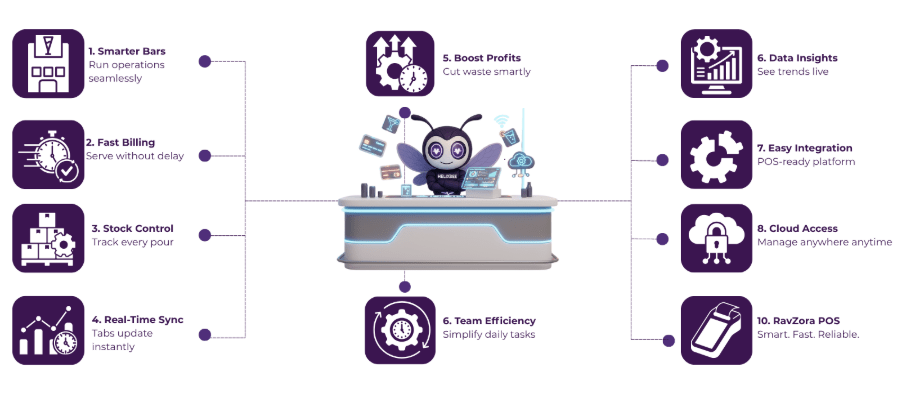
How POS Systems Are Improving Bar Operations
The 7 Best POS Systems for Bars (2025 Edition)
-
RavZora POS
Overview:
RavZora is a cloud-based POS system designed for bars, pubs, and bar-restaurants. It offers fast billing, real-time inventory tracking, smart upselling, and live kitchen sync. Ideal for both small bars and multi-location setups, it runs on any device and deploys in under 72 hours.
Pros:
- Real-time tab, table, and kitchen sync for faster service
- Smart inventory alerts and dynamic menu control
- Upsell engine boosts average order value (up to 31%)
- Cloud-based, device-flexible, and supports multiple outlets
Cons:
- Newer in the market with fewer third-party reviews
- No public pricing; available only via custom quote
- Advanced features may be too much for very small bars
- Limited third-party integrations for niche bar tools
Rating: (4.5/5).
-
Toast
Overview: Toast is a cloud-based, all-in-one POS built specifically for restaurants and bars. It combines proprietary hardware (like spill-proof terminals and handhelds) with integrated software and payment processing into one seamless system. Toast is known for its robust feature set and durable hardware, making it ideal for high-volume bars, full-service restaurants, and multi-location operations that want a powerful unified platform.
Pros:
- Restaurant-Focused Features: Comprehensive tools for menu customization, order routing, and tip management are built-in, reflecting a design truly tailored to bars and restaurants.
- Integrated Hardware & Payments: Offers purpose-built hardware (spill-resistant terminals, Toast Go handhelds) fully integrated with Toast’s software and payment processing for a smooth, reliable operation.
- Robust Reporting & Analytics: Provides granular reports on sales, labor, and even product mix, helping bar managers track top-sellers and costs in detail.
- All-in-One Ecosystem: Beyond POS, it includes extras like built-in online ordering, gift card and loyalty programs, and employee management, reducing the need for third-party add-ons.
Cons:
- Higher Cost: Toast tends to be on the expensive side – it has monthly software fees (starting around $69) and requires Toast’s payment processing, which may come with contract commitments and processing fees.
- Limited to Toast Hardware: You must use Toast’s proprietary hardware, so you can’t run it on just any tablet, which means upfront hardware investments and less flexibility compared to BYOD solutions.
- Customer Support Issues: Some users report that customer support can be hit-or-miss, with slow response times during urgent issues.
- Complex for New Users: Despite a modern interface, a few features require navigating deep menus or multiple steps.
Rating: 4.5/5.
-
Square for Restaurants (Square POS)
Overview:
Square for Restaurants is a flexible, user-friendly POS platform by Square, known for its simplicity and transparent pricing. It runs on iPads and Square’s own inexpensive hardware, which keeps startup costs low.
Pros:
- Easy to Use: Square’s interface is famously intuitive, and minimal training is needed for staff.
- Affordable (Free Plan): Offers a free POS plan with core features included, so small venues can start without a monthly subscription. Even advanced tiers have clear, flat monthly pricing and no surprise fees.
- Flexible Hardware: Runs on common devices (iPad or even phones) and has optional Square hardware, so bars can choose inexpensive setups and even be mobile for events.
- Bar-Friendly Features: Supports opening/closing tabs and split bills and works offline – meaning you can keep taking orders and swipe cards during internet outages.
Cons:
- Payment Processing Fees: All transactions run through Square, and while setup is easy, the processing fee is fixed (e.g. ~2.6% + 10¢ in the US). High-volume bars might get better rates with a different POS/processor combo.
- Limited Advanced Features: Square covers the basics well, but it can lack some high-end capabilities that larger bars or restaurants might want.
- Support Variability: Customer support is not 24/7 on the free plan (business hours only), and user feedback on support is mixed – some find it helpful; others report slow or scripted responses depending on the issue.
- Not Fully Global: Square is widely available in the U.S., but in markets like India it’s not officially supported.
Rating: 4.5/5.
-
Lightspeed Restaurant
Overview:
Lightspeed Restaurant (formerly Upserve) is a powerful cloud-based POS famous for its in-depth inventory management and analytics capabilities. It’s an iPad-based system that allows a high degree of customization in reporting and menu setup, making it a favorite of data-driven bar owners and restaurant operators.
Pros:
- Advanced Inventory Management: Includes built-in tools for ingredient-level tracking, purchase ordering, and low-stock alerts – allowing bars to monitor liquor and keg levels, garnish supplies, and more without separate software.
- Deep Reporting & Analytics: Highly customizable reports let you slice and dice sales data by item, category, time, and other metrics.
- Multi-Outlet Ready: Strong support for multi-location operations – you can manage menus, pricing, and analytics across multiple bar locations from one dashboard.
- Flexible Payments and Add-Ons: Lightspeed allows integration with various payment processors (you aren’t locked into one provider), and it has an ecosystem of add-ons.
Cons:
- Premium Pricing: Lightspeed is generally one of the pricier solutions. Its advanced capabilities come with higher monthly fees, and certain add-on modules (like loyalty or advanced analytics packages) cost extra.
- Steeper Learning Curve: With so many features and customization options, new users might find the back-office interface overwhelming at first.
- Support Can Vary: While Lightspeed offers 24/7 support, some users note that response quality can vary.
- Hardware Costs: You’ll need iPads or compatible hardware to run Lightspeed, and while you can use your own, many bars will also want compatible printers, cash drawers, and possibly Lightspeed’s proprietary stands or terminals.
Rating: 4.4/5.
-
Clover
Overview:
Clover is a versatile POS solution backed by Fiserv, known for its sleek, all-in-one hardware and an app marketplace for customizatio.. Clover offers various devices – from the handheld Clover Flex to the countertop Clover Station – that are stylish, durable, and ready out-of-the-box. It’s popular in the U.S. for small businesses and bars that want a dependable, plug-and-play system with integrated payments.
Pros:
- Integrated Hardware: Clover’s proprietary hardware is attractive and built for heavy use – you get restaurant-grade terminals and tablets that can handle the hustle of a bar (spill-resistant design and fast transactions).
- Excellent Tab Management: Great for bars and clubs – Clover allows you to open, pre-authorize, merge, and split tabs with just a few taps, preventing card declines and speeding up closing out customer bills.
- App Marketplace: Clover has a vast app market, enabling you to extend your POS with third-party apps for niche needs.
- Multiple Payment Options: Accepts all major payment types out of the box – chip, swipe, contactless (NFC), mobile wallets, and even QR code payments.
Cons:
- High Total Cost: The upfront cost of Clover hardware and its monthly service fees can be expensive compared to using consumer devices.
- Processor Lock-In: Each Clover device is tied to Fiserv’s processing – you generally can’t use a different payment processor without getting new hardware.
- Limited International Availability: Clover is mainly available in the US (and a few other markets via partners).
- Feature Gaps Require Apps: Out-of-the-box, Clover’s core POS features are solid but not as deeply specialized for restaurants/bars as some competitors.
Rating: 4.0/5.
-
TouchBistro
Overview
TouchBistro is an iPad-based POS system designed by restaurant people, which makes it well-suited for bars, pubs, and clubs. It packs in virtually every feature a hospitality venue needs: from table and tab management to menu customization and even tableside ordering via mobile iPads.
Pros:
- Very Easy to Learn: The interface is highly intuitive with a low learning curve.
- Strong Bar Features: TouchBistro supports opening/closing tabs, splitting checks, happy hour pricing, and custom drink modifiers.
- In-Depth Menu and Inventory Tools: Includes menu engineering tools and basic inventory tracking for ingredients.
- Offline Reliability: Unlike cloud-only systems, TouchBistro primarily runs locally on your iPad network – meaning your bar can keep operating if the internet is down. Data syncs to the cloud once reconnected, and automatic daily cloud backups ensure your information is safe.
Cons:
- Apple-Only Hardware: TouchBistro only works with iPads and Mac-based servers. Bars must invest in Apple devices, which can be costly if you need multiple terminals. This also means no native Android or Windows terminal support.
- Extra Costs for Add-Ons: Many useful features (online ordering, reservations, gift cards, loyalty, etc.) are paid add-ons rather than included in the base price.
- Limited Built-In Payroll/Analytics: TouchBistro has decent reporting, but some advanced analytics or integrations (like detailed payroll, or integrating with certain accounting systems) aren’t as comprehensive out-of-the-box.
- Support Response Times: While 24/7 support is offered, users have noted that live chat responses can be slower than those of competitors.
Rating: 4.2/5.
-
Petpooja
Overview:
Petpooja is a popular India-based restaurant POS platform that has gained traction for its robust feature set and regional customizations. It’s a cloud-based system that handles everything from quick billing to inventory, and it’s designed with the realities of Indian food and beverage businesses in mind.
Pros:
- Highly Customizable: Bar owners can tailor the system extensively – from menu layout and modifier options to bill formats and tax configurations – making Petpooja adaptable to unique bar setups and local requirements.
- Built for India (Regional Support): Includes integrations and features specific to Indian hospitality, like built-in GST tax calculations, support for UPI payments and local e-wallets, and direct integration with delivery aggregators (Zomato, Swiggy) for online orders.
- Bar Inventory & Menu Features: Petpooja helps track liquor stock and consumption with an item-wise inventory system, which is crucial for barspetpooja.com. It can record pours, flag variance or pilferage, and supports recipe definitions for cocktails.
- Rich Analytics and Reports: Provides real-time sales and expense reports that give insight into menu performance and profit margins.
Cons:
- Inventory Module Quirks: While Petpooja does offer inventory management, some users find this module a bit clunky or less intuitive.
- Occasional Support Delays: Petpooja’s support is generally well-regarded, but at times there are slow turnaround times for certain issues.
- User Interface Aging: The POS interface, while functional, isn’t as slick or modern-looking as some global competitors.
- Primarily Local Reach: Petpooja is focused on India (and has some presence in UAE). Bars in the U.S. or other countries won’t find much utility here, as the product is tailored to the Indian market (currency, integrations, support).
Rating: 4.5/5.
Final Words
Choosing the right POS system for your bar can make the difference between chaos and control. From streamlining billing to tracking every drop of stock, the right technology helps you focus on what truly matters, delivering great experiences to your customers.
Among all the options, RavZora POS stands out for its smart automation, lightning-fast setup, and deep focus on real-time performance. It’s built for Indian bars, pubs, and lounges that want a simple yet powerful solution to manage everything from orders to inventory — all in one place.
With RavZora, you can say goodbye to manual entries, stock confusion, and delayed billing. Its intuitive design, cloud flexibility, and advanced features like smart upselling and live kitchen sync make it more than just a POS, it’s your digital bar manager.
Frequently Ask Questions
1. Why is health information exchange important in healthcare?
It improves care coordination, reduces duplicate tests, minimizes errors, and helps providers make timely, data-driven decisions across different healthcare settings.
2. What are the main models of health information exchange?
3. Which standards guide health information exchange?
Standards like FHIR and HL7 define consistent data formats, making it easier for EHRs, HIEs, and other healthcare platforms to exchange information.
4. What are the benefits of using health information exchange?
HIE improves care coordination, reduces healthcare costs, supports population health management, enhances research, and increases operational efficiency.
5. How does AERIS enhance healthcare information exchange?
AERIS leverages FHIR standards, connects legacy systems, automates workflows, reduces manual errors, and provides real-time access to patient records and lab results.
1. Can a POS system help reduce liquor wastage at bars?
Yes. A modern POS system tracks every pour and sale in real time, helping bar owners identify overpouring, theft, or unrecorded drinks. This directly reduces wastage and improves profit margins.
2. Is cloud-based POS better than traditional on-premise systems for bars?
Absolutely. Cloud-based POS systems allow you to access sales, stock, and reports from anywhere. They also update automatically, cost less to maintain, and are ideal for multi-location bar owners.
3. How long does it take to set up a POS system like RavZora for a bar?
RavZora POS can be deployed in under 72 hours. Once configured, your team can start billing, tracking stock, and managing tabs immediately without technical hassle.
4. Can I integrate a POS system with my accounting or CRM tools?
Yes. Most modern POS systems, including RavZora, support integrations with accounting software and CRM platforms to simplify bookkeeping, loyalty tracking, and customer engagement.