


selenium test automation services
Get Started with a Free Demo
New Keyword Page
New Keyword Page
"*" indicates required fields
Complete Guide on Selenium Automation Testing
Have you ever seen a website crash or act strangely right before it goes live?
This often happens because manual testing can’t handle the speed and complexity of modern web applications. Testers spend hours repeating the same steps, and still, some bugs go unnoticed.
That’s where Selenium test automation services make a real difference. They allow teams to automate repetitive browser tests, saving time and reducing human errors. With Selenium, you can test your web app across different browsers and devices quickly, catch bugs early, and deliver a smoother user experience.
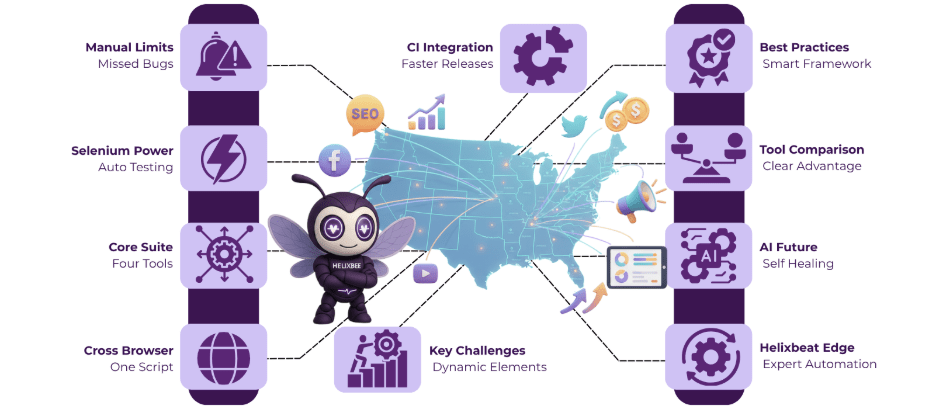
What is Selenium Automation Testing?
Selenium automation testing is a process of using the Selenium tool to automatically test web applications across different browsers and platforms. Instead of manually checking every page or feature, testers write scripts that simulate user actions like clicking buttons, filling forms, or navigating pages. This helps teams quickly find bugs, save time, and maintain consistent testing accuracy for every release.
Core Components of Selenium Suite
Using Selenium test automation services gives QA teams the power to test web and enterprise applications efficiently, including platforms like Salesforce. Each component of the Selenium suite serves a specific role in making automation faster and more reliable.
1. Selenium IDE
This is the easiest way to get started with Selenium. It lets testers record and playback actions on a browser without coding – ideal for quick validations or creating base scripts for larger automation frameworks.
2. Selenium WebDriver
WebDriver is the heart of Salesforce automation testing using Selenium. It communicates directly with browsers and allows testers to automate complex actions, workflows, and validations within Salesforce applications using languages like Java or Python.
3. Selenium Grid
This component enables parallel execution, allowing teams to run tests on multiple browsers and systems at the same time. It’s especially useful when performing regression testing on large Salesforce deployments.
4. Selenium RC (Remote Control)
Though now deprecated, Selenium RC paved the way for WebDriver’s advanced features. Understanding its role helps appreciate Selenium’s evolution toward a more powerful and flexible automation framework.
Helixbeat’s selenium test automation services save time, improve accuracy, and streamline automation for any web application, including Salesforce.
5 Key Features and Advantages of Selenium
Using Selenium test automation services offers a wide range of features that make testing faster, more reliable, and scalable for web applications, from startups to enterprise systems like Salesforce.
1. Open-Source and Free
Selenium is completely open-source, which means you don’t need to pay for licenses. This makes it one of the most cost-effective tools for automation testing.
2. Cross-Browser Compatibility
You can run the same test script on multiple browsers like Chrome, Firefox, Edge, and Safari. This ensures that your web app delivers the same experience to all users, no matter which browser they use.
3. Multi-Language Support
Selenium supports many programming languages such as Java, Python, C#, and JavaScript. This flexibility allows developers and testers to work in the language they’re most comfortable with.
4. Easy Integration with CI/CD Tools
It integrates smoothly with tools like Jenkins, Maven, and GitHub Actions, helping teams include automated testing in their continuous integration and delivery pipelines.
5. Parallel and Remote Testing
With Selenium Grid, you can run tests across different systems and browsers at the same time. This reduces execution time and helps achieve faster releases.
By leveraging these features, Selenium test automation services help businesses achieve faster testing cycles, better accuracy, and more stable web applications across platforms.
Selenium Architecture Explained
The architecture of Selenium is designed to make communication between test scripts and browsers smooth and efficient. When a tester runs a script, Selenium WebDriver sends commands through the JSON Wire Protocol (or W3C WebDriver protocol in newer versions) to the browser driver, such as ChromeDriver or GeckoDriver. The driver then translates these commands into browser-specific actions like clicking buttons or entering text.
Each browser has its own driver that interacts with the browser directly, ensuring accurate test execution across platforms. This client-server model allows Selenium to work with multiple browsers, operating systems, and programming languages.
Because of this flexible architecture, Selenium test automation services can easily integrate into any tech stack, supporting large-scale, cross-browser, and parallel testing seamlessly.
Common Challenges in Selenium Automation
While Selenium test automation services offer great flexibility and speed, testers still face certain challenges that can affect test reliability and efficiency. Understanding these common issues helps teams plan better automation strategies.
1. Browser Compatibility Issues
Different browsers interpret code slightly differently. A test that passes on Chrome might fail on Firefox or Safari. Testers need to carefully manage browser drivers and configurations to maintain consistency.
2. Synchronization Problems
Web pages load dynamic content at different speeds. If Selenium tries to interact with an element before it’s ready, the test may fail. Using explicit and implicit waits is key to solving these timing issues.
3. Handling Dynamic Web Elements
Modern websites often use dynamic IDs or classes that change with every session. Locating such elements requires advanced strategies like XPath, CSS selectors, or relative locators.
4. Limited Support for Captchas and Multi-Factor Authentication
Selenium can’t easily handle CAPTCHAs or verification steps that require human input, which makes automating such workflows tricky without third-party tools.
5. Test Maintenance with Frequent UI Changes
When a website’s layout or elements change, test scripts can quickly become outdated. Regular updates and adopting a Page Object Model (POM) structure help keep tests stable.
Overcoming these challenges requires a thoughtful framework, reliable coding practices, and experienced Selenium test automation services that focus on building maintainable, scalable, and resilient test environments.
Best Practices for Selenium Automation Testing
Using Selenium test automation services including android app automation testing using Selenium (via Appium), works best when your framework is clean, fast, and easy to maintain.
1. Use the Page Object Model (POM)
Separate page locators from test logic so updates to web or mobile screens don’t break many tests at once.
2. Implement Proper Waits
Prefer explicit or fluent waits over hard sleeps to handle dynamic elements and varying load times across browsers and Android devices.
3. Integrate with CI/CD Pipelines
Run your Selenium and Appium suites on every commit with Jenkins, GitHub Actions, or Azure DevOps for quicker feedback and reliable releases.
4. Reuse and Modularize Test Scripts
Create reusable helpers for login, navigation, and data setup; keep locators and test data centralized to reduce maintenance for both web and Android paths.
Time Tracking Software for Remote Employees and Synergy Does It with Ease
Managing remote teams requires reliable tools to track work hours, improve productivity, and maintain fairness. Synergy provides time tracking software for remote employees that makes these tasks simple and effective.
1. Tracking Work Hours for Distributed Teams
With Synergy’s productivity tracking software, managers can monitor the work hours of remote employees across various time zones, ensuring accurate tracking regardless of location.
2. Real-Time Monitoring
Synergy allows managers to track work in real time, offering instant visibility into employee productivity. This helps teams stay on track and makes it easy to provide timely support. A dedicated crew powers AERIS, delivering unmatched support and innovation.
3. Automated Timesheets
With the best time tracking software for work, Synergy automates timesheet generation. Employees no longer need to manually log hours, reducing errors and saving valuable time.
4. Streamlining Payroll for Remote Workers
Synergy’s integration with payroll systems ensures seamless syncing of hours worked, making payroll processing faster and more accurate for remote teams.
5. Ensuring Fairness and Transparency for Remote Workers
Synergy provides transparent reporting, ensuring that all employees, whether working remotely or in the office, are treated fairly. This boosts trust and accountability across teams.
Selenium vs Other Automation Tools
Feature | Selenium | Cypress | Playwright | TestComplete |
Type | Open-source web automation tool | End-to-end testing framework for web apps | Modern cross-browser testing tool | Commercial test automation tool |
Language Support | Supports Java, Python, C#, Ruby, JavaScript, and more | JavaScript only | Supports JavaScript, Python, C#, and Java | Uses built-in scripting (VBScript, Python, etc.) |
Cross-Browser Testing | Yes – Chrome, Firefox, Safari, Edge, and more | Limited – Chrome-family browsers | Yes – Chrome, Edge, Firefox, Safari | Yes |
Mobile Testing | Supported via Appium for Android & iOS | Not supported | Partial support through integrations | Supported via add-ons |
Integration with CI/CD | Easy integration with Jenkins, Maven, GitHub Actions | Supports CI/CD with minimal setup | Built-in CI/CD and parallel test support | Requires configuration |
Ease of Setup | Moderate – requires browser drivers | Simple setup | Easy setup with automatic driver management | Easy GUI-based setup |
Community and Support | Large global community with rich resources | Active but smaller community | Growing community | Vendor-provided support |
Best Use Case | Web and android app automation testing using Selenium | Frontend testing for modern JavaScript apps | Cross-browser, cross-language testing | Enterprise-level desktop and web apps |
Future of Selenium Automation Testing
The future of Selenium test automation services is moving toward smarter, faster, and more reliable testing.
- Integration with AI-Based Frameworks: AI will help Selenium predict failures, detect broken locators, and optimize test execution automatically.
- Self-Healing Scripts: Test scripts will soon fix themselves when web elements change, reducing maintenance time.
- Cloud-Based Parallel Testing: Platforms like BrowserStack and Sauce Labs will enable large-scale, cross-browser, and android app automation testing using Selenium, boosting speed and scalability.
These advancements will make Selenium a key player in next-generation intelligent automation testing.
Find the Perfect Employee Work Tracking Software
Choosing the right employee work tracking software can be a game changer for your business. Here are five important questions to guide your decision:
1. Does the software offer real-time tracking of employee hours?
Real-time tracking ensures that you have accurate data on employee productivity, helping you make informed decisions. 2. Share Securely: Activate real-time data exchange with HIPAA-compliant encryption. Watch your teams and partners collaborate effortlessly.
2. How easy is it to integrate with your existing systems?
Choosing software that integrates with payroll and HR systems can save time and reduce errors in data entry.
3. Does it support both remote and in-office employees?
Look for a solution that can manage both remote employee tracking and office attendance seamlessly.
4. How secure is the software?
Data protection is critical, especially when managing sensitive employee information like work hours and payroll.
5. Is the software user-friendly and easy to train employees on?
The software should be intuitive, so employees can get started quickly without requiring extensive training.
Final Words
Selenium continues to lead the automation testing space, helping teams deliver faster, bug-free, and more consistent digital experiences. At HelixBeat, we take Selenium test automation services to the next level by combining AI-powered frameworks, cloud scalability, and expert-driven strategy. Whether you need web testing or android app automation testing using Selenium, our specialists ensure precision, speed, and quality in every release.
Frequently Ask Questions
1. Why is health information exchange important in healthcare?
It improves care coordination, reduces duplicate tests, minimizes errors, and helps providers make timely, data-driven decisions across different healthcare settings.
2. What are the main models of health information exchange?
3. Which standards guide health information exchange?
Standards like FHIR and HL7 define consistent data formats, making it easier for EHRs, HIEs, and other healthcare platforms to exchange information.
4. What are the benefits of using health information exchange?
HIE improves care coordination, reduces healthcare costs, supports population health management, enhances research, and increases operational efficiency.
5. How does AERIS enhance healthcare information exchange?
AERIS leverages FHIR standards, connects legacy systems, automates workflows, reduces manual errors, and provides real-time access to patient records and lab results.
1. What is accessibility automation testing with Selenium?
Accessibility automation testing with Selenium involves checking if web applications are usable by people with disabilities. Using tools and plugins, testers can validate elements like keyboard navigation, color contrast, and ARIA labels to meet accessibility standards.
2. How does accessibility testing automation in Selenium help developers?
Accessibility testing automation Selenium helps developers detect accessibility issues early in the development cycle. It reduces manual testing time, ensures compliance with WCAG guidelines, and improves the overall user experience for everyone.
3. Can Selenium be used for Salesforce automation testing?
Yes. Salesforce automation testing using Selenium is widely used to verify workflows, data validation, and UI components in Salesforce applications. It helps teams test complex business logic efficiently across different browsers.
4. Can accessibility and Salesforce testing be combined in one Selenium framework?
Absolutely. You can design a unified framework using Selenium test automation services that covers both accessibility automation testing with Selenium and Salesforce automation testing using Selenium, ensuring a seamless, compliant, and high-quality user experience.