


Table Reservation System for Restaurants
Get Started with a Free Demo
New Keyword Page
New Keyword Page
"*" indicates required fields
Did you know that nearly 40% of restaurant booking errors happen due to manual scheduling and poor coordination?
If your team still juggles reservations through phone calls or handwritten notes, it’s easy to lose track — leading to double bookings, empty tables, and frustrated guests. Managing reservations manually not only wastes time but also affects your restaurant’s reputation and revenue during peak hours.
That’s where a table reservation system for restaurants makes all the difference. It automates the entire process — from online booking and table allocation to instant confirmations and guest reminders. The system updates in real time, connects with your POS and floor plan, and helps you seat more guests efficiently. In short, it keeps your restaurant running smoothly, even on the busiest nights.
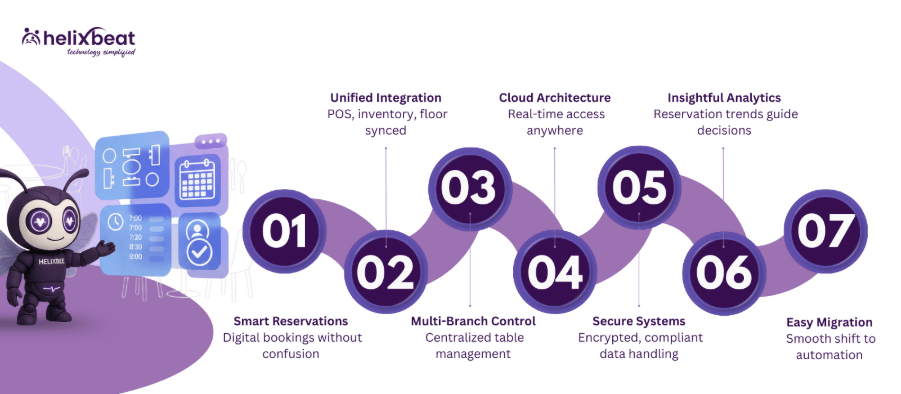
Understand the Basic Concept of Table Reservation System for Restaurants
A table reservation system for restaurants is a digital tool that helps you manage customer bookings without any confusion or manual work. Instead of writing down reservations on paper or relying on phone calls, guests can book their tables online in real time.
The system automatically updates available seats, avoids double bookings, and sends instant confirmations. It also connects with your restaurant’s POS and floor layout, so your staff always knows which tables are booked, free, or being cleaned. In short, it keeps your reservations organized and your guests happy.
How Modern Reservation Systems Connect POS, Inventory, and Floor Plans
A modern online restaurant reservation system works as a unified platform that connects your POS, inventory, and floor plan in real time. This integration helps your staff manage seat availability, track guest flow, and streamline daily operations from one dashboard. When a customer books a table online, the system instantly updates the POS and floor plan, ensuring every team member — from the kitchen to the front desk — stays informed and ready.
Here’s how it works:
- POS Integration: The online restaurant reservation system links bookings with order and billing data, helping you see which tables are occupied, billed, or ready for new guests.
- Inventory Sync: It tracks pre-orders and menu availability; if a dish or ingredient runs low, it updates the booking options accordingly.
- Floor Plan Mapping: Displays your restaurant layout digitally and assigns tables smartly based on group size and timing.
- Centralized Updates: Any change in reservation status instantly reflects across all connected systems, reducing miscommunication.
By integrating everything in real time, an online restaurant reservation system helps maximize table turnover, reduce waiting time, and enhance guest satisfaction.
Centralized Dashboard for Multi-Branch Table Management
A centralized dashboard in an online restaurant reservation system lets you manage all your branches from one place. Whether you run two outlets or twenty, you can track real-time table availability, customer bookings, and staff updates across every location. This means no more confusion about double bookings or missed reservations, everything is visible in one unified view.
It also allows managers to assign roles, monitor performance, and make quick adjustments during peak hours. For instance, if one branch is fully booked, the system can suggest nearby outlets with open tables.
With this connected setup, your restaurant chain stays efficient, consistent, and ready to deliver a smooth dining experience no matter which branch your guests choose.
The Tech Used to Run a Table Reservation System
A strong table reservation system isn’t just about taking bookings, it’s powered by smart technology that keeps everything connected, secure, and running smoothly.
1. Cloud-Based Architecture for Real-Time Access
A modern online restaurant reservation system is built on cloud-based architecture that keeps your operations connected and updated in real time. Whether you’re using a tablet at the front desk or a phone on the go, managers and staff can instantly view new bookings, table availability, and customer preferences.
This setup also powers restaurant table management software, allowing multiple branches to share the same data securely. With automatic backups and software updates, you save time on manual tracking and reduce booking errors.
2. API Integration with POS and CRM Systems
An advanced restaurant reservation management system uses API integration to connect with your POS, CRM, and even third-party platforms like Google Reserve or WhatsApp Business. When a guest books a table, the POS updates automatically, and customer details are stored in the CRM for future loyalty programs or feedback.
This smooth data flow keeps your staff informed, helps automate guest reminders, and simplifies billing — all from a single connected restaurant booking management system.
This setup also powers restaurant table management software, allowing multiple branches to share the same data securely. With automatic backups and software updates, you save time on manual tracking and reduce booking errors.
3. Data Encryption and Secure Servers
Every reliable restaurant table management software must prioritize security. That’s why most systems use SSL encryption, firewall protection, and secure cloud servers to safeguard customer data.
From contact details to payment information, everything stays protected under global standards like GDPR and PCI-DSS. A secure online restaurant reservation system not only builds trust with your guests but also ensures your business operates without risk of data breaches or downtime.
Together, these technologies make an online restaurant reservation system faster, safer, and more efficient, helping restaurants manage tables, guests, and operations with ease.
How Table Reservation Data Improves Restaurant Analytics
A table reservation system for restaurants doesn’t just handle bookings, it also collects valuable data that helps you make smarter business decisions. Every reservation, cancellation, or no-show tells you something about your restaurant’s performance. With built-in analytics, you can track busy hours, popular menu items, average dining time, and customer preferences.
This data helps you plan better, from staff scheduling and inventory ordering to marketing promotions. For example, if Fridays are always packed, you can add more servers or adjust table layouts for faster turnover. Over time, the system gives you clear insights into trends and patterns that boost profits and improve customer satisfaction. In short, your reservation data becomes a powerful tool to grow your business.
Time Tracking Software for Remote Employees and Synergy Does It with Ease
Managing remote teams requires reliable tools to track work hours, improve productivity, and maintain fairness. Synergy provides time tracking software for remote employees that makes these tasks simple and effective.
1. Tracking Work Hours for Distributed Teams
With Synergy’s productivity tracking software, managers can monitor the work hours of remote employees across various time zones, ensuring accurate tracking regardless of location.
2. Real-Time Monitoring
Synergy allows managers to track work in real time, offering instant visibility into employee productivity. This helps teams stay on track and makes it easy to provide timely support. A dedicated crew powers AERIS, delivering unmatched support and innovation.
3. Automated Timesheets
With the best time tracking software for work, Synergy automates timesheet generation. Employees no longer need to manually log hours, reducing errors and saving valuable time.
4. Streamlining Payroll for Remote Workers
Synergy’s integration with payroll systems ensures seamless syncing of hours worked, making payroll processing faster and more accurate for remote teams.
5. Ensuring Fairness and Transparency for Remote Workers
Synergy provides transparent reporting, ensuring that all employees, whether working remotely or in the office, are treated fairly. This boosts trust and accountability across teams.
What Our Clients Say About Synergy’s Leave and Attendance software
“The attendance and leave management system has made tracking hours effortless for our retail team. Accuracy has improved significantly!”
— Rina S., Store Manager, Retail Business
“Using the attendance and leave management software in our IT services company has simplified leave approvals and reduced HR workload drastically.”
— Arvind M., HR Manager, Technology Services
“The employee attendance and leave management system has transformed our manufacturing operations, ensuring accurate time tracking across multiple shifts.”
— Priya T., Operations Head, Manufacturing
“With the online attendance and leave management system, our remote team can log hours and track leave seamlessly, improving transparency and productivity.”
— Vikram P., Project Manager, Marketing Services
How to Move from Old Booking Methods to a Smart System
Switching from handwritten logs or phone-based reservations to a smart, automated system may seem challenging at first, but with the right approach, it’s simple and rewarding.
1. Evaluate Your Current Booking Process
Start by listing the problems you face with manual reservations — missed calls, double bookings, or lack of data tracking. Knowing where the issues lie helps you choose the right digital solution.
2. Choose the Right Table Reservation Software
Pick an online restaurant reservation system that fits your business size and needs. Look for features like POS integration, mobile access, and real-time updates to make the transition smooth.
3. Import Your Existing Data
Transfer your current reservation records, customer details, and table layouts into the new system. Most restaurant table management software offers import tools that make this easy and quick.
4. Set Up Integrations
Connect your new restaurant booking management system with your POS, CRM, and payment gateway. This integration keeps everything in sync — from table availability to billing.
5. Train Your Staff
Before going live, give your staff a short training session on how to use the dashboard, manage online bookings, and handle customer updates. A confident team ensures smoother operations.
6. Go Live and Monitor Performance
Launch your new restaurant reservation management system and keep an eye on how it performs during the first few weeks. Use analytics reports to adjust settings, improve workflows, and make data-driven improvements.
By following these steps, restaurants can easily shift from outdated booking methods to a smart, connected system that saves time, reduces errors, and enhances the guest experience.
Why RavZora Is the Best Table Reservation System for Restaurants
RavZora is more than just a booking tool, it’s a complete table reservation system for restaurants that connects your POS, inventory, and customer data in one place. It helps you manage online bookings, walk-ins, and waitlists effortlessly while reducing no-shows through automated confirmations and reminders. With real-time updates, you always know which tables are free, booked, or being prepared, keeping your restaurant organized and efficient.
What makes RavZora stand out is its smart analytics and easy setup. You can access everything from a single dashboard, whether you run one outlet or multiple branches. The system also supports mobile devices, secure payments, and customizable layouts that fit your restaurant’s style.
In short, RavZora helps you save time, serve more guests, and deliver a better dining experience, all while keeping your operations smooth and stress-free.
Frequently Ask Questions
1. Why is health information exchange important in healthcare?
It improves care coordination, reduces duplicate tests, minimizes errors, and helps providers make timely, data-driven decisions across different healthcare settings.
2. What are the main models of health information exchange?
3. Which standards guide health information exchange?
Standards like FHIR and HL7 define consistent data formats, making it easier for EHRs, HIEs, and other healthcare platforms to exchange information.
4. What are the benefits of using health information exchange?
HIE improves care coordination, reduces healthcare costs, supports population health management, enhances research, and increases operational efficiency.
5. How does AERIS enhance healthcare information exchange?
AERIS leverages FHIR standards, connects legacy systems, automates workflows, reduces manual errors, and provides real-time access to patient records and lab results.
1. Can customers modify or cancel their bookings through the system?
Yes, most modern online restaurant reservation systems allow guests to edit or cancel their bookings directly through email or SMS links. This helps reduce no-shows and keeps your seating plan up to date automatically.
2. Does the system support special requests like birthdays or large group bookings?
Absolutely. Guests can add notes or special requests while booking, such as arranging a birthday table, group seating, or dietary preferences. These requests are visible to your staff before the guest arrives.
3. Will it work if the internet connection goes down temporarily?
Many restaurant table management software platforms have offline sync capabilities, meaning reservations made offline are automatically updated once the connection is restored, so you never lose data.
4. Can the reservation system send automatic reminders to guests?
Yes, the system can send automated reminders via SMS, email, or WhatsApp, helping reduce no-shows and confirming attendance before the reservation time.
5. How long does it take to set up the system for a new restaurant?
Setup usually takes less than 48 hours, depending on the size of your restaurant and the integrations needed (POS, CRM, or payment gateways). Most platforms also provide guided onboarding to make the process easy.