


Future of Cloud Performance Testing: Trends and Best Practices
Get in Touch
New Lead: Testing as a Service
Testing as a Service Landing Page Form, connected with the Mailchimp.
"*" indicates required fields
Did you know that more than 65% of companies face slowdowns or downtime after moving to the cloud, leading to losses of nearly $300,000 for every hour of disruption? This shows a major problem: cloud systems can fail when they’re not properly tested for real-world conditions.
Many businesses don’t realize how their apps will perform when user traffic increases or when servers in different regions slow down. As a result, customers face delays, pages crash, and revenue drops.
Cloud performance testing solves this problem by checking how your system behaves under different loads and network conditions. It helps you find issues early, improve speed, and keep your cloud apps running smoothly even during the busiest hours. It’s the smart way to make your cloud setup reliable and ready for anything.
Why Companies Need to Invest in Cloud Performance Testing Services
As businesses rely more on cloud-based systems, performance issues can directly impact customer trust and revenue. Here’s why investing in cloud performance testing services is essential:
- Detect hidden issues early: Identify performance bottlenecks before they affect users.
- Improve scalability: Test how your application handles traffic spikes and growing workloads.
- Optimize costs: Fine-tune resource usage to avoid overpaying for unnecessary cloud capacity.
- Improve user experience: Maintain fast, smooth, and reliable application performance worldwide.
In short, cloud performance testing helps you stay ahead of problems and deliver a consistently reliable experience to every user.
Step-by-Step Process Involved in Cloud Performance Testing
Before diving into cloud deployment, it’s essential to verify how your application performs under real-world conditions. Cloud performance testing helps identify scalability limits, latency issues, and infrastructure inefficiencies early.
Here’s a step-by-step process involved in Cloud Performance Testing:
1. Define Performance Goals and Metrics
- The first step is to establish what success looks like. Identify the key performance indicators (KPIs) — such as response time, throughput, scalability, and latency — that reflect real-world user expectations.
- For cloud environments, you also need to define autoscaling thresholds, network bandwidth limits, and cost-performance balance parameters.
2. Identify Test Scenarios and Workloads
- Next, determine which components and user journeys to test. Simulate realistic workloads by mapping concurrent users, request rates, and transaction patterns.
- Cloud applications often have multi-region or microservice architectures, so workload distribution across different cloud zones should also be factored in.
3. Set Up the Test Environment
- Create a replica of the production environment within the cloud setup. Configure instances, load balancers, and databases with the same parameters as production.
- Make sure your monitoring tools (like AWS CloudWatch, Azure Monitor, or Datadog) are integrated to capture metrics in real time.
4. Choose the Right Testing Tools
- Select tools that support distributed cloud testing and auto-scaling simulation. Commonly used tools include Apache JMeter, LoadRunner Cloud, BlazeMeter, Gatling, and k6.
- The right tool should allow integration with CI/CD pipelines and provide detailed cloud-based analytics.
5. Execute Load, Stress, and Scalability Tests
Run different types of tests:
- Load Testing: Evaluate performance under expected user load.
- Stress Testing: Push the system beyond its limits to find breaking points.
- Scalability Testing: Check if your system scales efficiently under increased demand.
Each test should be conducted under controlled conditions to analyze server response, auto-scaling triggers, and failover behavior.
6. Monitor, Analyze, and Collect Metrics
- During testing, monitor CPU utilization, memory usage, disk I/O, and network latency. Use cloud-native monitoring dashboards to collect data on system bottlenecks and identify performance leaks.
- The goal here is to gather actionable insights that directly point to infrastructure or code-level optimizations.
7. Optimize and Retest
- Based on findings, fine-tune configurations—adjust instance types, improve caching, or optimize database queries. Then, re-run the tests to validate improvements.
- Cloud environments are dynamic, so continuous performance testing should be part of the DevOps cycle to ensure consistent reliability as deployments evolve.
By following this step-by-step process, businesses can gain a clear understanding of how their applications perform under real-world cloud conditions. Cloud performance testing not only enhances system reliability but also ensures scalability, cost efficiency, and a seamless user experience across changing workloads.
Best Practices for Effective Cloud Performance Testing
To make cloud performance testing truly effective, following best practices is crucial for accurate results and long-term system stability. Here are the five key practices to keep in mind:
- Conduct testing in an environment that mirrors the production setup as closely as possible. This ensures realistic performance results, accounting for actual cloud configurations, data volumes, and network conditions.
- Simulate real user behavior by designing test scenarios that reflect peak usage hours, geographical distribution, and transaction patterns. This helps identify performance bottlenecks that may not appear under normal load conditions.
- Use cloud-native monitoring and analytics tools to track performance metrics in real time. Tools like AWS CloudWatch, Azure Monitor, or Google Cloud Operations Suite help pinpoint specific performance issues at the infrastructure or application level.
- Integrate performance testing into your CI/CD pipeline to make it a continuous process rather than a one-time event. Regular testing after each deployment helps maintain consistent performance and prevents regression issues.
- Finally, analyze cost versus performance. Cloud environments are pay-as-you-go, so optimizing configurations for performance without unnecessary over-provisioning ensures both efficiency and affordability.
By following these best practices, teams can build high-performing, scalable, and cost-efficient cloud applications that consistently deliver smooth user experiences even under unpredictable workloads.
Top Cloud Performance Testing Tools in 2025
In 2025, cloud performance testing tools are smarter, faster, and built to handle complex cloud systems. These tools don’t just measure speed – they help teams find issues early, test at scale, and keep cloud applications running smoothly under any load.
1. Apache JMeter and BlazeMeter
Apache JMeter is a popular open-source tool for testing how apps perform under pressure. When paired with BlazeMeter, it becomes more powerful, allowing teams to run large-scale tests from multiple locations and track results in real time.
It’s ideal for both beginners and experts testing cloud-based applications.
2. LoadRunner Cloud and Gatling
LoadRunner Cloud helps large businesses test thousands of users at once with AI-based analysis and automatic reports.
Gatling, on the other hand, is simple for developers to use and works well in agile environments.
Both fit perfectly into a modern cloud performance testing strategy.
3. Cloud-Native Testing Platforms
Tools like AWS Performance Testing, Azure Load Testing, and Google Cloud PerfKit are built right into cloud platforms. They make setup easy, reduce manual work, and allow testing directly within the live environment.
These cloud-based performance testing tools are cost-efficient and scalable.
In short, the best cloud performance testing tools in 2025 help businesses test smarter, improve speed, and keep applications stable even during heavy usage.
Test your cloud speed with Helixbeat Now
Case Studies: Real-World Cloud Performance Testing Success
A leading e-commerce platform faced slow checkout times during festive sales, affecting thousands of users. By using a structured cloud performance testing strategy with JMeter and AWS tools, the company identified bottlenecks in API calls and optimized server configurations.
The result: page load time dropped by 45%, uptime improved to 99.9%, and customer conversions increased significantly.
In another case, a fintech startup used cloud-based performance testing tools to test its digital payment system across regions. The team simulated 50,000 concurrent transactions to check system reliability under heavy loads.
After fine-tuning their infrastructure, they achieved 60% faster response times and reduced cloud costs by 25%. These real-world examples show how smart performance testing for cloud applications can turn potential failures into measurable business success.
Future Trends in Cloud Performance Testing
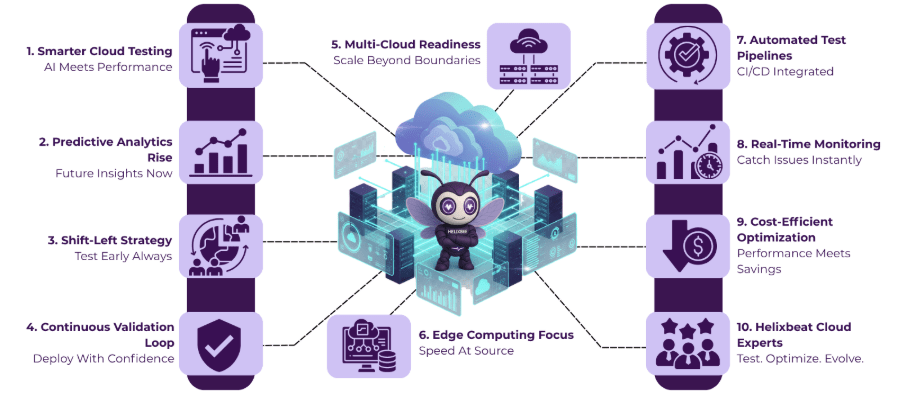
As cloud ecosystems continue to grow, cloud performance testing is also shifting toward smarter, automated, and more predictive approaches. Here are the key future trends shaping this field:
1. AI-Driven Performance Analytics
Artificial Intelligence and Machine Learning are transforming the way cloud systems are tested. AI-driven analytics can automatically detect performance anomalies, predict failures before they occur, and recommend optimization strategies. Tools integrated with AIOps platforms will make it easier to manage complex cloud infrastructures with minimal manual intervention.
2. Shift-Left and Continuous Performance Testing
The traditional “test-after-deployment” model is being replaced with Shift-Left Testing, where performance tests are integrated early in the development cycle. Combined with CI/CD pipelines, this approach ensures faster feedback, quicker fixes, and better scalability validation during each code update or release.
3. Multi-Cloud and Edge Performance Testing
With businesses adopting multi-cloud and edge computing architectures, testing tools must evaluate performance across distributed environments. This includes measuring latency between edge nodes, cross-cloud data synchronization, and region-specific load balancing, ensuring consistent user experience globally.
In the coming years, these advancements will help businesses deliver more reliable, scalable, and high-performing cloud applications without compromising speed or cost.
Why Helixbeat is the Best Choice for Cloud Performance Testing
At Helixbeat, we don’t just test your cloud systems; we make them faster, stronger, and more reliable. Our experts create a complete cloud performance testing strategy that fits your business goals and cloud setup. We help you detect slowdowns, fix bottlenecks, and make sure your applications perform well even during high traffic.
We combine smart automation, detailed analytics, and cloud expertise to deliver results you can measure. Whether you’re using AWS, Azure, or Google Cloud, Helixbeat ensures your apps stay stable and cost-efficient under any load.
Here’s why businesses trust Helixbeat:
- Works with all major cloud platforms – AWS, Azure, and Google Cloud.
- Real-time insights – Find and fix performance issues quickly.
- Smart automation tools – Faster, more accurate testing results.
- Custom solutions – Customized testing for APIs, microservices, and serverless apps.
- Secure and compliant – Testing that protects your data and meets standards.
With Helixbeat, cloud performance testing becomes simple, effective, and results-driven, helping your applications run smoothly, no matter how much they grow. Get in touch with us.
FAQs
1. What factors affect performance testing in cloud environments?
Key factors include network latency, data center location, virtual machine configuration, and workload distribution. A strong performance testing strategy for cloud applications considers all these elements to deliver accurate results.
2. How is cloud performance testing different from traditional performance testing?
Unlike traditional methods, performance testing for cloud applications focuses on scalability, distributed systems, and resource optimization across multiple servers and regions.
3. What are some examples of cloud-based performance testing tools?
Popular cloud-based performance testing tools include Apache JMeter, BlazeMeter, LoadRunner Cloud, and AWS Performance Testing. These tools help simulate real-world traffic and measure performance metrics accurately.
4. How do I create an effective cloud performance testing strategy?
A solid cloud performance testing strategy starts by defining KPIs, setting load thresholds, automating tests, and continuously monitoring performance to catch issues before deployment.
5. Can small businesses benefit from cloud performance testing?
Yes, even small businesses can use cloud performance testing tools to prevent downtime, improve speed, and reduce cloud costs by identifying performance gaps early.