


How to the Choose Right Inventory Software for Your Restaurants
Get Started with a Free Demo
New Lead: Ravzora
Synergy Landing Page Form, connected with the Mailchimp.
"*" indicates required fields
Studies show that restaurants can lose up to 10% of their food inventory each year due to ineffective inventory management. This results in increased costs and decreased profitability. The root of the problem lies in outdated manual processes or inadequate software that fails to provide accurate, real-time data, leading to stock imbalances, overordering, and wasted ingredients.
The solution is simple: inventory software for restaurants. With the right system, restaurants can optimize their inventory management, ensuring accurate stock levels, reducing waste, and improving overall operational efficiency.
Here, we’ll guide you on how to choose the best inventory software for your restaurant, focusing on the essential features, key benefits, and top software options available in 2025.
What is Inventory Software for Restaurants?
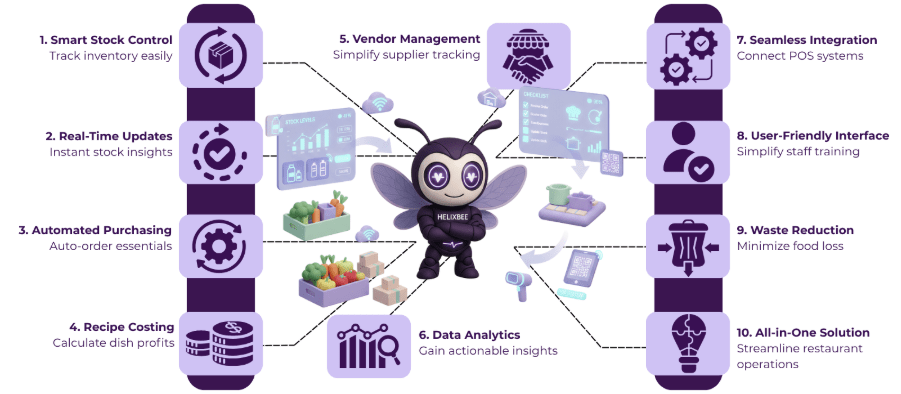
Inventory software for restaurants is a digital tool designed to help restaurant owners and managers track and manage their stock efficiently. It automates the process of monitoring ingredients, supplies, and beverages, providing real-time updates on stock levels.
This software helps restaurants reduce waste, prevent stockouts, and optimize purchasing, ensuring they always have the right products on hand while minimizing unnecessary costs.
Common Inventory Challenges Restaurants Face
Managing inventory efficiently can be a challenging task for restaurants. Here are some of the common problems they encounter:
1. Stockouts and Overordering
Without proper tracking, restaurants can run out of key ingredients or order too much, leading to waste and higher costs. This issue is particularly prevalent without a good restaurant inventory management system.
2. Manual Tracking Errors
Relying on paper-based systems or spreadsheets increases the chances of mistakes, which can result in inaccurate stock records and ordering errors. Restaurant inventory management software helps reduce these errors by automating the process.
3. Wasted Ingredients
Perishable items that aren’t monitored closely can spoil before they’re used, leading to unnecessary food waste. A food and beverage inventory management software system can help track expiration dates and minimize spoilage.
4. Inaccurate Forecasting
Predicting the right amount of stock needed for busy days can be difficult without accurate data, causing either shortages or excess inventory. The best restaurant inventory management software offers insights to help with better forecasting.
5. Poor Integration with Other Systems
If inventory software doesn’t sync with point-of-sale or ordering systems, discrepancies can occur, making it hard to track actual stock usage and sales. A comprehensive restaurant inventory management software can integrate seamlessly with other restaurant systems for smoother operations.
Addressing these challenges with the right restaurant inventory management software can help streamline operations and improve overall restaurant performance.
Key Features to Look for in the Best Restaurant Inventory Management Software
When choosing the best restaurant inventory management software, it’s important to focus on features that help streamline operations, reduce waste, and improve cost control. Here are four key features to consider:
1. Real-Time Inventory Tracking
- The best restaurant inventory management software offers real-time updates on stock levels, ensuring that restaurant managers can keep track of ingredients and supplies without delays.
- This feature helps prevent stockouts and overstocking, ensuring you have just the right amount of stock at all times.
2. Automated Purchase Orders and Vendor Management
- An essential feature of top restaurant inventory management software is the automation of purchase orders. This allows the software to automatically generate purchase orders when stock levels drop below a certain threshold.
- Additionally, food and beverage inventory management software can integrate vendor management, helping you track supplier performance and prices for better purchasing decisions.
3. Recipe and Menu Costing
- Good restaurant inventory management software should also include recipe and menu costing features. This helps restaurants calculate the exact cost of each dish by tracking ingredient usage and current market prices, ensuring menu prices are accurate and cost-effective.
- Restaurant inventory management helps you identify expensive menu items and make adjustments to improve profitability.
4. Comprehensive Reporting and Analytics
- A strong restaurant inventory management software comes with detailed reporting and analytics capabilities. These reports provide insights into stock turnover, food costs, waste patterns, and supplier performance.
- By using this data, restaurants can optimize their food and beverage inventory management practices to reduce waste and improve overall operational efficiency.
By focusing on these features, restaurants can select the best restaurant inventory management software that not only tracks stock but also improves profitability, efficiency, and sustainability.
How to Choose the Right Inventory Software for Your Restaurant
Choosing the right inventory software for restaurants can make a significant difference in your operations. Here’s a simple guide to help you make the best choice:
1. Assess Your Restaurant’s Needs
Before selecting restaurant inventory management software, understand the specific needs of your restaurant. Consider the size of your business, the complexity of your menu, and how much inventory you manage. A small café might need a simpler system, while a larger restaurant with multiple locations may require more advanced features.
2. Check for Real-Time Inventory Updates
Make sure the restaurant inventory management software offers real-time tracking of your stock levels. This feature ensures you always know what ingredients are in stock and what needs to be ordered. Real-time updates prevent the issues of running out of essential ingredients or overordering, which can waste money and food.
3. Look for Easy Integration
The best restaurant inventory management software should easily integrate with your existing point-of-sale (POS) system, ordering system, and accounting software. This integration ensures that all your systems work together smoothly, reducing manual input and minimizing errors.
4. Consider User-Friendliness
Choose a system that is easy to use for your staff. Food and beverage inventory management software should have an intuitive interface that doesn’t require much training. This will help your team get up to speed quickly and reduce the chances of mistakes during daily operations.
5. Evaluate Reporting and Analytics Features
The restaurant inventory management software you choose should provide useful reports and analytics. These insights will help you understand your food costs, waste patterns, and stock turnover. With this data, you can make informed decisions about ordering and menu pricing to improve your restaurant’s profitability.
By following these steps, you’ll be able to choose restaurant inventory management software that fits your business needs, making your inventory management process more efficient and cost-effective.
5 Best Inventory Management Software for Restaurants in 2025
1. RavZora – All-in-One Restaurant Management
RavZora is a comprehensive platform designed to streamline restaurant operations. It offers real-time inventory tracking, automated purchase orders, and seamless integration with POS systems.
Ideal for restaurants seeking a unified solution, RavZora enhances efficiency and reduces manual errors.
2. MarketMan – Best for Small to Mid-Sized Restaurants
MarketMan is a cloud-based inventory management software tailored for small to mid-sized restaurants. It provides features like real-time inventory tracking, supplier management, and recipe costing.
MarketMan is known for its user-friendly interface and affordability, making it a popular choice for growing establishments.
3. BlueCart – Ideal for Streamlining Ordering
BlueCart focuses on simplifying the ordering process for restaurants. It allows restaurants to place orders with multiple suppliers through a single platform, track deliveries, and manage inventory efficiently.
BlueCart is particularly beneficial for restaurants looking to streamline their procurement process.
4. Yellow Dog – Robust Features for Larger Operations
Yellow Dog offers a comprehensive inventory management solution suitable for larger restaurant operations. It includes features like barcode scanning, batch tracking, and detailed reporting.
Yellow Dog is ideal for restaurants that require advanced inventory control and reporting capabilities.
5. Supy – Tailored for Fine Dining and Multi-Location Operations
Supy is designed for high-end restaurants and multi-location operations. It offers features like real-time inventory tracking, recipe costing, and supplier management.
Supy is known for its sleek interface and comprehensive functionalities, catering to the needs of upscale dining establishments.
Each of these inventory management software solutions offers unique features suited to different types of restaurants.
Tips to Get the Most Out of Your Restaurant Inventory Management Software
To make the most of your restaurant inventory management software, it’s important to use it effectively.
- Regularly update your inventory data to ensure accuracy.
- Train your staff on how to use the software efficiently to avoid errors.
- Use the software’s reporting features to monitor trends and make data-driven decisions.
- Integrate the software with your POS and accounting systems for seamless operations.
By following these tips, you can optimize your inventory management and boost your restaurant’s efficiency.
Why RavZora is the Best Restaurant Inventory Management Software
RavZora is the best restaurant inventory management software because it offers everything you need to streamline your restaurant’s operations. It provides real-time updates on stock levels, so you can avoid running out of ingredients or overordering. Plus, it integrates seamlessly with your POS system, making it easy to manage both sales and inventory in one place.
What sets RavZora apart is its powerful analytics and reporting features. It gives you clear insights into food costs, waste, and supplier performance, helping you make smarter decisions.
With its easy-to-use interface and all-in-one functionality, RavZora is the perfect choice for restaurants looking to improve efficiency and increase profits.
FAQs
1. How can inventory management software help reduce food waste?
Inventory management software helps track stock levels in real-time, preventing overordering and ensuring ingredients are used before they spoil, which reduces food waste.
2. Is inventory management software suitable for small restaurants?
Yes, many inventory management software options are scalable and can be customized to fit the needs of small restaurants, helping them manage stock efficiently and save costs.
3. Can inventory management software integrate with my POS system?
Most modern inventory management systems can seamlessly integrate with POS systems, allowing for synchronized sales and inventory data, reducing manual work and errors.
4. What features should I look for in restaurant inventory management software?
Look for features like real-time tracking, automated ordering, recipe costing, supplier management, and detailed reporting to streamline operations and improve profitability.
5. How much does restaurant inventory management software cost?
The cost varies depending on the software’s features and the size of your restaurant. There are both subscription-based and one-time payment options, with many providers offering tiered pricing based on the number of users or locations.