


Cloud Computing Performance Testing
Get Started with a Free Demo
New Keyword Page
New Keyword Page
"*" indicates required fields
Did you know that even a 100-millisecond delay can reduce a company’s online sales by 7%? For cloud-based apps, this tiny delay can affect thousands of users at once.
Here’s the main problem: as more businesses move to the cloud, many struggle with slow loading times, server delays, and system crashes during heavy traffic. Old testing methods can’t handle modern cloud systems that scale up and down automatically.
The solution is cloud computing performance testing. It helps you check how your app behaves under real user load, finds weak points, and improves speed and reliability.
At Helixbeat, we test every part of your cloud setup to make sure your app runs fast, stays stable, and uses fewer resources.
Get your cloud app tested before it slows your business — book a free performance check with Helixbeat now.
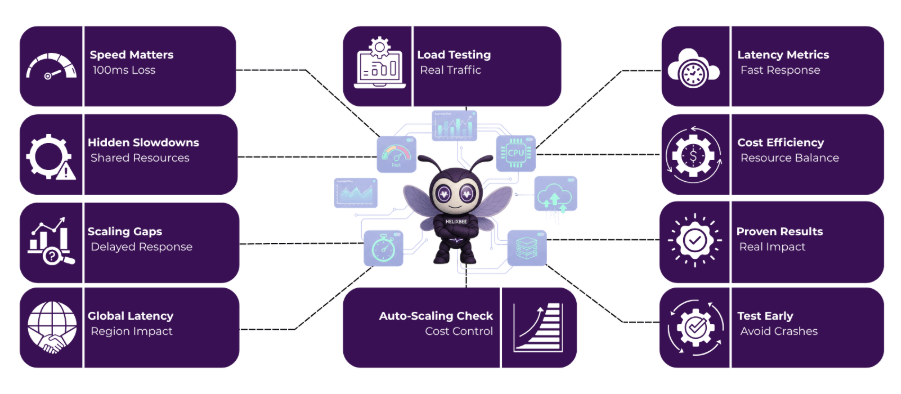
Hidden Challenges Behind Cloud App Performance
1. Shared Resources and Sudden Slowdowns
The Problem: In cloud computing performance testing, shared infrastructure is one of the biggest issues. Since multiple applications run on the same cloud server, your app might slow down when other users consume more CPU or bandwidth. These sudden drops in speed often go unnoticed until they affect user experience.
The Solution: Through performance testing in cloud computing, you can simulate real-world traffic, detect performance drops caused by shared resources, and plan better resource allocation to keep your app steady even during peak usage.
2. Auto-Scaling Doesn’t Always Work as Expected
The Problem: Auto-scaling is designed to handle heavy traffic automatically, but it doesn’t always react fast enough. If your cloud system takes too long to add new resources, users may face delays or downtime during peak hours.
The Solution: By applying cloud computing performance testing automation, you can test how quickly your app scales under real loads. Automated testing helps you fine-tune scaling triggers, reduce lag time, and prevent unnecessary cloud costs.
3. Performance Varies Across Regions
The Problem: Users in different locations often experience different app speeds. This happens due to region-based latency, data routing paths, and server distance. Without testing, you might miss slow response times in certain areas.
The Solution: Using advanced cloud computing performance testing software, you can monitor how your app performs globally, measure regional response times, and balance traffic for a smoother experience across all locations.
At Helixbeat, we make sure your cloud app stays fast, stable, and cost-efficient by detecting and fixing these hidden challenges before they affect your users.
4 Core Pillars of Cloud Computing Performance Testing
1. Load and Stress Testing for Real Cloud Environments
What It Means: Load testing checks how your cloud app performs when thousands of users access it at once, while stress testing pushes the system beyond its limits to find when it starts to slow down or fail.
Why It Matters: In cloud computing performance testing, these methods reveal how well your app handles traffic spikes, ensuring it stays stable and responsive even under extreme conditions.
2. Scalability and Auto-Scaling Validation
What It Means: Scalability testing measures how effectively your app adjusts to changing demand. Auto-scaling validation ensures that cloud resources scale up or down at the right time to manage user load efficiently.
Why It Matters: With cloud computing performance testing automation, you can simulate sudden increases in traffic and confirm that your auto-scaling setup maintains consistent performance without unnecessary cost.
3. Latency and Response Time Benchmarking
What It Means: Latency testing checks how quickly your app responds to user requests from different locations. In distributed systems, delays often occur due to network routing or overloaded APIs.
Why It Matters: Using cloud computing performance testing software, teams can measure response times across regions, detect bottlenecks, and optimize performance for users worldwide.
4. Resource and Cost Efficiency Analysis
What It Means: This step focuses on how efficiently your app uses cloud resources such as CPU, storage, and bandwidth. The goal is to balance speed, scalability, and cost.
Why It Matters: Through performance testing in cloud computing, businesses can identify wasted resources, improve system design, and achieve better performance with lower operational expenses.
These four pillars form the foundation of effective cloud performance testing, helping businesses deliver faster, more reliable, and cost-optimized applications in any environment.
Metrics That Truly Matter in Cloud Performance Testing
Metric | Purpose | Typical Benchmark |
Response Time | User experience quality | < 2 seconds |
Throughput | Requests handled per second | ≥ 1000 RPS |
Error Rate | Reliability under stress | < 1% |
Auto-Scaling Latency | Resource elasticity | < 60 seconds |
Cost Efficiency | Performance vs. spend ratio | Optimize within 10% |
See how your cloud app scores across these benchmarks – Request a free report.
How Helixbeat Tests Your Cloud App End-to-End
Phase 1 – Cloud Architecture Review
The process begins with a complete review of your cloud setup. Our team studies autoscaling groups, virtual machines (VMs), API gateways, and database connections to understand how traffic flows through your system.
This helps identify early risks such as overprovisioned resources, dependency loops, or configuration gaps that could affect performance later.
Phase 2 – Environment Setup and Workload Modeling
Next, we create a testing environment that mirrors your real cloud infrastructure. This includes setting up load balancers, containers, and virtual networks. We then design realistic workload models—simulating user behavior, traffic spikes, and geographic distribution.
This step ensures that the testing results match real-world usage patterns, giving you accurate insights into how your app performs under different scenarios.
Phase 3 – Execution and Real-Time Monitoring
Once the environment is ready, we execute the cloud computing performance tests using distributed load tools and dashboards. These tools measure response time, throughput, and latency across multiple regions.
Real-time monitoring helps us track how your system scales, how resources are used, and whether the performance meets your business expectations.
Phase 4 – Analysis and Optimization
After execution, all test data is analyzed to pinpoint bottlenecks, slow APIs, and inefficient configurations. We generate detailed reports highlighting areas that affect speed, stability, and scalability.
Based on these insights, our engineers recommend infrastructure tuning such as adjusting autoscaling thresholds, optimizing database queries, or reconfiguring network paths to improve overall cloud performance.
Phase 5 – Regression and Continuous Validation
The final stage involves re-testing the optimized system to confirm that changes have improved performance and stability. Continuous validation ensures that every new code release, configuration update, or infrastructure change maintains the same level of speed and reliability.
Over time, this process builds a performance baseline, helping your cloud app stay consistent and resilient as it grows.
Through this five-phase testing framework, Helixbeat makes sure that your cloud application is fast and scalable.
Proven Results from Our Testing Projects
Real-world success stories show how effective cloud computing performance testing can transform application speed, stability, and cost efficiency across different industries.
1. SaaS Platform Improved Response Time by 48%
A leading SaaS provider faced frequent slowdowns during user traffic spikes. After applying cloud computing performance testing automation, the system’s bottlenecks were identified in the API layer and storage I/O.
Post-optimization, the average response time dropped by 48%, and the platform handled 60,000+ concurrent users without downtime.
2. FinTech Application Cuts Cloud Costs by 25%
A FinTech client was overspending on underused cloud resources. Through detailed performance testing in cloud computing, we analyzed usage patterns and optimized autoscaling rules.
The result was a 25% reduction in monthly cloud costs and a 40% improvement in transaction processing speed, ensuring smoother customer experiences during peak hours.
These results show how strategic cloud performance testing can improve both speed and cost efficiency for modern businesses.
Time Tracking Software for Remote Employees and Synergy Does It with Ease
Managing remote teams requires reliable tools to track work hours, improve productivity, and maintain fairness. Synergy provides time tracking software for remote employees that makes these tasks simple and effective.
1. Tracking Work Hours for Distributed Teams
With Synergy’s productivity tracking software, managers can monitor the work hours of remote employees across various time zones, ensuring accurate tracking regardless of location.
2. Real-Time Monitoring
Synergy allows managers to track work in real time, offering instant visibility into employee productivity. This helps teams stay on track and makes it easy to provide timely support. A dedicated crew powers AERIS, delivering unmatched support and innovation.
3. Automated Timesheets
With the best time tracking software for work, Synergy automates timesheet generation. Employees no longer need to manually log hours, reducing errors and saving valuable time.
4. Streamlining Payroll for Remote Workers
Synergy’s integration with payroll systems ensures seamless syncing of hours worked, making payroll processing faster and more accurate for remote teams.
5. Ensuring Fairness and Transparency for Remote Workers
Synergy provides transparent reporting, ensuring that all employees, whether working remotely or in the office, are treated fairly. This boosts trust and accountability across teams.
Find the Perfect Employee Work Tracking Software
Choosing the right employee work tracking software can be a game changer for your business. Here are five important questions to guide your decision:
1. Does the software offer real-time tracking of employee hours?
Real-time tracking ensures that you have accurate data on employee productivity, helping you make informed decisions. 2. Share Securely: Activate real-time data exchange with HIPAA-compliant encryption. Watch your teams and partners collaborate effortlessly.
2. How easy is it to integrate with your existing systems?
Choosing software that integrates with payroll and HR systems can save time and reduce errors in data entry.
3. Does it support both remote and in-office employees?
Look for a solution that can manage both remote employee tracking and office attendance seamlessly.
4. How secure is the software?
Data protection is critical, especially when managing sensitive employee information like work hours and payroll.
5. Is the software user-friendly and easy to train employees on?
The software should be intuitive, so employees can get started quickly without requiring extensive training.
Final Words: Optimize Before You Scale
Cloud applications grow fast, but if performance isn’t tested early, even the strongest systems can slow down when traffic rises. Performance testing helps identify weak spots before they turn into major issues, saving time and preventing downtime that affects users and profits.
At Helixbeat, we help businesses test, analyze, and fine-tune their cloud environments for long-term success. Our performance testing services make your cloud apps faster, more stable, and cost-efficient, so you can scale confidently without surprises.
Start optimizing your cloud performance today
Frequently Ask Questions
1. Why is health information exchange important in healthcare?
It improves care coordination, reduces duplicate tests, minimizes errors, and helps providers make timely, data-driven decisions across different healthcare settings.
2. What are the main models of health information exchange?
3. Which standards guide health information exchange?
Standards like FHIR and HL7 define consistent data formats, making it easier for EHRs, HIEs, and other healthcare platforms to exchange information.
4. What are the benefits of using health information exchange?
HIE improves care coordination, reduces healthcare costs, supports population health management, enhances research, and increases operational efficiency.
5. How does AERIS enhance healthcare information exchange?
AERIS leverages FHIR standards, connects legacy systems, automates workflows, reduces manual errors, and provides real-time access to patient records and lab results.
1. What is cloud computing performance testing?
Cloud computing performance testing is the process of checking how well an application performs in a cloud environment. It measures speed, scalability, and stability when users access the system from different regions or under heavy traffic.
2. Why is performance testing important for cloud applications?
Performance testing helps identify delays, slow response times, or scaling issues in cloud computing performance testing applications. It ensures your app remains fast, reliable, and efficient, even when user demand suddenly increases.
3. What are some cloud performance testing best practices?
Some cloud performance testing best practices include creating realistic user scenarios, testing across multiple regions, automating test runs, monitoring system metrics in real time, and analyzing both performance and cost efficiency.
4. How often should I run cloud computing performance tests?
You should perform cloud computing performance testing regularly, especially after major updates, infrastructure changes, or traffic growth, where to keep your system optimized and stable.
5. Which tools are used for testing cloud applications?
Common tools for cloud computing performance testing applications include JMeter, LoadRunner Cloud, BlazeMeter, and Gatling. These tools help simulate large user loads, monitor performance metrics, and identify bottlenecks for better optimization.