


Ecommerce Software Testing: How to Prevent Checkout Failures on E-commerce Websites
Get Started with a Free Demo
New Keyword Page
New Keyword Page
"*" indicates required fields
Did you know that nearly 70% of online shopping carts are abandoned before purchase, with checkout failures being one of the top reasons?
Every failed transaction isn’t just a lost sale – it’s a missed opportunity to build customer trust and loyalty. For e-commerce businesses, even small errors in the checkout process can snowball into significant revenue loss and frustrated shoppers.
This is where ecommerce software testing becomes crucial. By using robust ecommerce QA testing, businesses can identify glitches, optimize payment flows, and ensure every transaction is smooth and secure. With the right testing strategies, checkout failures can be prevented, increasing conversions, and creating a smooth shopping experience that keeps customers coming back.
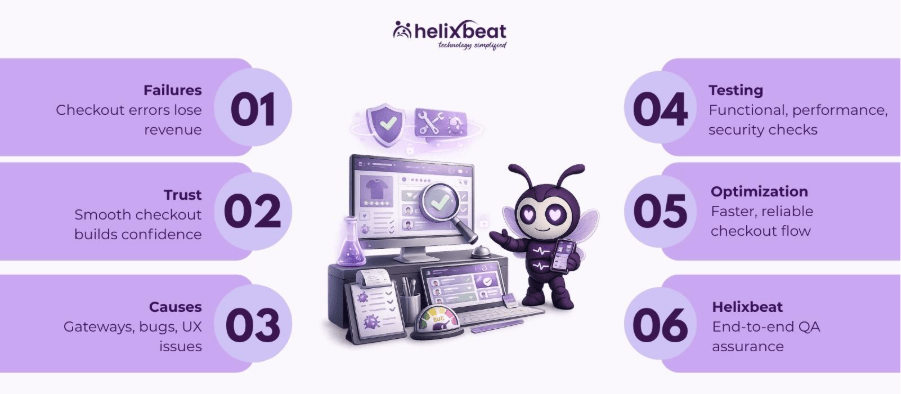
Why Checkout Failures Are a Major Problem in E-commerce
When it comes to running a successful online store, ecommerce software testing plays a vital role in preventing issues that can disrupt the customer journey. Checkout failures, in particular, are one of the most critical problems that businesses face.
1. Lost Revenue and Decreased Profit Margins
Every failed checkout is a direct loss to your revenue stream. Studies show that even a 1% improvement in checkout success rates can result in millions of dollars in recovered sales for large e-commerce businesses.
Beyond lost sales, recurring checkout issues can increase operational costs due to additional customer support, refunds, and system troubleshooting.
This highlights why robust ecommerce software testing is essential for protecting both sales and profit margins.
2. Damage to Brand Reputation and Customer Trust
Checkout failures don’t just cost money – they can erode customer confidence in your brand. Shoppers expect a smooth, secure, and fast purchasing experience.
Frequent failures can lead to negative reviews, reduced repeat purchases, and customers switching to competitors.
With proactive ecommerce software testing, you can identify and fix these problems before they impact your brand’s reputation.
3. Increased Cart Abandonment and Lost Customer Insights
Checkout issues are a leading factor in cart abandonment, which affects not only sales but also your ability to understand customer behavior.
Abandoned carts reduce the accuracy of analytics used for inventory management, personalized marketing, and demand forecasting.
Implementing consistent ecommerce software testing ensures a seamless checkout process, helping businesses retain customers and gather actionable insights effectively.
By understanding these challenges and applying thorough ecommerce software testing, businesses can not only prevent checkout failures but also maximize revenue.
5 Important Causes of Checkout Failures
Modern restaurants need more than basic tools, which is why using advanced restaurant booking software and online booking systems has become essential.
Before diving into the causes, it’s important to note that ecommerce software testing can proactively detect and prevent many of these issues. Understanding the root causes is the first step toward a seamless checkout experience.
1. Payment Gateway Errors
Payment failures are one of the most common reasons for checkout abandonment. These can occur due to network timeouts, incorrect API integration, or unsupported card types.
Example: A customer trying to pay with a Visa card might face an error if the payment gateway only supports Mastercard and PayPal. Such errors can frustrate buyers and lead them to abandon their cart. Regular ecommerce QA testing ensures all payment methods work smoothly.
2. Browser and Device Compatibility Issues
Not all shoppers use the same device or browser. Checkout pages that aren’t optimized for mobile devices, tablets, or less common browsers can fail.
Example: A checkout button that works on Chrome but breaks on Safari could prevent iPhone users from completing a purchase. Cross-browser and mobile testing as part of ecommerce software testing prevents these issues.
3. Code and Integration Bugs
Checkout failures often stem from poorly implemented code or broken integrations with third-party services like shipping providers, tax calculators, or CRM tools.
Example: An integration bug may calculate shipping incorrectly, preventing the checkout from processing. Continuous ecommerce QA testing helps identify these bugs before they affect real users.
4. Network and Server Downtime
High traffic, server overload, or network interruptions can prevent checkout pages from loading or processing payments.
Example: A flash sale attracts thousands of buyers, but the server crashes midway, leading to failed transactions. Performance testing during high-traffic scenarios ensures your checkout can handle spikes.
5. User Experience (UX) and Navigation Flaws
Complex or confusing checkout flows, unclear error messages, or mandatory fields that aren’t intuitive can lead to user frustration.
Example: If a form requires a phone number in an unusual format and doesn’t show clear instructions, users may abandon the checkout. UX testing during ecommerce QA testing ensures smooth navigation and reduces errors.
By identifying these common causes through ecommerce software testing, businesses can address potential issues before they impact customers, reducing cart abandonment and improving overall conversion rates.
What are the Major Types of Ecommerce Software Testing Required for Checkout
Before exploring the types, it’s important to remember that ecommerce software testing ensures every part of the checkout process is reliable, secure, and user-friendly. Proper testing helps prevent failures, reduce cart abandonment, and enhance customer satisfaction.
1. Functional Testing
Functional testing ensures that every element of the checkout process works as intended. This includes buttons, forms, coupon codes, and payment confirmation flows.
Example: Checking if adding a product to the cart, applying a discount code, and completing payment triggers the correct confirmation message. Functional testing in ecommerce QA testing helps catch errors before customers encounter them.
2. Integration Testing
Integration testing verifies that all third-party services linked to the checkout process, like payment gateways, shipping APIs, and tax calculators, work seamlessly together.
Example: Ensuring that PayPal payments update the order status correctly in the e-commerce backend. Without integration testing, disconnected systems can lead to failed transactions.
3. Performance Testing
Performance testing measures how the checkout system behaves under different load conditions, including high traffic periods like sales or holiday seasons.
Example: Simulating 1,000 users completing checkout simultaneously to identify slowdowns or server crashes. Performance testing in ecommerce software testing prevents revenue loss due to slow or failed checkouts.
4. Security Testing
Security testing ensures sensitive customer data, such as payment information and personal details, are protected against breaches and fraud.
Example: Checking if credit card data is encrypted and if the site complies with PCI DSS standards. Ecommerce QA testing must prioritize security to maintain trust and prevent legal issues.
5. Regression Testing
Regression testing verifies that new updates, features, or bug fixes do not break existing checkout functionality.
Example: After updating the shipping module, regression testing ensures the payment flow, discount application, and confirmation emails still work correctly. This continuous testing is a critical part of ongoing ecommerce software testing.
Closing sentence for this section:
By combining these types of testing in a structured ecommerce QA testing strategy, businesses can ensure their checkout process is smooth, secure, and reliable, preventing costly failures before they affect customers.
Checklist for Checkout Performance
Checklist Item | Description | Why It Matters |
Form Validation | Ensure all fields (address, phone, email) are correctly validated with clear error messages. | Prevents user errors and reduces checkout abandonment. |
Load Time Optimization | Checkout pages should load in under 3 seconds on all devices and browsers. | Fast pages improve user experience and conversion rates. |
Payment Gateway Functionality | Test all payment options (cards, wallets, UPI, PayPal) for smooth processing. | Ensures successful transactions and prevents revenue loss. |
Security & Compliance | Encrypt sensitive data, comply with PCI DSS, and test for vulnerabilities. | Protects customer data and builds trust. |
Mobile Responsiveness | Ensure checkout works seamlessly on smartphones and tablets. | Majority of users shop on mobile; prevents device-specific failures. |
Error Handling & Notifications | Provide clear messages for failed payments or missing info and options to retry. | Reduces customer frustration and abandoned carts. |
Integration Verification | Test integrations with shipping, tax, CRM, and inventory systems. | Prevents broken workflows and order processing errors. |
Regression Coverage | Run automated regression tests after updates or new feature releases. | Ensures new changes don’t break existing checkout functionality. |
Analytics & Monitoring | Track checkout drop-offs, abandoned carts, and transaction failures. | Helps identify patterns and optimize checkout experience. |
Continuous QA Testing | Regularly perform ecommerce QA testing for updates, high traffic, or new campaigns. | Maintains consistent performance and prevents future failures. |
Why Helixbeat is the Best for E-commerce QA Testing
When it comes to preventing checkout failures, we at Helixbeat don’t just test – we ensure every transaction flows smoothly from cart to confirmation.
Our approach combines advanced ecommerce software testing tools with real-world e-commerce expertise, so your customers never experience frustration at the most critical moment: checkout.
What sets Helixbeat apart in E-commerce QA Testing:
- End-to-End Checkout Simulation – We replicate real customer journeys across devices, browsers, and geographies to catch issues no standard testing can.
- Payment Gateway Resilience Testing – Our QA process verifies every gateway, including credit/debit cards, wallets, and UPI, under high load scenarios to prevent transaction failures.
- Smart Automation with Human Insight – Automated scripts handle repetitive checks while our QA experts focus on complex scenarios like discount logic, multi-product flows, and promo stacking errors.
- Rapid Issue Resolution – We identify and fix critical checkout bugs before they go live, reducing cart abandonment by up to 30% in our clients’ stores.
- Continuous Monitoring & Reporting – Real-time dashboards highlight checkout performance trends, so you can act quickly and confidently during sales or campaigns.
With Helixbeat, your checkout isn’t just tested – it’s optimized. We make sure every customer completes their purchase, every time, so you never lose a sale.
Book now for a free website QA review and prevent checkout failures before they happen.
Frequently Ask Questions
1. Why is health information exchange important in healthcare?
It improves care coordination, reduces duplicate tests, minimizes errors, and helps providers make timely, data-driven decisions across different healthcare settings.
2. What are the main models of health information exchange?
3. Which standards guide health information exchange?
Standards like FHIR and HL7 define consistent data formats, making it easier for EHRs, HIEs, and other healthcare platforms to exchange information.
4. What are the benefits of using health information exchange?
HIE improves care coordination, reduces healthcare costs, supports population health management, enhances research, and increases operational efficiency.
5. How does AERIS enhance healthcare information exchange?
AERIS leverages FHIR standards, connects legacy systems, automates workflows, reduces manual errors, and provides real-time access to patient records and lab results.
1. How often should an e-commerce site undergo QA testing?
Checkout and payment flows should be tested before every new update, release, or promotional campaign. Regular ecommerce QA testing ensures your site remains reliable and prevents unexpected failures during peak traffic.
2. Can automated testing completely replace manual testing for checkout?
Automation is excellent for repetitive checks like form validation or load testing, but manual testing is essential for user experience, complex flows, and visual elements. Combining both ensures your checkout works flawlessly.
3. What role does security testing play in ecommerce QA?
Security testing protects sensitive customer data and payment details while identifying vulnerabilities like weak encryption or unsecured APIs. It builds customer trust and keeps your site compliant with standards like PCI DSS.