


What is Food Ordering System and How it Functions
Get Started with a Free Demo
New Lead: Ravzora
Synergy Landing Page Form, connected with the Mailchimp.
"*" indicates required fields
Did you know that more than 60% of restaurant sales now come from online orders? People love the ease of ordering food from their phones or laptops. They expect quick delivery, live order tracking, and easy payments — all without having to call the restaurant.
But for many restaurants, this shift to digital isn’t easy. Managing multiple orders, updating menus, and keeping track of deliveries can quickly get confusing. Mistakes in billing or delayed deliveries can upset customers and hurt sales.
That’s why having a food ordering system is so important. It’s a simple digital tool that helps restaurants take orders, manage menus, accept payments, and track deliveries — all in one place. Whether you run a café, a fine-dining restaurant, or a fast-food outlet, an online food ordering system makes your work smoother and your customers happier.
With a digital food ordering system, you can handle more orders in less time, reduce manual errors, and offer a better dining experience — both online and offline.
What is Food Ordering System and How it Functions
A food ordering system is a digital platform that allows customers to view a restaurant’s menu, place their orders, and make payments online or in-store. It helps restaurants manage every step from receiving orders to preparing food and handling deliveries — all in one place.
With a restaurant food ordering system, businesses can save time, avoid manual mistakes, and serve customers faster. Whether it’s a dine-in restaurant, café, or fast-food outlet, a digital food ordering system makes daily operations easier and more organized.
Different Types of Food Ordering Systems
There are several types of food ordering systems, and each one works in a slightly different way to suit the restaurant’s needs.
1. Website-Based Ordering System
Customers visit the restaurant’s website, browse the menu, and place their order.
Example: A local pizza shop lets customers order directly from its website without using any app.
2. Mobile App Ordering System
Restaurants have their own apps where customers can order food, make payments, and track deliveries.
Example: A café app where users can order coffee on the go and pick it up on arrival.
3. Third-Party Aggregator Platforms
These are apps like Zomato, Swiggy, or Uber Eats that connect multiple restaurants with customers.
Example: A customer orders from different restaurants using one common app.
4. Self-Service Kiosks
These systems are placed inside the restaurant so customers can place and pay for their order without waiting in line.
Example: McDonald’s self-order screens, where you choose your meal and pay instantly.
5. POS-Integrated Ordering System
This combines online and in-store orders into one system for easy management.
Example: A restaurant using one dashboard to handle dine-in, takeaway, and online orders together.
Each of these food ordering systems for restaurants helps improve customer convenience and operational speed in its own way.
How a Food Ordering System Works — 7 Step-by-Step Process
A food ordering system makes the entire process of ordering and serving food simple and efficient. Here’s how it works step by step:
Step 1: Menu Display: The restaurant uploads its full menu with photos, prices, and descriptions into the digital food ordering system so customers can easily browse online.
Step 2: Customer Browsing: Customers open the online food ordering system or mobile app to explore dishes, customize orders, and add items to their cart.
Step 3: Order Placement: Once the order is confirmed, it instantly appears on the restaurant’s food ordering system for restaurants, helping staff prepare it without delay.
Step 4: Payment Options: Customers can pay through multiple gateways such as cards, UPI, or wallets — all managed securely within the restaurant food ordering system.
Step 5: Order Processing: The kitchen team receives real-time alerts and starts preparing the order right away.
Step 6: Real-Time Updates: The system keeps customers informed with live notifications about order status — from confirmation to dispatch.
Step 7: Delivery or Pickup: The final step is handled through the fast food ordering system, where customers either get doorstep delivery or pick up their food at the counter.
With this automated process, restaurants can handle more orders with fewer errors, while customers enjoy a smooth and satisfying experience from start to finish.
What Features Make an Online Food Ordering System Smart
A smart online food ordering system goes beyond just taking orders — it helps restaurants manage every part of the business more efficiently. Here are some key features that make it powerful and easy to use:
1. Easy Menu Management
Restaurants can quickly add, edit, or remove dishes, update prices, and display attractive food photos anytime.
2. Real-Time Order Tracking
Customers can see the status of their order, from preparation to delivery — directly through the digital food ordering system.
3. Multiple Payment Options
The online food ordering system supports UPI, cards, wallets, and cash on delivery for a smooth payment experience.
4. POS Integration
With a restaurant food ordering system linked to the POS, both online and offline orders appear in one place, making it easier for staff to manage.
5. Customer Data Insights
The system tracks popular dishes, repeat customers, and peak hours to help owners make better business decisions.
6. Promotions and Loyalty Programs
Restaurants can offer discounts, coupons, or reward points to keep customers coming back.
7. Multi-Device Compatibility
The food ordering system for restaurants works seamlessly on mobile phones, tablets, and desktops for both staff and customers.
These smart features help restaurants save time, reduce manual work, and deliver a faster, more personalized dining experience.
Benefits of Using a Restaurant Food Ordering System
Using a restaurant food ordering system can completely change how a business runs, making operations faster, more accurate, and more profitable. Here’s how it helps, backed by real numbers:
1. Faster Order Management
With a digital food ordering system, restaurants can process orders up to 40% faster compared to manual methods. Real-time order notifications help the kitchen start cooking immediately, reducing customer waiting time and increasing table turnover.
2. Fewer Errors
Since all orders are entered digitally, restaurants see up to 60% fewer order mistakes than when orders are taken by phone or paper. The online food ordering system sends clear details straight to the kitchen, cutting down confusion and food wastage.
3. Higher Customer Satisfaction
A recent report showed that 78% of customers prefer ordering from restaurants with an online food ordering system because of ease, transparency, and live tracking. This builds trust and improves repeat orders.
4. Better Sales Tracking
A restaurant food ordering system automatically records sales, helping owners track performance without manual spreadsheets. Studies show restaurants using automated systems experience a 25% improvement in daily reporting accuracy and get better insights into top-selling dishes.
5. More Revenue Opportunities
Restaurants that use a food ordering system for restaurants often report up to 30% higher revenue by promoting combo deals, online-exclusive discounts, and loyalty programs. Personalized marketing keeps customers engaged and increases repeat purchases.
6. 24/7 Availability
Even after closing hours, restaurants can receive pre-orders or schedule deliveries through a smart online food ordering system. This round-the-clock accessibility can raise total monthly sales by 10–15%, especially for cloud kitchens and fast food outlets.
In short, adopting a digital food ordering system helps restaurants save time, cut errors, and grow profits, all while keeping customers happy and loyal.
Why RavZora is the Best Online Ordering Platform for Restaurants
Running a restaurant is not easy — managing orders, payments, and deliveries can get stressful, especially during rush hours. That’s where RavZora comes in. It’s a smart and simple online food ordering system built to make restaurant operations faster and easier.
Here’s why many restaurants choose RavZora as their trusted digital food ordering system:
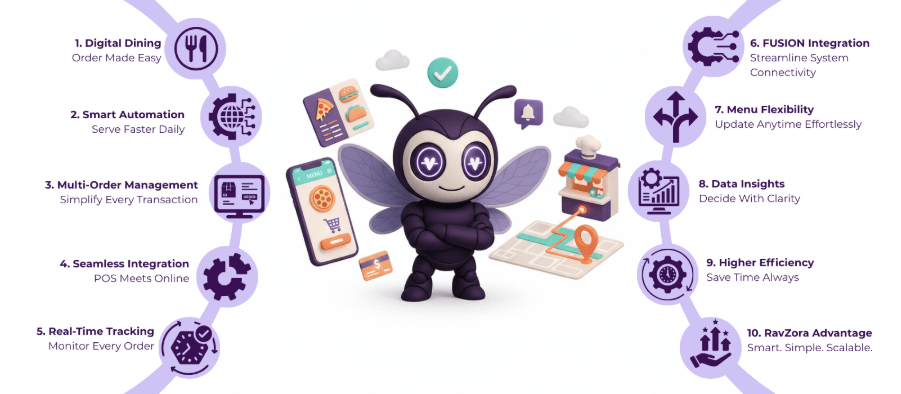
- All-in-One Platform: RavZora connects online orders, dine-in orders, and takeaway requests in one place. You can handle everything from a single dashboard.
- Simple Menu Management: Add or edit dishes, change prices, or update offers anytime. The restaurant food ordering system makes it easy to keep your menu fresh and accurate.
- Real-Time Order Tracking: Restaurants and customers can both track order status live — from confirmation to delivery — reducing confusion and delays.
- POS and Payment Integration: RavZora smoothly connects with your POS system and supports payments through UPI, cards, and wallets, making the food ordering system for restaurants truly complete.
- Data and Reports: You can see daily sales, top-selling items, and customer trends to make better business decisions.
- Perfect for Fast Food Outlets: The fast food ordering system in RavZora helps quick-service restaurants manage high volumes of orders without any chaos.
With RavZora, restaurants save time, reduce mistakes, and give customers a better experience every single day. It’s more than just an ordering tool — it’s the smartest way to grow your restaurant business.
Try RavZora today, the best online ordering platform for restaurants that helps you work smarter, serve faster, and earn more.
Why Fast Food Chains Need a Digital Food Ordering System
Fast food chains rely on speed, accuracy, and high order volumes — and that’s exactly what a digital food ordering system delivers. It helps manage hundreds of orders at once without confusion, keeps the kitchen and front counter in sync, and gives customers a faster, easier way to order.
With features like real-time tracking, instant payment processing, and automated order updates, a fast food ordering system saves time and reduces errors. It also supports combo offers, online promotions, and loyalty programs that help boost repeat sales. In short, it keeps the entire process running smoothly — from menu to meal.
How to Set Up a Food Ordering System for Your Restaurant
Setting up a food ordering system for restaurants is easier than it sounds. With the right tools, you can start taking online orders in just a few steps:
- Choose the Right Platform:
Pick a digital food ordering system that suits your restaurant type — whether it’s a café, fine dining restaurant, or a fast-food outlet. Look for features like order tracking, POS integration, and multiple payment options. - Add Menu and Pricing:
Upload your menu with clear photos, item descriptions, and prices. A well-organized menu helps customers find their favorite dishes quickly and encourages more orders. - Set Up Payment and Delivery Options:
Integrate secure payment gateways like cards, UPI, or wallets. Also, connect your restaurant food ordering system with reliable delivery partners for smoother order handling. - Train Your Staff:
Make sure your team knows how to use the system — from receiving orders to updating order status. A few hours of training can save you hours of confusion later. - Test and Go Live:
Before going public, place a few test orders to check how the online food ordering system works. Once everything runs smoothly, promote it on social media and your website to attract customers.
A properly set up food ordering system not only simplifies your daily operations but also helps you serve faster, sell more, and keep customers coming back.
Final Words
Having a food ordering system is now a must for every restaurant. It helps manage orders, payments, and deliveries smoothly while keeping customers happy. Whether you own a small café or a busy fast-food outlet, using a digital food ordering system saves time, reduces mistakes, and helps your team work more efficiently.
That’s why many restaurants choose RavZora. It’s an easy-to-use online food ordering system that connects everything : menu, POS, payments, delivery, and reports — in one place. With RavZora, you can handle more orders, serve faster, and grow your business with confidence.
Start your journey with RavZora today — simplify your restaurant operations and serve your customers better.
FAQs
1. What should I look for when choosing the best online ordering platform for restaurants?
Look for features like easy menu setup, real-time tracking, secure payments, and POS integration. A platform like RavZora offers all of these in one simple food ordering system.
2. Can a digital food ordering system help small restaurants grow?
Yes, a digital food ordering system helps small restaurants reach more customers online, take more orders in less time, and manage everything from one place.
3. How is a fast food ordering system different from a regular one?
A fast food ordering system is built for speed — it handles high volumes of quick orders, supports combo meals, and keeps kitchen operations running smoothly.
4. Is it expensive to set up a food ordering system for restaurants?
Not necessarily. Many platforms, like RavZora, offer affordable plans that fit the size of your restaurant and help you get started without a big investment.
5. Can an online food ordering system work without a delivery partner?
Yes, restaurants can still use an online food ordering system for takeaway or self-pickup orders. Later, delivery can be added easily when the business grows.