


Step-by-Step Guide to Mobile App Performance Testing in 2025
Get in Touch
New Lead: Testing as a Service
Testing as a Service Landing Page Form, connected with the Mailchimp.
"*" indicates required fields
What if your app’s biggest challenge isn’t its design or features, but its speed? Users today expect apps to open in seconds, respond instantly, and never crash. Yet, many apps fail this simple test because they skip one critical step: mobile app performance testing
When performance issues go unnoticed, even the most innovative apps lose their charm. Slow loading, freezing screens, or battery drain can instantly drive users away. That’s why performance testing isn’t just about fixing bugs, it’s about protecting your brand experience.
Through performance testing for mobile app, businesses can ensure every tap, scroll, and action feels seamless. And that’s exactly what we do at Helixbeat. Our expert Android app performance testing services help identify hidden issues, boost app speed, and deliver flawless performance, so your users enjoy every moment without a glitch.
An Overview of Mobile App Performance Testing?
Mobile app performance testing is the process of checking how well an app performs under different real-world conditions such as varying network speeds, heavy user load, or limited device resources. It helps measure key factors like speed, responsiveness, stability, and resource usage to ensure the app runs smoothly across devices and operating systems.
In simple terms, performance testing for mobile app ensures that users get a fast, stable, and reliable experience every time they use your app. By running detailed Android app performance testing, businesses can identify performance bottlenecks early, fix them before release, and deliver an app that feels effortless to use.
Why Performance Testing is Important for Mobile Apps?
Performance testing is important to make sure your mobile app delivers consistent performance under varying load, stress, and network conditions. It helps identify issues like latency, memory leaks, and CPU bottlenecks before users experience them.
According to research by Google, 53% of users abandon an app if it takes more than three seconds to load, which shows how directly performance impacts user engagement and retention.
For businesses, a well-optimized app means fewer crashes, faster transactions, and better scalability during peak usage. Performance testing validates how your app behaves across different devices, operating systems, and network bandwidths, ensuring smooth execution even under high traffic.
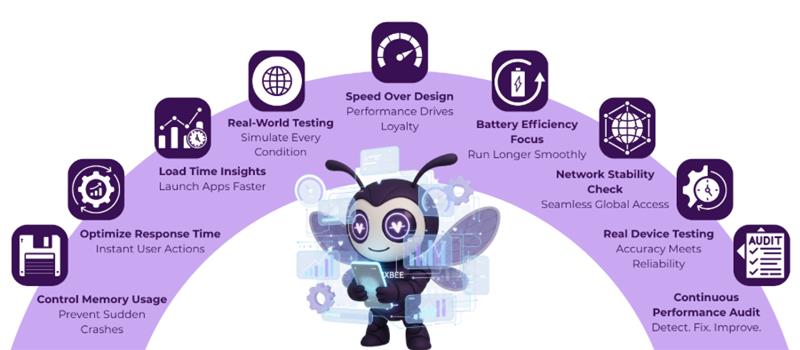
Investing in it early not only reduces post-launch bugs and operational costs but also enhances overall user experience (UX) and app reliability, driving stronger customer loyalty and brand credibility.
5 Metrics to Track While Mobile App Performance Testing
When you’re preparing your mobile app for real users, performance testing is key. Tracking the right metrics helps you make sure your app loads quickly, runs smoothly, and delivers a great experience across all devices and networks. Here are five important metrics every business should monitor before launch:
1. Load Time (App Launch Time)
- This measures how long your app takes to open and become ready to use after someone taps the icon. A delay of even a few seconds can frustrate users and lead to drop-offs.
- Testing app load time across different devices, operating systems, and networks (Wi-Fi, 4G, 5G) helps identify what’s slowing it down. Tools like Firebase Performance Monitoring or Appium make it easy to analyze and optimize load performance.
2. Response Time (API & UI Latency)
- Response time shows how fast your app reacts when users perform actions like loading products, submitting forms, or processing payments.
- Using tools such as Postman or JMeter, you can test multiple API requests simultaneously and keep response time under 500ms—ensuring a fast, seamless user experience that keeps customers engaged.
3. Memory Usage
- High memory usage can slow down your app or cause crashes—especially on older devices. Monitoring it helps you maintain stability and smooth performance.
- With Android Profiler or Xcode Instruments, you can track how your app allocates memory and optimize it so users enjoy lag-free navigation and faster screen transitions.
4. Battery Consumption
- Apps that drain too much battery often get uninstalled quickly. Tracking power usage helps you build an app that’s efficient and user-friendly.
- Tools like Battery Historian (Android) or Instruments Energy Log (iOS) let you identify power-hungry features like GPS tracking or background sync and adjust them for better battery life.
5. Network Performance (Data Throughput & Packet Loss)
- Many users rely on mobile data, so your app must perform well even with unstable networks. Network testing checks how your app handles weak or fluctuating connections.
- Using Charles Proxy or network emulators, you can simulate slow connections (2G, 3G) and optimize for data efficiency—so your app remains responsive no matter where your customers are.
By monitoring these five metrics: load time, response time, memory usage, battery consumption, and network performance; you can confidently deliver a high-performing mobile app that meets user expectations, reduces churn, and strengthens your brand’s reputation.
Steps Involved in Performance Testing for Mobile Application
A successful performance testing mobile app strategy follows a systematic approach to identify, analyze, and fix performance issues before they reach users. Here’s how the process unfolds:
1. Define Clear Performance Objectives
- Every testing process begins with setting measurable goals such as response time, load limits, and resource utilization targets.
- These objectives help teams focus on both backend efficiency and mobile app UI performance testing, ensuring that every tap, scroll, and animation feels smooth across devices.
2. Build a Realistic Test Environment
- Creating an environment that mimics real-world conditions is essential. This includes setting up different devices, operating systems, and network types.
- For instance, during performance testing mobile app, testers simulate varied bandwidths and user loads to see how the app performs under stress.
3. Design Test Scenarios and Scripts
- Here, QA teams prepare automated scripts that replicate common user interactions like browsing, logging in, or completing purchases.
- These scripts form the foundation of mobile app UI performance testing and help identify issues in both functionality and responsiveness.
4. Execute and Monitor Performance Tests
- Once the scripts are ready, testers run various tests such as load, stress, and spike tests.
- Using the best tool for mobile app performance testing like JMeter, LoadRunner, Appium, or Gatling—teams can track metrics like response time, CPU usage, and crash frequency in real time.
5. Analyze and Optimize Results
- After test execution, detailed performance data is analyzed to find bottlenecks, such as slow UI rendering, unoptimized APIs, or high memory usage.
- Developers then fine-tune the app, fix code inefficiencies, and retest until optimal performance is achieved.
By following these steps, performance testing for mobile app makes sure that your product remains stable, responsive, and visually smooth.
Start improving your app’s speed today: Contact Us.
5 Best Tool for Mobile App Performance Testing
Choosing the best tool for mobile app performance testing can make a huge difference in how effectively you identify and fix performance issues. Each tool offers unique strengths depending on your testing goals—be it Android, iOS, or web app performance.
1.Apache JMeter: One of the most popular open-source tools for performance testing mobile app, JMeter is known for its ability to simulate heavy loads and measure server performance. It’s ideal for API, load, and stress testing, helping developers understand how their app performs under pressure.
- LoadRunner (by Micro Focus): A powerful enterprise-grade tool that supports both mobile and web app testing. LoadRunner allows teams to test complex, multi-user scenarios and integrates easily with CI/CD pipelines—making it perfect for large-scale mobile app UI performance testing.
- Appium: Appium is widely used for Android app performance testing and iOS automation. It helps test app behavior, responsiveness, and UI performance across real devices and emulators. The best part—it’s open-source and supports multiple scripting languages like Java and Python.
- Gatling: Gatling is an excellent tool for continuous performance monitoring. It’s known for its high-speed load generation and easy integration with Jenkins and other DevOps tools. Gatling is often considered one of the best tools for mobile app performance testing for teams focused on scalability testing.
- NeoLoad: NeoLoad simplifies performance testing with its intuitive interface and real-time analytics. It supports both native and hybrid apps and helps in simulating network conditions like latency and packet loss, making it perfect for realistic performance testing mobile app scenarios.
Each of these tools brings a unique edge—whether it’s detailed analytics, automation support, or scalability. The right choice depends on your app’s complexity, testing goals, and development environment.
Challenges in Mobile App Performance Testing
Even with advanced tools and frameworks, testing mobile app performance comes with its own set of difficulties. Here are some of the most common challenges faced during mobile app performance testing:
- Device Fragmentation: Testing across countless devices, screen sizes, and OS versions makes consistent performance hard to achieve.
- Network Variability: Changing network speeds (3G, 4G, 5G, Wi-Fi) can cause unpredictable app behavior.
- Resource Limitations: Limited CPU, memory, and battery capacity often impact app stability and speed.
- Third-Party Dependencies: External APIs or SDKs can slow down performance or cause unexpected crashes.
- Real-World Simulation: Accurately recreating real-user conditions during performance testing mobile app is complex but essential for reliable results.
Overcoming these challenges through structured mobile app performance testing ensures your app stays fast, stable, and reliable—no matter the device, network, or user load
How Helixbeat Supports in Android Performance Testing
At Helixbeat, we focus on making your Android app perform at its absolute best. Our team uses a data-driven performance testing approach to analyze how your app behaves under real-world conditions—different devices, network strengths, and usage loads. We identify performance bottlenecks such as high CPU utilization, memory leaks, API latency, and frame rate drops, ensuring your app remains fast, responsive, and crash-free no matter the situation.
Here’s how we make it happen:
- Real-Device Testing: We test your app across multiple Android devices and OS versions to detect compatibility and performance gaps.
- Automated Load Simulation: Using tools like JMeter and Appium, we replicate real-world traffic to analyze performance under heavy usage.
- Backend & API Optimization: We track API response times, database queries, and server performance to reduce latency.
- UI & Rendering Analysis: We monitor frame rates and screen rendering times to enhance overall visual performance.
We use advanced analytics tools and cloud-based device testing to evaluate every layer of your app from backend APIs to UI performance. Contact us now.
Final Thoughts
Your app may look great, but if it’s slow or crashes often, users won’t stick around. That’s why mobile app performance testing is so important—it helps you make sure your app runs fast, stays stable, and gives users the smooth experience they expect. A well-performing app not only keeps users happy but also builds trust in your brand.
At Helixbeat, we make this process simple and effective. Our expert team focuses on Android app performance testing to help your app perform well under any condition. We test, optimize, and fine-tune every detail so your app loads quickly and works flawlessly. Want your app to perform at its best? Let Helixbeat help you make it happen. Book a free consultation call now.
FAQs
1. How often should I perform mobile app performance testing?
Ideally, performance testing should be done before every major release or update. Regular testing ensures your app stays optimized as new features, users, or OS updates are added.
2. Can performance testing improve app store ratings?
Yes. A smooth, crash-free app leads to better user reviews and higher retention, which directly helps improve your app’s ratings and visibility in app stores.
3. What’s the difference between functional testing and performance testing?
Functional testing checks if your app works correctly, while mobile app performance testing evaluates how fast and stable it is under real-world conditions like heavy traffic or poor network connectivity.