


Point Of Sale Machine Price
Get Started with a Free Demo
New Lead: Ravzora
Synergy Landing Page Form, connected with the Mailchimp.
"*" indicates required fields
A 2025 study by Restaurant Technology Insights found that cafés and restaurants using a digital point of sale system worked 35% faster, made 40% fewer billing mistakes, and gained 25% more repeat customers in just a few months. Still, many small cafés and restaurants use old billing methods or basic systems that slow down service and cause confusion during busy hours.
The main issue is that many owners think a POS system is too costly. In reality, today’s point of sale system for cafés and restaurants is affordable and easy to use. Even small businesses can now get features like cloud billing, order tracking, and digital payments in one place without spending a lot.
Choosing the right point of sale machine isn’t just about saving money — it’s about running your café or restaurant smoothly, keeping your customers happy, and improving profits. In this blog, we’ll explain the real point of sale machine price, what features matter most, and how you can pick a system that gives you the best results for your budget.
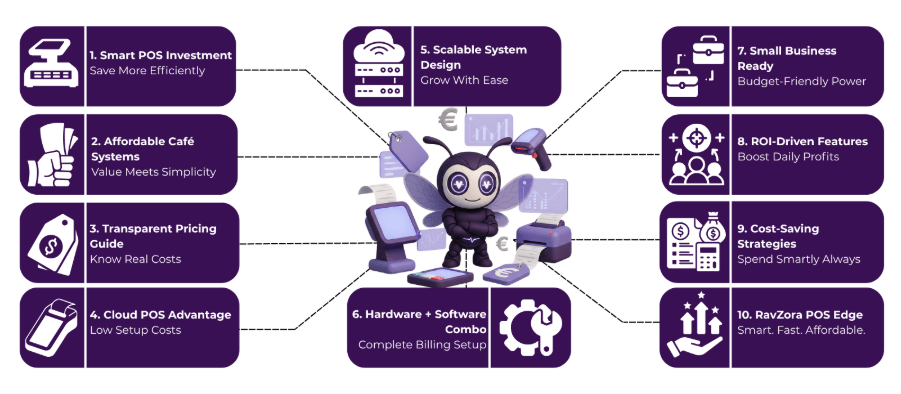
What Is a Point of Sale System for Cafés and Restaurants?
A point of sale (POS) system is the place where your café or restaurant completes a customer transaction, but it’s much more than just a billing tool. It combines hardware like a touchscreen, card reader, and printer with software that handles orders, payments, and receipts in real time. For cafés, a point of sale system café setup helps take quick orders, manage tables, and accept multiple payment types — all from one screen.
For restaurants, a point of sale system restaurant connects every part of your business, from the kitchen and counter to inventory and customer data. It tracks sales, monitors stock levels, and gives detailed reports on what’s selling best. In short, it helps you run operations smoothly, reduce errors, and give customers a faster, more satisfying dining experience.
Average Restaurant Point of Sale System Price – A Quick Breakdown
Business Type | Typical One-Time Hardware Cost* | Typical Monthly/Annual Software Subscription | Ideal For |
Café / Small Restaurant | ₹ 15,000 – ₹ 50,000 (hardware) | ₹ 1,000 – ₹ 5,000/month or ₹ 12,000 – ₹ 30,000/year | Single outlet, simpler operations |
Mid-sized Restaurant | ₹ 50,000 – ₹ 1,00,000+ (hardware + setup) | ₹ 5,000 – ₹ 15,000/month or more depending on features | Multiple tables, full service, inventory tracking |
Multi-outlet / Chain | ₹ 1,00,000+ (for multiple terminals + advanced hardware) | Custom pricing; higher tier software + multi-location management | Large scale, multiple locations |
Hardware includes touchscreen terminal, card reader/printer, cash drawer, possibly kitchen display.
Notes:
- In India, a cloud/online POS license can cost around ₹ 15,000 – ₹ 50,000 for hardware and initial setup.
- Annual software plans for restaurant-POS start at approximately ₹ 12,000/year for basic packages.
- Full-feature systems with advanced modules (KDS, multi-outlet, analytics) will push costs higher on both hardware and subscription sides.
This table gives you a solid baseline to estimate the restaurant point of sale system price depending on how big your setup is and how many features you need.
Factors Affecting Point of Sale Machine Price
Before exploring the details, it’s important to understand that the point of sale machine price doesn’t stay the same for everyone. The total cost changes based on the type of business, features you need, and how your system is set up.
Whether it’s a point of sale system café, a restaurant POS, or a point of sale machine for small business, a few key factors influence the final pricing.
1. Hardware Components and Setup
The cost of a point of sale machine for restaurant or café depends on the hardware you choose. Basic versions include a screen, printer, and card reader, while advanced systems have barcode scanners, kitchen displays, or multiple counters. More hardware usually means a higher upfront cost.
2. Software Subscription and Features
Every point of sale system café or restaurant runs on POS software that manages orders, billing, and reports. Monthly or yearly subscription costs vary based on how many users or features you need. Cloud-based options are ideal for small businesses, offering affordable pricing and access from anywhere.
3. Customization and Add-On Modules
The restaurant point of sale system price can rise when you add tools like CRM, online ordering, or loyalty programs. For example, a point of sale system restaurant with menu management and analytics will cost more than a basic billing version.
4. Cloud vs On-Premise Deployment
Cloud systems have lower setup costs and charge monthly fees, while on-premise POS systems need a one-time payment and manual updates. For a point of sale system small business, cloud POS is often more practical and budget-friendly.
5. Maintenance, Training, and Support
After installation, expenses like staff training, updates, and technical support affect the total point of sale machine price. Choosing a provider with 24/7 support helps reduce downtime and keeps daily operations smooth.
Point of Sale Machine for Small Business – Affordable Yet Powerful Options
When you’re looking for a point of sale machine for small business, you don’t have to choose between budget and power — you can get both. Here are five cost-smart, high-value features to keep in mind:
- Real-time inventory tracking and automatic low-stock alerts ensure that your small business never runs out of key items.
- Multi-mode payment processing (card, mobile wallet, contactless) so customers can pay the way they prefer and you capture every sale.
- Cloud-based access lets you view sales, inventory, and reports from anywhere, ideal for a café or retail outlet when you’re managing remotely.
- Built-in customer loyalty and CRM tools to help you turn one-time buyers into repeat patrons, useful for any small retail or café setup.
- Modular design: start with the essentials now, and add features like kitchen display, online ordering or multi-location support as your business grows.
With the right point of sale system small business pick, you can get a setup that’s both affordable and powerful — saving time, reducing errors, and delivering a smarter checkout experience as you grow.
Tips to Reduce POS Setup Costs Without Compromising Quality
Setting up a point of sale system doesn’t have to be expensive. With a few smart choices, you can get a powerful and reliable setup for your café, restaurant, or small business — all while keeping costs low. Here are some practical ways to reduce your point of sale machine price without cutting down on quality.
1. Choose a Cloud-Based POS System
Cloud-based solutions eliminate the need for heavy hardware and servers. A point of sale system café or restaurant that runs on the cloud offers flexibility, automatic updates, and lower upfront costs.
2. Start Small and Scale Later
Focus on the essentials first — billing, payments, and basic reports. You can always add inventory, CRM, or online ordering modules later. This approach helps small cafés and eateries control their POS setup costs in the early stage.
3. Opt for All-in-One Packages
Many providers bundle hardware, software, and support together at discounted rates. Choosing a full point of sale machine for restaurant package often saves more than buying components separately.
4. Use Subscription-Based Plans
Go for monthly or annual subscriptions instead of paying everything upfront. This makes the restaurant point of sale system price easier to manage and gives you access to updates and support.
5. Compare Multiple Providers Before Purchase
Always request quotes from different vendors and compare features, pricing, and reviews. It’s one of the easiest ways to find the best point of sale machine price that matches your needs.
By making these small but smart decisions, you can get a point of sale system small business setup that’s both affordable and efficient — helping your team serve faster, reduce errors, and grow profitably.
Point of Sale Machine for Restaurant – Features That Improve ROI
A point of sale machine for restaurant isn’t just about billing — it’s a tool that drives profit, efficiency, and customer satisfaction. The right system helps reduce human errors, save staff time, and give clear insights into what’s working in your restaurant. Here are the key features that directly improve your ROI (Return on Investment):
1. Smart Table and Order Management
Manage multiple tables, split bills easily, and track orders directly from one dashboard. This speeds up service and improves customer turnover, which means more sales in less time.
2. Real-Time Inventory Tracking
Keep an eye on your ingredients, receive stock alerts, and reduce wastage. A connected restaurant point of sale system price may seem higher at first, but its inventory control saves money every month by minimizing over-ordering.
3. Integrated Kitchen Display System (KDS)
Orders go straight from the POS to the kitchen screen, eliminating paper slips and confusion. This reduces errors, improves coordination, and ensures faster delivery of meals, increasing both customer satisfaction and table turnover.
4. Data-Driven Sales Reports
The point of sale system restaurant records every sale, payment mode, and dish performance. These analytics help you plan menus, manage staff, and make smarter business decisions that improve long-term profits.
5. Loyalty and CRM Tools
Reward repeat customers, send promotions, and track dining patterns. A point of sale machine for restaurant with built-in CRM can increase repeat visits by up to 20%, directly boosting your monthly revenue.
With the right POS setup, every transaction becomes an opportunity to grow. A restaurant that uses a data-driven point of sale system can save costs, work faster, and build better relationships with customers — leading to a strong and measurable return on investment.
Why RavZora Is the Best Point of Sales for Cafe and Restaurants
RavZora is designed to make running cafés and restaurants easier. It’s more than just a billing tool — it helps you manage orders, track stock, handle payments, and see how your business is performing, all from one screen. Whether you’re running a small café or a busy restaurant, RavZora keeps everything organized, fast, and accurate.
Here’s why RavZora stands out:
- Easy to Use Interface – The system is simple and quick to learn. Your staff can take orders, manage tables, and split bills easily, which helps speed up service and reduce mistakes.
- Cloud-Based and Flexible – RavZora works on any device — Android, iOS, or desktop — so you don’t need to buy expensive hardware. You can even check your business data from anywhere.
- Smart Inventory and Kitchen Management – With real-time inventory tracking and a Kitchen Display System (KDS), you’ll never run out of stock or mix up orders. It keeps both your kitchen and counter running smoothly.
- All-in-One Dashboard – Manage dine-in, takeaway, and online orders together. RavZora supports multiple payment methods, making checkout simple for both staff and customers.
- 24/7 Support and Easy Integrations – The team behind RavZora offers round-the-clock support and integration with loyalty programs, accounting tools, and marketing apps.
In short, RavZora gives cafés and restaurants everything they need to serve faster, reduce errors, and increase profits, all while keeping setup costs affordable. It’s a complete point of sale system café and point of sale machine for restaurant designed to grow with your business.
Frequently Ask Questions
1. Why is health information exchange important in healthcare?
It improves care coordination, reduces duplicate tests, minimizes errors, and helps providers make timely, data-driven decisions across different healthcare settings.
2. What are the main models of health information exchange?
3. Which standards guide health information exchange?
Standards like FHIR and HL7 define consistent data formats, making it easier for EHRs, HIEs, and other healthcare platforms to exchange information.
4. What are the benefits of using health information exchange?
HIE improves care coordination, reduces healthcare costs, supports population health management, enhances research, and increases operational efficiency.
5. How does AERIS enhance healthcare information exchange?
AERIS leverages FHIR standards, connects legacy systems, automates workflows, reduces manual errors, and provides real-time access to patient records and lab results.
1. What is the average restaurant point of sale system price in India?
The restaurant point of sale system price in India usually ranges between ₹25,000 to ₹80,000, depending on hardware, software features, and whether it’s a cloud-based or on-premise setup.
2. How can a point of sale system café setup help small businesses save money?
A point of sale system café helps reduce billing errors, track stock in real time, and automate daily reports — saving time and cutting unnecessary expenses for small business owners.
3. What features should I look for in a point of sale machine for restaurant operations?
When choosing a point of sale machine for restaurant, look for features like kitchen integration, multi-table management, real-time inventory tracking, and sales reports to improve efficiency and profit.
4. Is a point of sale system small business setup expensive to maintain?
No, a point of sale system small business setup is affordable, especially if you use a cloud-based plan with monthly or yearly subscriptions instead of high upfront costs.
5. Why is RavZora considered the best POS for cafés and restaurants?
RavZora stands out because it’s an all-in-one point of sale system for cafés and restaurants that manages orders, inventory, and payments from one platform while staying affordable and easy to use.