


Postman Performance Testing
Get in Touch
New Lead: Testing as a Service
Testing as a Service Landing Page Form, connected with the Mailchimp.
"*" indicates required fields
Is your API truly optimized to handle high traffic and demanding users? Without proper postman performance testing, you might be leaving your system vulnerable to slowdowns and errors. Performance and load testing using Postman helps identify issues like delayed response times, inefficient data handling, or server overloads, long before your users experience them.
Rest API performance testing using Postman enables developers to simulate real-world conditions, ensuring that your API can scale seamlessly and perform under pressure. Using Postman for performance testing guarantees that your API is tested thoroughly for optimal performance.
Let’s see how Postman can be the ultimate tool for testing and optimizing your API performance.
Postman performance testing is a way to check how well an API works under different conditions using Postman, a tool for testing APIs. It helps test things like how fast the API responds, how well it handles a lot of users, and if it can manage high traffic without breaking. By simulating real-world situations, Postman helps find issues like slow response times or failures when the system is under pressure. Postman makes it easy for developers to run these tests and make sure their APIs will work smoothly in real-life use.
Why Use Postman for Performance and Load Testing?
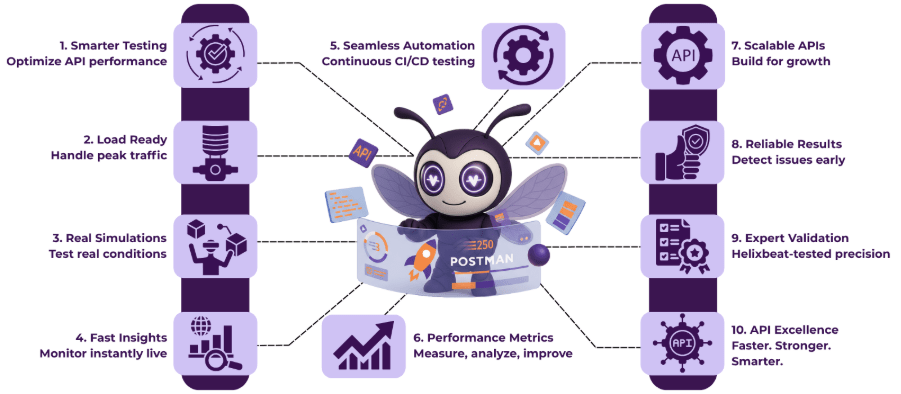
Postman is an ideal tool for performance and load testing due to its simplicity and powerful features. Here’s why you should consider it for your API testing:
- Easy to Use: Postman’s user-friendly interface makes it simple to set up and run tests, even for those new to performance testing.
- Comprehensive Testing: Performance and load testing using Postman allows you to simulate real-world traffic and test how your API handles multiple requests.
- Supports REST APIs: Rest API performance testing using Postman helps you check the efficiency of your REST APIs, ensuring they meet performance standards.
- Customizable Tests: Using Postman for performance testing allows you to tailor tests according to your needs, including setting different load conditions, response time expectations, and stress levels.
- Integrates Seamlessly: Postman easily integrates with CI/CD pipelines, enabling automated performance testing during development and deployment cycles.
With Postman, you get a comprehensive and flexible solution to ensure your APIs perform at their best under any load.
4 Ways Postman Facilitates API Performance Testing
Postman makes it easy to conduct thorough API performance testing, helping developers ensure their APIs are robust and capable of handling various traffic loads. Here’s how Postman simplifies the process:
1. Easy Test Creation and Configuration
Postman makes API performance testing using Postman straightforward by offering a user-friendly interface to create and configure tests. Whether you’re performing rest API performance testing using Postman or setting up a more complex scenario, Postman’s flexibility lets you configure multiple requests, headers, and body data to simulate real-world conditions.
Performance and load testing using Postman allows you to specify user numbers, request frequency, and other parameters to match the specific conditions you want to test.
2. Simulating Load and Stress Scenarios
Postman allows you to simulate both regular and peak load conditions to evaluate how your API handles varying amounts of traffic. Using Postman for performance testing lets you simulate different user loads, from light traffic to massive spikes, helping you understand how your API performs under stress.
This feature is crucial for performance and load testing using Postman, ensuring that your API is optimized for real-world usage.
3. Real-Time Analytics and Metrics
Postman provides real-time analytics and detailed metrics during rest API performance testing using Postman, giving you immediate insights into response times, throughput, and error rates.
This data helps you quickly identify performance bottlenecks or failures, making it easier to optimize your API before it reaches production.
4. Automated Performance Testing with Collections
Using Postman collections, you can automate your API performance testing using Postman, making it easier to run tests repeatedly and efficiently.
Collections help automate performance and load testing using Postman, allowing you to run performance tests across different environments and integrate them into your CI/CD pipelines, ensuring that performance is continuously monitored and maintained.
Step-by-Step Guide to Conducting Postman Performance Testing
Conducting performance testing using Postman is a straightforward process, allowing you to simulate various real-world scenarios and assess how your API performs under different loads. Follow this step-by-step guide to get started with Postman performance testing:
1. Set Up Postman and Create a New Collection
First, download and install Postman if you haven’t already. Once installed, open Postman and create a new collection where you’ll store your performance tests. Collections allow you to group multiple requests and run them together. To begin performance and load testing using Postman, start by defining the API endpoints you want to test in your collection.
2. Define the Test Scenarios
Next, define the test scenarios you want to simulate. If you’re performing rest API performance testing using Postman, create requests that cover the different API endpoints you wish to evaluate. Make sure to include various request types (GET, POST, PUT, DELETE) and configure them with the appropriate headers, body data, and authentication details.
3. Configure Performance and Load Testing
Now, set up the load testing parameters. Using Postman for performance testing allows you to define how many virtual users (simulated users) will send requests, as well as the frequency of these requests. You can use Postman’s built-in runner to simulate load by defining the number of iterations, request delays, and even concurrent users, replicating real-world usage patterns.
4. Run the Tests and Monitor the Results
With your scenarios and load parameters configured, it’s time to run the tests. As you execute the performance tests, Postman will display real-time analytics, including response times, throughput, and any errors encountered. This information is crucial for identifying any performance bottlenecks or inefficiencies.
5. Analyze the Metrics and Optimize
After running the tests, carefully analyze the results. Look at metrics such as response times, request failures, and the system’s behavior under heavy loads. If the API is slow or experiences failures during Postman performance testing, review the API code or infrastructure for potential improvements.
6. Automate the Testing Process
For ongoing testing, automate your performance testing by scheduling tests or integrating them into your CI/CD pipeline. Performance and load testing using Postman can be easily automated by running your collections with Newman, the command-line collection runner. This allows you to continuously monitor API performance throughout the development lifecycle.
By following these steps, you can ensure your API is performance-ready, able to handle various load scenarios, and optimized for real-world use.
Best Practices for Postman Performance Testing
To get the most out of Postman performance testing, follow these best practices:
- Start with realistic test scenarios that mimic real user behavior.
- Gradually increase the load to identify performance bottlenecks.
- Use Postman’s built-in monitoring to track long-term performance trends.
- Run tests across different environments (e.g., development, staging, production) for more accurate results.
- Keep your tests simple and focused on key API endpoints.
- Review and adjust timeouts, delays, and concurrency settings for more accurate simulations.
By following these best practices, you can ensure that your API is optimized for performance and ready to handle real-world usage effectively.
Practical Example of API Performance Testing Using Postman
Imagine you’re testing an e-commerce API that handles user registration, product searches, and order placements. Using Postman performance testing, you create requests for each part of the API—user registration (POST), product search (GET), and order placement (POST). For performance and load testing using Postman, you simulate more and more users to mimic high traffic, like during a sale. This shows you how the API handles lots of requests at once.
Once the tests are running, Postman gives you live updates on how fast each request is, how many requests are handled successfully, and how much data is processed. For example, you might notice that product searches slow down when 500 users are searching at the same time.
With this info, you can improve the API or make your infrastructure stronger to handle busy times, making sure the e-commerce API works smoothly even under high demand. This example shows how rest API performance testing using Postman helps spot issues and fix them before they affect real users.
Common Challenges in API Performance Testing Using Postman
While API performance testing using Postman is a powerful tool, it does come with its set of challenges. Here are some common obstacles you might encounter:
- Limited Load Testing Capabilities: Postman is excellent for smaller-scale tests, but it may struggle to handle extremely high traffic loads or simulate millions of users effectively.
- Resource-Intensive Tests: Running heavy performance tests can consume significant system resources, leading to slower testing and possibly affecting the results.
- Manual Configuration of Test Scenarios: For complex performance tests, setting up and managing multiple variables manually can become time-consuming and error-prone.
- Lack of Advanced Analytics: While Postman provides basic performance metrics, it lacks more advanced features like detailed visualizations or long-term performance tracking.
- Integration Limitations: While Postman can be integrated into CI/CD pipelines, some advanced integrations may require additional tools or workarounds.
Despite these challenges, using Postman for performance testing is still a great starting point for testing APIs at scale. With proper configuration and supplementary tools, you can overcome these limitations and ensure your API is robust and performance-ready.
Final Words
Postman is a powerful tool for performance testing, but to ensure your API remains robust under all conditions, continuous testing and optimization are essential. At Helixbeat, we specialize in Postman performance testing and provide tailored solutions to help businesses optimize their APIs for high traffic and peak loads. With our expertise, we ensure your APIs perform seamlessly, even in the most demanding environments.
- Helixbeat offers complete API performance testing services.
- We integrate Postman into your testing pipeline for ongoing monitoring.
- Our team provides actionable insights to enhance your API’s efficiency.
Work with Helixbeat for your API performance needs and ensure a flawless user experience. Contact us now.
FAQs
1. What is API performance testing using Postman?
API performance testing using Postman is the process of evaluating how well an API handles different traffic loads and performance scenarios using Postman. It helps measure response times, throughput, and error rates to ensure the API functions optimally under stress.
2. How does performance and load testing using Postman help optimize my API?
Performance and load testing using Postman helps identify bottlenecks and weaknesses in your API by simulating real-world traffic. This allows you to improve your API’s response time and scalability, ensuring it performs efficiently under heavy usage.
3. Can I use Postman for rest API performance testing?
Yes, rest API performance testing using Postman is a powerful way to test the efficiency of REST APIs. Postman allows you to simulate different scenarios and measure how the API handles varying traffic loads and requests, ensuring smooth operation in production.
4. What are the benefits of using Postman for performance testing?
Using Postman for performance testing provides a user-friendly interface for testing APIs. It allows you to run load tests, simulate real-world usage, and generate detailed reports on API performance, making it an essential tool for optimizing your system’s reliability.
5. How can Postman help with API performance testing in a CI/CD pipeline?
By integrating using Postman for performance testing into your CI/CD pipeline, you can continuously monitor your API’s performance. This ensures that any performance issues are caught early, allowing for quicker optimizations and more reliable deployments.