


Rest API Load Testing
Get in Touch
New Lead: Testing as a Service
Testing as a Service Landing Page Form, connected with the Mailchimp.
"*" indicates required fields
Did you know that 88% of users are less likely to return to a website after a bad experience, especially if the API is slow or unreliable? Poor API performance, such as slow response times or system crashes, can lead to frustrated users and lost business, especially during periods of high traffic.
The solution is to test your API under load. This allows you to identify potential performance issues before they affect your users. By simulating real-world traffic, you can ensure that your system handles spikes in demand, stays fast, and remains stable. Load testing helps to improve response times, reduce downtime, and make sure your API scales smoothly as your user base grows.
Here, we’ll walk you through the benefits of load testing your APIs, the best tools to use, and how it can help you create a better user experience and avoid costly downtime
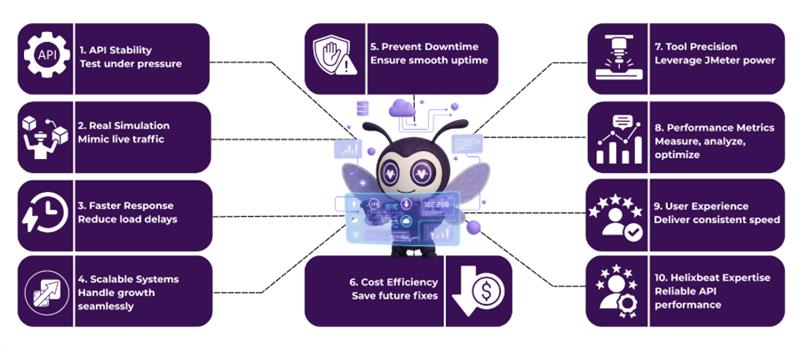
What is REST API Load Testing?
REST API Load Testing is the process of simulating multiple users or requests to assess how well an API performs under heavy traffic. It involves testing the API’s response time, stability, and ability to handle large volumes of requests.
By simulating real-world usage, this type of testing helps identify potential bottlenecks, measure performance, and ensure the API can handle peak loads without crashing or slowing down. It’s an essential step in ensuring that an API can deliver a smooth and reliable user experience, even during high-demand periods.
Why is REST API Load Testing Crucial for Your Application?
1. Ensures Scalability
REST API Load Testing is essential to determine if your API can handle a large volume of requests. By conducting load tests using tools like JMeter REST API Load Testing, you can ensure that your API can scale efficiently under heavy traffic and continue to perform well as your user base grows.
2. Improves Response Times
Load testing helps identify slow-performing areas in your API, allowing you to optimize them for better performance. With REST API Performance Testing, you can pinpoint bottlenecks and make adjustments to ensure fast, consistent response times even during high demand.
3. Prevents Downtime
By performing load testing for REST API before deployment, you can prevent unexpected failures and downtime. Testing tools such as Postman for load testing REST API help you simulate high traffic scenarios to ensure your API can handle increased load without crashing.
4. Enhances System Stability
REST API performance testing ensures that your API can remain stable under stress. By using various REST API performance testing tools, you can detect issues like memory leaks or errors that might occur under heavy load and address them before they affect users.
5. Saves Costs in the Long Run
Investing in REST API load testing upfront, whether with JMeter REST API load testing or other tools, helps avoid costly post-launch fixes. Identifying and resolving performance issues before going live can save significant time and resources, ensuring smoother operation and reducing the risk of customer dissatisfaction.
By performing REST API Load Testing, you can ensure your API delivers optimal performance, scalability, and reliability, providing a seamless user experience even during peak traffic.
Step-by-Step Guide: How to Perform REST API Load Testing
Performing REST API Load Testing involves several key steps to ensure your API can handle expected traffic and deliver optimal performance. Here’s a simple step-by-step guide to get you started:
1. Define Your Testing Goals
Before starting the test, clearly define what you want to achieve. Identify key metrics such as:
- Expected number of concurrent users
- Target response times
- Acceptable error rates
- Throughput or request per second
Understanding these goals will help you set up meaningful tests and measure success accurately.
2. Choose the Right Load Testing Tool
Select a REST API performance testing tool that suits your needs. Popular tools include:
- JMeter for simulating multiple users and tracking response times.
- Postman for simpler, more manual tests, especially when you already use it for API development.
- Other tools like LoadRunner or Gatling can also be useful depending on your requirements.
3. Create Test Scenarios
Design different test scenarios that simulate real-world user interactions. For example:
- A test that mimics normal usage patterns, such as logging in, making requests, or fetching data.
- A stress test that simulates a large number of simultaneous users to check how the API handles spikes in traffic.
4. Set Up and Run the Tests
Set up your test environment and execute the load tests. You should:
- Set the number of virtual users to simulate.
- Define the duration and frequency of requests.
- Monitor the system resources (e.g., CPU, memory, database) during testing to check for any bottlenecks.
5. Analyze Test Results
Once the test is completed, analyze the results to identify performance issues:
- Look for response time trends and check if they stay within acceptable limits.
- Identify any failure points or error responses, such as timeouts or 500 server errors.
- Review system metrics to detect potential resource overloads.
6. Optimize and Retest
Based on your findings, optimize your API to handle higher loads. This could involve improving database queries, scaling infrastructure, or optimizing code performance. After making improvements, retest the API to ensure the optimizations worked and that the API performs as expected under load.
By following these steps, you can ensure that your REST API is capable of handling high traffic, delivering consistent performance, and providing a seamless experience for users.
Top REST API Performance Testing Tools
When it comes to REST API performance testing, choosing the right tool can make all the difference in ensuring your API performs optimally under load. Here are some of the top tools used for testing API performance:
1. JMeter
A powerful, open-source tool widely used for load testing REST APIs. It allows you to simulate multiple users, track response times, and analyze performance under different load conditions.
2. Postman
While commonly used for API development and testing, Postman also offers features for basic load testing. It helps you test individual endpoints and simulate real-world traffic for small-scale applications.
3. Gatling
A highly efficient tool for load testing, Gatling is known for its ability to handle high levels of concurrency while providing detailed performance metrics for REST API testing.
4. LoadRunner
A comprehensive testing tool by Micro Focus that supports testing for REST APIs and web applications. It is often used for enterprise-level projects requiring complex and large-scale performance tests.
Choosing the right tool depends on your specific testing needs, but these options will provide valuable insights into your API’s performance and scalability.
Common Challenges in REST API Performance Testing
Here are five common challenges in REST API load testing:
1. Handling High Traffic and Load
When performing load testing for REST API, simulating real-world traffic is crucial. High numbers of concurrent users can expose issues like slow response times or server crashes.
Tools like Postman can be used for testing individual API endpoints, but they may struggle to simulate large traffic volumes, requiring more advanced tools like JMeter or Gatling.
2. Response Time Inconsistency
One key aspect of REST API performance testing is measuring response times under different load conditions. However, response time can vary due to multiple factors, such as server processing time or database queries.
Identifying these issues can be challenging without proper performance testing tools that allow for detailed monitoring of each request and response.
3. Throughput vs. Latency
Balancing throughput (the number of requests per second) with latency (the time taken to process each request) is critical in REST API performance testing. Load testing helps determine whether the API can handle high traffic without significant delays.
If performance issues are found, the system might need adjustments to manage both high throughput and low latency efficiently.
4. Data Integrity in Distributed Systems
Load testing REST API across multiple services or microservices often brings up data consistency issues. As the API scales, managing data synchronization and ensuring consistency across distributed systems becomes complex.
A failure in one microservice can affect the entire system’s performance, making performance testing critical to handle these scenarios.
5. Security and Authentication Bottlenecks
Security layers like JWT or OAuth tokens can introduce overhead during REST API performance testing. When conducting load testing for REST API, it’s important to evaluate how these security mechanisms impact performance.
A heavy security check on every request can slow down response times, especially under heavy load, so optimizing the authentication process becomes a priority.
Overcoming these challenges requires careful planning, the right tools, and a thorough understanding of both the API and the system it interacts with. By addressing these issues, businesses can ensure their APIs perform well under real-world conditions.
Best Practices for REST API Load Testing
To ensure your API performs optimally under different traffic conditions, following these best practices for REST API load testing can help you achieve reliable, scalable results:
- Simulate Realistic Traffic: Create test scenarios that closely mimic real-world usage patterns, including peak traffic and user behavior. This approach ensures that your REST API is prepared for actual user loads and usage patterns.
- Gradually Increase Load: Start with a lower load and gradually scale up the number of requests. This method allows you to identify performance issues early and ensures that your API can handle increased traffic without performance degradation.
- Monitor System Resources: Keep track of essential system resources such as CPU, memory, and network usage during REST API performance testing. This helps detect resource bottlenecks that could affect your API’s stability and response time.
- Test Under Different Conditions: Perform tests during both normal usage and extreme conditions, such as sudden traffic spikes. This ensures your API remains resilient and can maintain performance under varying loads.
By following these best practices for REST API load testing, you can ensure that your API delivers a seamless experience, even under heavy usage or unexpected traffic surges.
How REST API Performance Testing Improves User Experience
REST API performance testing is essential for ensuring that APIs work quickly and reliably, even under heavy traffic. According to Google, 53% of mobile users abandon a website if it takes more than 3 seconds to load.
By testing your API’s performance, you can find and fix slow points, improving response times and delivering a faster experience for users. When APIs respond quickly, users are more likely to stay engaged, reducing bounce rates and increasing overall satisfaction.
Additionally, performance testing for REST APIs ensures that the system can handle high traffic without crashing. A Forrester report found that 60% of enterprises face downtime issues due to untested APIs under peak traffic. By addressing these issues in advance, you ensure your system remains stable, even during traffic surges, providing a reliable service. This results in a smoother user experience, which leads to better customer retention and trust.
Final Words
At Helixbeat, we know how important it is to make sure your APIs perform well, even when there’s a lot of traffic. Our REST API load testing helps you find and fix any slow spots, making sure your API responds quickly and works smoothly. We simulate real traffic to test how your API handles high demand, so users experience a fast and reliable service without any issues.
With Helixbeat’s REST API performance testing, you can be confident that your APIs are ready for growth. We use the best tools to test your API in different conditions, ensuring it performs well under pressure. This approach helps improve user satisfaction, keeps your system stable, and ensures your business stays ahead of the competition. Book a free consultation now.
FAQs
1. What factors affect the performance of a REST API?
Several factors can impact the performance of a REST API, including the size and complexity of requests, database performance, network latency, and server resources. Optimizing these factors can improve response times and overall API efficiency.
2. How do I determine the right load for my REST API testing?
The right load depends on your application’s expected traffic. Start by understanding your user base, peak traffic times, and business requirements. Then simulate varying loads to see how your API performs under different scenarios.
3. Can REST API load testing identify security vulnerabilities?
While load testing focuses primarily on performance, it can indirectly highlight potential security issues. For example, testing under high load may reveal vulnerabilities such as Denial of Service (DoS) attacks or weaknesses in rate limiting.
4. What’s the difference between load testing and stress testing for REST APIs?
Load testing checks how an API handles expected traffic, while stress testing pushes the API beyond its limits to identify breaking points. Stress testing is used to find the maximum capacity of the API and ensure it can recover from failures.
5. How do I analyze the results of REST API performance testing?
After testing, analyze metrics such as response times, error rates, throughput, and server resource utilization. Identifying patterns in these metrics helps pinpoint performance bottlenecks and areas that need optimization.