


Restaurant Billing System
Get Started with a Free Demo
New Keyword Page
New Keyword Page
"*" indicates required fields
Still managing your restaurant bills by hand or using slow billing apps? That can lead to wrong bills, missing records, and unhappy customers. Many restaurant owners lose time and money every day because of these small but costly mistakes.
A smart restaurant billing system solves all these problems. It makes billing faster, keeps track of your sales, and handles taxes and payments automatically. With POS billing software for restaurants, you can serve customers quicker and manage everything from one easy dashboard. That’s why many restaurants today trust RavZora, the best billing software for restaurant owners who want smooth and simple operations.
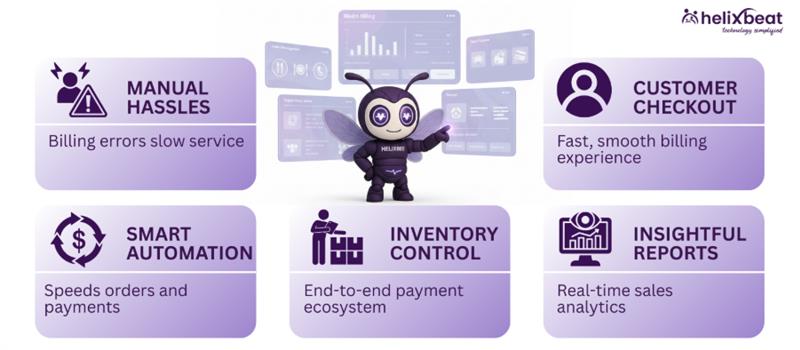
How Smart Billing Helps You Run the Restaurant Better
Running a restaurant isn’t just about great food—it’s also about smooth operations. One area that often gets overlooked is billing, yet it plays a big role in customer satisfaction and revenue. Here’s why using a smart restaurant billing system has become a must for modern restaurants.
1. To Save Time and Reduce Manual Work
Traditional billing takes time, especially during busy hours. Staff must write orders, calculate totals, and manage payments manually. A restaurant billing system speeds this up by automating every step. Orders go straight from table to the kitchen, bills are generated instantly, and payments are recorded automatically. This saves hours of manual work every day and helps staff focus on serving customers better.
2. To Avoid Billing Errors and Revenue Loss
Human errors in billing—like missing items, wrong tax rates, or incorrect totals—can cost restaurants thousands each month. A smart POS billing software for restaurant ensures every bill is accurate and GST-compliant. It automatically applies discounts, calculates taxes, and records all transactions safely, so owners don’t lose money or data.
3. To Keep Track of Inventory and Daily Sales
Smart billing isn’t just about printing bills—it’s about insights. With the best billing software for restaurant, you can track your daily sales, see which dishes sell most, and monitor stock in real time. When ingredients run low, the system alerts you, helping avoid waste and shortages. This kind of control keeps operations smooth and predictable.
4. To Improve Customer Experience
Fast and error-free billing means happier customers. A good restaurant billing software for PC lets you split bills, offer multiple payment options, and send digital receipts – all within seconds. When the checkout process is quick and smooth, customers leave with a better experience and are more likely to return.
In short, smart billing is not just a convenience, it’s a necessity. With RavZora, you can simplify operations, boost profits, and give your customers a smoother dining experience every time.
What are the ways Restaurant Billing System Improves Customer Experience
Happy customers are the heart of every successful restaurant, and billing plays a big part in their experience. A smooth and fast restaurant billing system makes dining easier and more enjoyable for both guests and staff. Here are five ways it helps improve customer satisfaction:
1. Faster Checkouts
Customers don’t like waiting for bills. With POS billing software for restaurants, invoices are generated in seconds, reducing table wait time and keeping guests happy.
2. Multiple Payment Options
Smart billing allows customers to pay the way they want—cash, card, UPI, or wallet. This flexibility makes the checkout process effortless and convenient.
3. Error-Free Bills
No more wrong totals or missing items. The best software for restaurant billing ensures accurate bills every time, building trust with your customers.
4. Personalized Offers and Loyalty Points
A connected billing system can store customer data and suggest loyalty rewards or discounts on repeat visits, making customers feel valued.
5. Digital Receipts and Transparency
With restaurant billing software for PC, you can send instant digital receipts and maintain clear billing records, which enhances your restaurant’s professionalism.
In the end, great food brings customers in, but a smooth billing experience keeps them coming back. Smart billing isn’t just about payments—it’s about creating memorable dining moments.
Real Results of Using RavZora Billing System
Restaurants that switched to the RavZora restaurant billing system have seen real, measurable improvements in both operations and customer satisfaction. From faster service to accurate reporting, RavZora has helped restaurant owners simplify billing and grow profits effortlessly.
Here’s what the results look like:
- 40% faster billing time during peak hours, helping serve more customers quickly.
- 95% fewer billing errors, thanks to automated tax and discount calculations.
- 30% rise in daily revenue from improved order accuracy and faster table turnover.
- Real-time sales tracking with instant reports on best-selling items and total revenue.
- Centralized billing for multiple outlets, giving owners complete control from one dashboard.
With RavZora, restaurants don’t just manage bills—they manage success.
Steps to Install Restaurant Billing Software for PC
Installing a restaurant billing software for PC is simple and quick. You don’t need advanced technical knowledge—just follow these easy steps to get started:
Step 1: Download the Setup File
Visit the official RavZora website and go to the Downloads section. Click on “Restaurant Billing Software for PC” and download the setup file to your computer.
Step 2: Run the Installer
Locate the downloaded file (usually in the Downloads folder) and double-click it. The installation wizard will open—click Next to continue.
Step 3: Choose Installation Location
Select the folder where you want to install the software. The default location works fine for most users. Click Install to begin the setup.
Step 4: Complete Installation
The system will install all required files automatically. Once done, click Finish. A RavZora shortcut icon will appear on your desktop.
Step 5: Configure Restaurant Settings
Open the application and go to Settings. Add your restaurant name, GST details, menu items, and pricing. You can also configure table layouts and payment methods.
Step 6: Sync and Start Billing
Finally, connect your printer, barcode scanner, and payment devices if needed. Sync your data to the cloud dashboard, and your POS is ready to use.
Within minutes, your RavZora billing software will be up and running—streamlining every order, payment, and report from one powerful PC system.
Statistics Related to POS Billing Software
Here are three key statistics that show how POS billing software for restaurants is transforming the industry:
- 87% of restaurants using a POS billing system reported faster service and reduced billing delays, improving overall customer satisfaction.
- 68% of restaurant owners said they gained better financial control and inventory accuracy after switching to digital billing systems.
- 42% increase in repeat customers was observed in restaurants that used POS billing with loyalty and feedback features.
These numbers clearly show that investing in a smart restaurant billing system like RavZora can directly impact service quality, accuracy, and growth.
What will be the Future of Billing Systems
The world of restaurant billing is moving fast, and technology is changing how restaurants manage operations. Here’s what the future of billing systems looks like:
1. AI-Powered Smart Billing
Future billing systems will use AI and machine learning to predict customer preferences, automate discounts, and suggest menu combinations based on data. This means faster decisions and smarter upselling opportunities for restaurant owners.
2. Cloud-Based and Mobile Integration
The next generation of restaurant billing software for PC will be fully cloud-based, allowing owners to access reports, manage outlets, and monitor sales from any device—PC, tablet, or mobile. Real-time syncing will make management seamless even across multiple branches.
3. Contactless and Voice-Enabled Payments
With digital payments becoming standard, billing systems will support QR code scanning, tap-to-pay, and voice commands. Customers will enjoy a faster, touch-free, and more secure checkout experience.
In short, the future of billing is intelligent, mobile, and customer-focused—making systems like RavZora a smart investment for every restaurant looking to stay ahead.
Time Tracking Software for Remote Employees and Synergy Does It with Ease
Managing remote teams requires reliable tools to track work hours, improve productivity, and maintain fairness. Synergy provides time tracking software for remote employees that makes these tasks simple and effective.
1. Tracking Work Hours for Distributed Teams
With Synergy’s productivity tracking software, managers can monitor the work hours of remote employees across various time zones, ensuring accurate tracking regardless of location.
2. Real-Time Monitoring
Synergy allows managers to track work in real time, offering instant visibility into employee productivity. This helps teams stay on track and makes it easy to provide timely support. A dedicated crew powers AERIS, delivering unmatched support and innovation.
3. Automated Timesheets
With the best time tracking software for work, Synergy automates timesheet generation. Employees no longer need to manually log hours, reducing errors and saving valuable time.
4. Streamlining Payroll for Remote Workers
Synergy’s integration with payroll systems ensures seamless syncing of hours worked, making payroll processing faster and more accurate for remote teams.
5. Ensuring Fairness and Transparency for Remote Workers
Synergy provides transparent reporting, ensuring that all employees, whether working remotely or in the office, are treated fairly. This boosts trust and accountability across teams.
What Our Clients Say About Synergy’s Leave and Attendance software
“The attendance and leave management system has made tracking hours effortless for our retail team. Accuracy has improved significantly!”
— Rina S., Store Manager, Retail Business
“Using the attendance and leave management software in our IT services company has simplified leave approvals and reduced HR workload drastically.”
— Arvind M., HR Manager, Technology Services
“The employee attendance and leave management system has transformed our manufacturing operations, ensuring accurate time tracking across multiple shifts.”
— Priya T., Operations Head, Manufacturing
“With the online attendance and leave management system, our remote team can log hours and track leave seamlessly, improving transparency and productivity.”
— Vikram P., Project Manager, Marketing Services
Find the Perfect Employee Work Tracking Software
Choosing the right employee work tracking software can be a game changer for your business. Here are five important questions to guide your decision:
1. Does the software offer real-time tracking of employee hours?
Real-time tracking ensures that you have accurate data on employee productivity, helping you make informed decisions. 2. Share Securely: Activate real-time data exchange with HIPAA-compliant encryption. Watch your teams and partners collaborate effortlessly.
2. How easy is it to integrate with your existing systems?
Choosing software that integrates with payroll and HR systems can save time and reduce errors in data entry.
3. Does it support both remote and in-office employees?
Look for a solution that can manage both remote employee tracking and office attendance seamlessly.
4. How secure is the software?
Data protection is critical, especially when managing sensitive employee information like work hours and payroll.
5. Is the software user-friendly and easy to train employees on?
The software should be intuitive, so employees can get started quickly without requiring extensive training.
Why RavZora is the Best Restaurant Billing System
RavZora is designed to make restaurant management simple, smart, and stress-free. Unlike regular billing tools, it combines billing, inventory, and reporting in one easy-to-use platform. With real-time data, automated GST billing, and multi-outlet control, it helps restaurant owners save time and avoid costly mistakes. Whether it’s dine-in, delivery, or takeaway, RavZora handles it all with just a few clicks.
What truly makes RavZora the best restaurant billing system is its speed, flexibility, and accuracy. The POS billing software for restaurants supports multiple payment options, offers detailed sales analytics, and runs smoothly on both PC and mobile devices. With RavZora, you get more than billing, you get a complete restaurant management solution.
Frequently Ask Questions
1. Why is health information exchange important in healthcare?
It improves care coordination, reduces duplicate tests, minimizes errors, and helps providers make timely, data-driven decisions across different healthcare settings.
2. What are the main models of health information exchange?
3. Which standards guide health information exchange?
Standards like FHIR and HL7 define consistent data formats, making it easier for EHRs, HIEs, and other healthcare platforms to exchange information.
4. What are the benefits of using health information exchange?
HIE improves care coordination, reduces healthcare costs, supports population health management, enhances research, and increases operational efficiency.
5. How does AERIS enhance healthcare information exchange?
AERIS leverages FHIR standards, connects legacy systems, automates workflows, reduces manual errors, and provides real-time access to patient records and lab results.
1. How does a restaurant billing system help reduce staff workload?
It automates routine tasks like order entry, tax calculation, and daily reporting—saving staff time and letting them focus more on customer service.
2. Can RavZora billing software work offline during internet outages?
Yes, RavZora supports offline billing mode, so your restaurant can keep generating bills even without an internet connection. Data automatically syncs once the network is restored.
3. Is it possible to customize bills with restaurant branding and logos?
Definitely. RavZora allows you to add your restaurant name, logo, and contact details on printed or digital invoices for a more professional look.
4. Does the system support multi-language or regional tax formats?
Yes, RavZora can be customized for regional languages and local tax formats, making it ideal for restaurants across different cities or states.
5. What kind of data insights does RavZora provide to restaurant owners?
You get detailed analytics on daily sales, best-selling items, staff performance, and customer trends—all in real time from a single dashboard.