


Restaurant Bookkeeping Software
Get Started with a Free Demo
New Keyword Page
New Keyword Page
"*" indicates required fields
Did you know that over 70% of restaurant owners struggle with bookkeeping errors and cash flow mismatches every month? From misplaced invoices to inconsistent expense tracking, manual accounting often turns into a daily headache. Even with a POS system in place, most restaurants still find their books disorganized—sales data doesn’t sync with expenses, tax reports take hours, and financial insights come too late to act on.
That’s where restaurant bookkeeping software changes everything. It automates every financial workflow—from tracking daily sales and supplier invoices to generating profit and tax reports in real time. Instead of juggling spreadsheets and late-night reconciliations, restaurant owners get a clear, unified view of their finances across all outlets. The result? Fewer errors, faster decisions, and a smarter way to run your restaurant’s finances—without the chaos.
Why Traditional Bookkeeping Fails in Restaurants
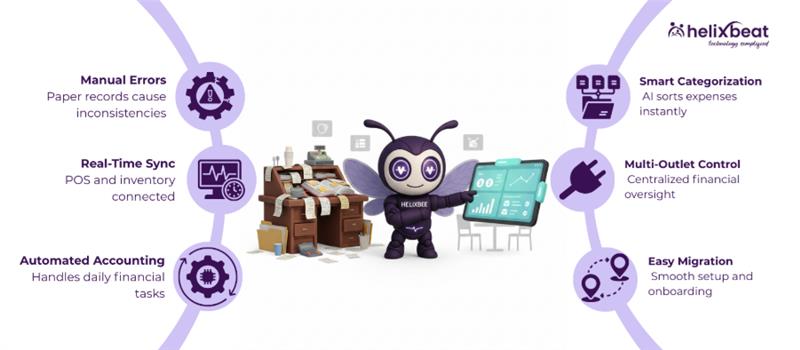
Traditional bookkeeping depends heavily on manual data entry and paper records, which often leads to missed transactions and delayed updates. In a busy restaurant, where sales happen every minute and expenses keep changing, it becomes nearly impossible to record everything accurately in time. Small errors like forgetting to enter a supplier bill or a refund can add up and affect your overall financial picture.
Another major issue is the lack of real-time visibility. When data from the POS, inventory, and payroll systems aren’t connected, restaurant owners have to switch between multiple reports to understand profits or losses. This not only wastes time but also delays important business decisions. Without automation, your finances are always one step behind your operations and that’s where modern restaurant bookkeeping software steps in to fix the gap.
How Modern Bookkeeping Software Syncs with POS and Inventory Systems
Modern restaurant bookkeeping software is built to work hand-in-hand with your POS and inventory systems, creating a single source of truth for all your financial data. Instead of juggling spreadsheets, everything — from customer orders to supplier bills — is automatically recorded, categorized, and synced in real time. This helps you maintain accurate books without manual effort and reduces the risk of missing transactions.
Here’s how the sync process works:
- Automatic Data Flow: Every sale made through your POS is instantly reflected in your accounting dashboard.
- Expense and Invoice Sync: Supplier bills and purchase orders are automatically captured and linked to the right expense category.
- Inventory Integration: Ingredient usage and stock levels are updated after every sale, helping track food costs and reduce waste.
- Bank & Payment Sync: Transactions from payment gateways and banks are matched with sales entries for faster reconciliation.
- Multi-Outlet Control: Financial data from all branches or outlets flows into a centralized system for consolidated reporting.
This real-time synchronization in restaurant bookkeeping software gives owners complete financial visibility, allowing them to track sales, manage costs, and make data-driven decisions instantly.
Core Accounting Automations That Simplify Daily Operations
The best accounting software for restaurants takes care of repetitive financial tasks automatically, saving you hours every week. It records every sale from your POS, updates expenses, and matches payments — all without manual entry. This automation reduces errors and helps you stay on top of your cash flow, so you can focus more on running your restaurant instead of balancing books.
With modern accounting software for restaurant business, daily operations like payroll, supplier payments, and expense tracking become smooth and stress-free. It automatically categorizes income and expenses, updates your profit and loss reports, and even schedules vendor payments on time. This means your accounts are always accurate, your staff gets paid on time, and your financial reports are ready whenever you need them.
Why RavZora is the Leading Restaurant Bookkeeping Software
RavZora stands out as the best accounting software for restaurant business because it combines automation, accuracy, and real-time insights in one powerful platform. It’s designed specifically for restaurant operations, making it easy to track daily sales, manage vendor payments, and monitor cash flow across multiple outlets — all without juggling spreadsheets or manual reports.
Here’s what makes RavZora the preferred choice for restaurants:
- Seamless POS & Inventory Integration: Automatically syncs data from your POS system and inventory to keep financials accurate and updated in real time.
- Smart Expense Categorization: AI-driven automation classifies every transaction — from ingredient costs to utilities — instantly.
- Multi-Outlet Financial Control: Get consolidated reports for all locations using a single dashboard.
- GST & Tax Ready: Built-in tools simplify GST filing and compliance for restaurant businesses.
- Cloud-Based Access: Manage your accounts anytime, anywhere, with secure cloud storage and real-time syncing.
With its powerful automation and restaurant-focused features, RavZora isn’t just a bookkeeping tool — it’s a complete financial management system that helps restaurants operate smarter, faster, and more profitably.
Migrating to Restaurant Bookkeeping Software: Step-by-Step Process
Switching from manual records or outdated systems to a modern restaurant bookkeeping software might sound complex, but with the right process, it’s smooth and efficient. Here’s a simple six-step guide to make your migration hassle-free:
Step 1: Evaluate Your Current Accounting Setup
Review your existing bookkeeping system, note down pain points, and identify what data — like sales, expenses, and vendor details — needs to be transferred.
Step 2: Select the Best Accounting Software for Restaurants
Choose a platform that integrates easily with your POS, inventory, and payroll systems. The best accounting software for restaurant business should offer automation, scalability, and tax-ready features.
Step 3: Prepare and Clean Your Financial Data
Before importing, organize your data by removing duplicates, correcting errors, and categorizing expenses properly to avoid confusion after migration.
Step 4: Import Data and Set Up Integrations
Upload past transactions, connect your POS system, and link bank accounts. This step allows your accounting software for restaurant business to sync real-time financial data instantly.
Step 5: Test the System and Validate Reports
Run test reports to verify that every transaction, sale, and expense appears correctly. Make sure the books balance before going live.
Step 6: Train Your Staff and Go Live
Provide a quick walkthrough to your finance and operations team so they can use the dashboard confidently. Once trained, activate live syncing and start managing your finances seamlessly.
Migrating to a smart bookkeeping system not only simplifies your daily accounting but also gives you total financial visibility, setting your restaurant up for long-term success.
How RavZora Bookkeeping System Fits In
RavZora isn’t just another accounting tool, it’s a fully integrated restaurant bookkeeping software designed to simplify every financial task your restaurant handles daily. From syncing POS sales and managing supplier invoices to tracking expenses and payroll, RavZora automates it all. Its AI-powered engine ensures every transaction is categorized accurately, giving you a clear, real-time picture of your restaurant’s cash flow and performance.
What makes RavZora stand out is how seamlessly it connects with the restaurant ecosystem. It works hand-in-hand with inventory management, POS systems, and payment gateways to deliver accurate, automated bookkeeping. Whether you run a single outlet or a franchise chain, RavZora acts as the best accounting software for restaurant business, helping you save time, reduce errors, and make smarter financial decisions — all from one easy-to-use dashboard.
Time Tracking Software for Remote Employees and Synergy Does It with Ease
Managing remote teams requires reliable tools to track work hours, improve productivity, and maintain fairness. Synergy provides time tracking software for remote employees that makes these tasks simple and effective.
1. Tracking Work Hours for Distributed Teams
With Synergy’s productivity tracking software, managers can monitor the work hours of remote employees across various time zones, ensuring accurate tracking regardless of location.
2. Real-Time Monitoring
Synergy allows managers to track work in real time, offering instant visibility into employee productivity. This helps teams stay on track and makes it easy to provide timely support. A dedicated crew powers AERIS, delivering unmatched support and innovation.
3. Automated Timesheets
With the best time tracking software for work, Synergy automates timesheet generation. Employees no longer need to manually log hours, reducing errors and saving valuable time.
4. Streamlining Payroll for Remote Workers
Synergy’s integration with payroll systems ensures seamless syncing of hours worked, making payroll processing faster and more accurate for remote teams.
5. Ensuring Fairness and Transparency for Remote Workers
Synergy provides transparent reporting, ensuring that all employees, whether working remotely or in the office, are treated fairly. This boosts trust and accountability across teams.
What Our Clients Say About Synergy’s Leave and Attendance software
“The attendance and leave management system has made tracking hours effortless for our retail team. Accuracy has improved significantly!”
— Rina S., Store Manager, Retail Business
“Using the attendance and leave management software in our IT services company has simplified leave approvals and reduced HR workload drastically.”
— Arvind M., HR Manager, Technology Services
“The employee attendance and leave management system has transformed our manufacturing operations, ensuring accurate time tracking across multiple shifts.”
— Priya T., Operations Head, Manufacturing
“With the online attendance and leave management system, our remote team can log hours and track leave seamlessly, improving transparency and productivity.”
— Vikram P., Project Manager, Marketing Services
Find the Perfect Employee Work Tracking Software
Choosing the right employee work tracking software can be a game changer for your business. Here are five important questions to guide your decision:
1. Does the software offer real-time tracking of employee hours?
Real-time tracking ensures that you have accurate data on employee productivity, helping you make informed decisions. 2. Share Securely: Activate real-time data exchange with HIPAA-compliant encryption. Watch your teams and partners collaborate effortlessly.
2. How easy is it to integrate with your existing systems?
Choosing software that integrates with payroll and HR systems can save time and reduce errors in data entry.
3. Does it support both remote and in-office employees?
Look for a solution that can manage both remote employee tracking and office attendance seamlessly.
4. How secure is the software?
Data protection is critical, especially when managing sensitive employee information like work hours and payroll.
5. Is the software user-friendly and easy to train employees on?
The software should be intuitive, so employees can get started quickly without requiring extensive training.
Frequently Ask Questions
1. Why is health information exchange important in healthcare?
It improves care coordination, reduces duplicate tests, minimizes errors, and helps providers make timely, data-driven decisions across different healthcare settings.
2. What are the main models of health information exchange?
3. Which standards guide health information exchange?
Standards like FHIR and HL7 define consistent data formats, making it easier for EHRs, HIEs, and other healthcare platforms to exchange information.
4. What are the benefits of using health information exchange?
HIE improves care coordination, reduces healthcare costs, supports population health management, enhances research, and increases operational efficiency.
5. How does AERIS enhance healthcare information exchange?
AERIS leverages FHIR standards, connects legacy systems, automates workflows, reduces manual errors, and provides real-time access to patient records and lab results.
1. How does restaurant bookkeeping software help reduce manual accounting errors?
Restaurant bookkeeping software automates data entry, invoice tracking, and payment reconciliation, eliminating the human errors common in manual bookkeeping.
2. Can the best accounting software for restaurants integrate with POS systems?
Yes, modern restaurant bookkeeping software like RavZora integrates directly with POS systems to sync sales, payments, and inventory in real time.
3. What makes RavZora the best accounting software for restaurant business?
RavZora offers AI-driven automation, tax-ready reports, POS and inventory integration, and real-time financial insights designed specifically for restaurant operations.
4. How long does it take to migrate to restaurant bookkeeping software?
Migration usually takes a few days, depending on data size. The process includes data cleanup, integration setup, and testing before going live.
5. Can restaurant bookkeeping software handle multiple outlets under one system?
Yes, advanced accounting software for restaurant business allows you to manage multiple locations, track branch-wise performance, and view consolidated financial reports on a single dashboard.