


Restaurant Inventory Management Software
Get Started with a Free Demo
New Keyword Page
New Keyword Page
"*" indicates required fields
More than 75% of restaurants face stock problems every month, losing nearly 30% of their profits due to wrong stock counts or food wastage. When ingredients go missing or expire before use, it directly affects your kitchen’s flow and your bottom line.
Most restaurants still use paper logs or spreadsheets to track items. But manual tracking takes time, causes mistakes, and doesn’t show real-time updates. You might end up overbuying or running out of key ingredients during rush hours.
The smart way to handle this is by using restaurant inventory management software. It automatically tracks your ingredients, updates stock levels, and helps you plan better. With a restaurant stock management system like RavZora, you can reduce waste, save money, and make sure your kitchen always runs smoothly.
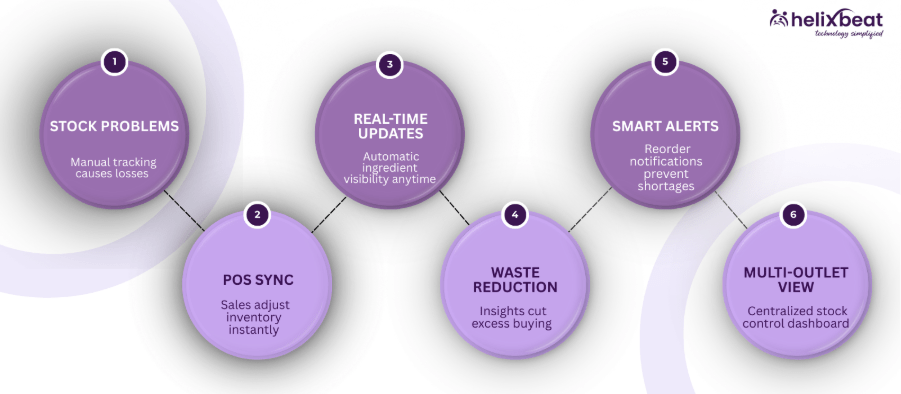
Why Manual Stock Tracking Doesn't Work for Restaurants
Manual stock tracking might seem easy at first, but it quickly becomes a problem as your restaurant grows. Writing numbers in a notebook or typing them in a spreadsheet can lead to mistakes, especially during busy hours. It’s hard to keep track of what’s coming in and what’s being used, and by the time you notice a shortage, it’s already too late.
Another issue is that manual tracking doesn’t give real-time updates. You can’t see which ingredients are running low or which items are being overused. This often leads to overbuying, food spoilage, and higher costs. That’s why many restaurants are now moving towards restaurant inventory management software that automates the process and gives accurate insights anytime.
How Restaurant Stock Management Software Works
Managing stock becomes much easier when you use a restaurant stock management system instead of relying on manual methods. It helps you monitor every ingredient, avoid shortages, and control costs with just a few clicks. Here’s how it works step by step:
Step 1: Add Your Inventory Items
Start by adding all your ingredients, raw materials, and supplies into the system. This creates a clear digital record of everything your restaurant uses for food stock management.
Step 2: Track Stock in Real Time
As ingredients are used in dishes or new stock is received, the software automatically updates quantities. You always have a real-time view of your inventory using the restaurant stock management app.
Step 3: Set Reorder Alerts
You can set minimum stock levels for each item. When an ingredient runs low, the system sends a notification so you can reorder before it affects your kitchen workflow.
Step 4: Link with POS and Purchase Orders
The software connects with your POS system and supplier records. Every sale adjusts stock levels, and purchase orders are automatically recorded, a key feature of food production inventory management software.
Step 5: Get Reports and Insights
You can easily view reports on usage, wastage, and costs. These insights help you plan purchases better and cut down unnecessary expenses.
With the help of an intelligent restaurant stock management system, you can manage your kitchen stock smoothly, reduce waste, and focus more on delivering great food instead of worrying about inventory.
Benefits of Restaurant Stock Management Software
Running a restaurant becomes much simpler when your inventory is organized. Using a restaurant stock management system helps you track every ingredient, cut down waste, and save both time and money. Here are the top benefits that make it a must-have tool for every restaurant:
1. Reduces Food Waste
Nearly 35% of restaurant food waste comes from overbuying and poor tracking. A restaurant stock management system helps cut that waste by up to 25%, as it monitors ingredient usage in real time. You buy only what’s needed, keeping your kitchen lean and cost-efficient.
2. Improves Cost Control
Restaurants that use food stock management software report up to 20% savings on inventory costs. The software gives clear visibility into pricing, consumption trends, and supplier costs, helping you make smarter purchase decisions and improve overall profit margins.
3. Saves Time and Effort
Manual stock checks can take hours every week. With automation, restaurants save up to 40% of staff time, as the system updates stock automatically and generates instant reports. This means your team can spend more time on customer service and kitchen operations.
4. Enhances Accuracy and Transparency
Human error in manual tracking can lead to up to 15% stock discrepancies each month. A digital restaurant stock management system eliminates these mistakes by syncing every sale, purchase, and ingredient movement in real time—ensuring full transparency and easy auditing.
5. Increases Efficiency Across Outlets
Multi-branch restaurants using restaurant inventory management software experience a 30% improvement in coordination between outlets. A single dashboard gives managers real-time data on all locations, helping maintain consistency in quality, stock, and purchasing.
In short, investing in a food production inventory management software helps your restaurant save money, reduce waste, and run more efficiently every single day.
Why Most Restaurants Choose RavZora Inventory Management Software
When it comes to managing stock efficiently, most restaurant owners trust RavZora inventory management software because it’s built specifically for the challenges of the food industry. It helps you control costs, prevent wastage, and make faster business decisions, all from one easy-to-use platform.
Here’s why restaurants prefer RavZora:
- Real-Time Stock Updates: Track every ingredient as it’s used, sold, or restocked with instant visibility across all outlets.
- Smart Reorder Alerts: Get automatic reminders before ingredients run out, helping you maintain a steady kitchen flow.
- POS and Accounting Integration: RavZora connects seamlessly with your POS and financial systems, keeping all records in sync.
- AI-Powered Forecasting: Predict future ingredient needs based on order trends and seasons.
- Multi-Outlet Dashboard: Manage multiple branches easily with one centralized restaurant stock management system.
- Mobile-Friendly App: Monitor your stock anytime, anywhere using RavZora’s restaurant stock management app.
RavZora acts as your digital kitchen assistant – simplifying inventory, saving time, and giving you full control over your restaurant’s operations. Whether you’re running a café, a cloud kitchen, or a large dining chain, RavZora’s smart features make food stock management faster and more reliable than ever.
How Easily You Can Set Up RavZora in Your Restaurant
Getting started with RavZora Inventory Management Software is quick and simple. You don’t need any technical skills — just follow these five easy steps to set up your restaurant’s stock system.
Step 1: Sign Up and Create Your Account
Visit the RavZora website and sign up for your account. Choose the plan that fits your restaurant type — whether it’s a small café, a cloud kitchen, or a large dining chain.
Step 2: Add Your Stock Items
Enter all your ingredients, raw materials, and supplies into the system. This helps create a complete digital list for easy food stock management.
Step 3: Set Reorder Levels and Supplier Details
Define the minimum quantity for each item and add your supplier information. The system will automatically alert you when stock goes below the set limit.
Step 4: Connect POS and Accounting Systems
RavZora integrates with your POS and accounting software. This means every sale and purchase automatically updates your stock records in real time.
Step 5: Access from Anywhere Using the App
Download the restaurant stock management app to manage inventory from your phone. You can track supplies, view reports, and make purchase decisions anytime, anywhere.
Within just a few days, your team will be running a smooth, automated, and error-free restaurant stock management system with RavZora.
Final Words
Managing restaurant inventory doesn’t have to be stressful and time-consuming. With RavZora Restaurant Inventory Management Software, you can easily keep track of every ingredient, control costs, and reduce waste, all from one simple dashboard. It’s the smarter, faster, and more reliable way to manage your kitchen operations.
Whether you run a small café or a multi-branch restaurant, RavZora gives you the tools to stay in control. From food stock management to real-time tracking and reporting, it helps you make better decisions every day. Take the next step toward a more profitable and organized business — switch to RavZora today and see the difference it makes.
Time Tracking Software for Remote Employees and Synergy Does It with Ease
Managing remote teams requires reliable tools to track work hours, improve productivity, and maintain fairness. Synergy provides time tracking software for remote employees that makes these tasks simple and effective.
1. Tracking Work Hours for Distributed Teams
With Synergy’s productivity tracking software, managers can monitor the work hours of remote employees across various time zones, ensuring accurate tracking regardless of location.
2. Real-Time Monitoring
Synergy allows managers to track work in real time, offering instant visibility into employee productivity. This helps teams stay on track and makes it easy to provide timely support. A dedicated crew powers AERIS, delivering unmatched support and innovation.
3. Automated Timesheets
With the best time tracking software for work, Synergy automates timesheet generation. Employees no longer need to manually log hours, reducing errors and saving valuable time.
4. Streamlining Payroll for Remote Workers
Synergy’s integration with payroll systems ensures seamless syncing of hours worked, making payroll processing faster and more accurate for remote teams.
5. Ensuring Fairness and Transparency for Remote Workers
Synergy provides transparent reporting, ensuring that all employees, whether working remotely or in the office, are treated fairly. This boosts trust and accountability across teams.
What Our Clients Say About Synergy’s Leave and Attendance software
“The attendance and leave management system has made tracking hours effortless for our retail team. Accuracy has improved significantly!”
— Rina S., Store Manager, Retail Business
“Using the attendance and leave management software in our IT services company has simplified leave approvals and reduced HR workload drastically.”
— Arvind M., HR Manager, Technology Services
“The employee attendance and leave management system has transformed our manufacturing operations, ensuring accurate time tracking across multiple shifts.”
— Priya T., Operations Head, Manufacturing
“With the online attendance and leave management system, our remote team can log hours and track leave seamlessly, improving transparency and productivity.”
— Vikram P., Project Manager, Marketing Services
Find the Perfect Employee Work Tracking Software
Choosing the right employee work tracking software can be a game changer for your business. Here are five important questions to guide your decision:
1. Does the software offer real-time tracking of employee hours?
Real-time tracking ensures that you have accurate data on employee productivity, helping you make informed decisions. 2. Share Securely: Activate real-time data exchange with HIPAA-compliant encryption. Watch your teams and partners collaborate effortlessly.
2. How easy is it to integrate with your existing systems?
Choosing software that integrates with payroll and HR systems can save time and reduce errors in data entry.
3. Does it support both remote and in-office employees?
Look for a solution that can manage both remote employee tracking and office attendance seamlessly.
4. How secure is the software?
Data protection is critical, especially when managing sensitive employee information like work hours and payroll.
5. Is the software user-friendly and easy to train employees on?
The software should be intuitive, so employees can get started quickly without requiring extensive training.
Frequently Ask Questions
1. Why is health information exchange important in healthcare?
It improves care coordination, reduces duplicate tests, minimizes errors, and helps providers make timely, data-driven decisions across different healthcare settings.
2. What are the main models of health information exchange?
3. Which standards guide health information exchange?
Standards like FHIR and HL7 define consistent data formats, making it easier for EHRs, HIEs, and other healthcare platforms to exchange information.
4. What are the benefits of using health information exchange?
HIE improves care coordination, reduces healthcare costs, supports population health management, enhances research, and increases operational efficiency.
5. How does AERIS enhance healthcare information exchange?
AERIS leverages FHIR standards, connects legacy systems, automates workflows, reduces manual errors, and provides real-time access to patient records and lab results.
1. What is restaurant inventory management software?
It’s a digital tool that helps restaurants track, manage, and control their stock levels in real time to avoid waste and losses.
2. How does restaurant stock management software reduce food waste?
It tracks ingredient usage and sends alerts before items expire or run out, helping restaurants cut food waste by up to 25%.
3. Can I use the restaurant stock management app on my phone?
Yes, RavZora offers a restaurant stock management app that lets you monitor inventory, sales, and supplier data from anywhere.
4. Does the software integrate with POS and accounting systems?
Absolutely. Most restaurant stock management systems, including RavZora, sync with POS and accounting tools for seamless updates.
5. How long does it take to set up RavZora Inventory Management Software?
You can set up and start using RavZora restaurant inventory management software in just a few days, no technical skills needed.