


Selenium Automation Testing Services
Get in Touch
New Lead: Testing as a Service
Testing as a Service Landing Page Form, connected with the Mailchimp.
"*" indicates required fields
Did you know that the test automation market is expected to cross USD 80 billion by 2030, and Selenium is used by nearly 1 in 3 companies worldwide for their automation testing needs? Yet, many QA teams still face real challenges: projects get delayed, manual testing takes too long, and bugs often slip into production.
Manual testing can’t keep up with fast development cycles anymore. Every code change needs to be checked across browsers, devices, and APIs and doing this manually costs time, money, and accuracy.
That’s where Selenium automation testing services make a difference. Selenium helps automate repetitive tests, improve speed, and reduce testing costs by up to 40%. It works across all major browsers and integrates easily with tools used in CI/CD pipelines.
What is Selenium in Automation Testing?
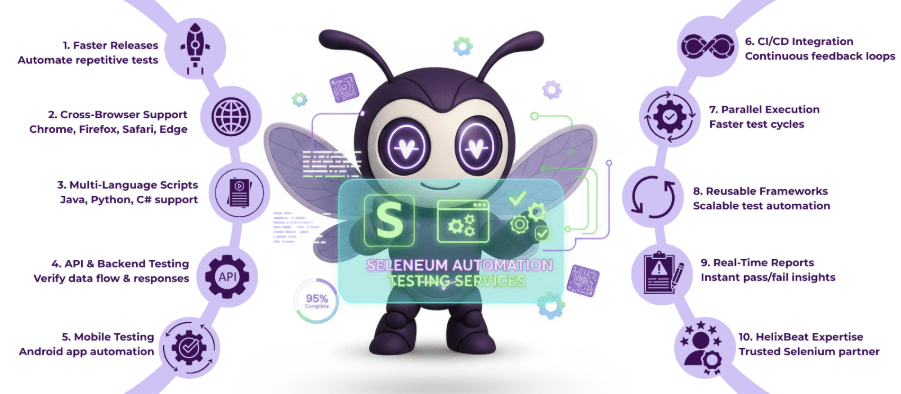
Selenium is an open-source tool used to automate the testing of web applications. Instead of manually checking how a website performs on different browsers, Selenium runs those tests automatically through scripts. It supports popular languages like Java, Python, and C#, and works across browsers like Chrome, Firefox, and Edge.
Through Selenium automation testing services, companies can test faster, detect bugs early, and ensure their web and mobile apps run smoothly across platforms. Selenium can also be integrated with APIs and Android testing tools, making it a flexible choice for modern quality assurance teams.
Why Companies Choose Selenium for Test Automation
Selenium in automation testing has become the preferred choice for companies that want faster, more reliable, and cost-effective quality assurance. Here’s why it stands out:
- Open-Source and Free: Selenium doesn’t require any license fees, making it a budget-friendly solution for businesses of all sizes.
- Cross-Browser Compatibility: It supports major browsers like Chrome, Firefox, Safari, and Edge, ensuring consistent user experiences.
- Multi-Language Support: Test scripts can be written in Java, Python, C#, or Ruby, giving teams the freedom to use familiar languages.
- Easy Integration: Selenium integrates smoothly with CI/CD tools, enhancing automation efficiency across the development cycle.
- Scalable and Flexible: It enables parallel testing, allowing faster execution and better handling of large projects.
Because of these strengths, Selenium automation testing services are trusted by businesses worldwide to deliver quality, speed, and precision in every release.
Types of Selenium Automation Testing Services
Businesses use Selenium automation testing services to test everything from web applications to APIs and mobile platforms. Here are the five main types of testing that make Selenium a complete solution for modern QA teams.
1. Functional Testing
Functional testing ensures that every feature of your web application works exactly as intended. With Selenium in automation testing, teams can automate UI actions like clicks, form submissions, and navigation to verify end-to-end functionality across browsers. This eliminates manual effort and ensures consistent results in every release.
2. Regression Testing
Regression testing is essential whenever new updates or code changes are made. Using Selenium test automation services, repetitive test cases can be re-executed quickly to confirm that new features haven’t broken existing functionality. This helps maintain product stability and reduces the time spent on manual retesting.
3. Web Services Automation Testing Using Selenium
For web applications that rely heavily on APIs, web services automation testing using Selenium ensures that backend systems communicate correctly with the frontend. By combining Selenium with API tools, teams can verify data flow, response codes, and system reliability, ensuring a seamless user experience across platforms.
4. Automation API Testing Using Selenium
Automation API testing using Selenium helps validate backend services that interact with web or mobile interfaces. This ensures that APIs return correct data, respond quickly, and handle errors gracefully. When integrated into CI/CD pipelines, it provides continuous feedback for developers and improves release quality.
5. Android App Automation Testing Using Selenium
With the rise of mobile-first applications, android app automation testing using Selenium has become a must-have service. Using Selenium alongside tools like Appium, testers can automate UI interactions on Android devices, ensuring consistent performance, smooth navigation, and bug-free experiences across different screen sizes and operating systems.
Together, these five types of Selenium automation testing services create a unified, scalable testing approach that improves quality, reduces effort, and speeds up delivery across web and mobile platforms.
Process Involved in Selenium Automation Testing
Follow this simple, end-to-end flow to see how Selenium in automation testing is set up, executed, and improved over time.
Step 1: Requirement & Scope Definition
We identify user flows, browsers/devices, and API endpoints to cover. This aligns the plan with your release goals and sets clear success metrics for Selenium automation testing services.
Step 2: Toolchain & Framework Selection
We choose languages (Java/Python/C#), a test runner (TestNG/JUnit), and CI/CD tools (Jenkins/GitHub Actions). A modular, data-driven framework makes selenium test automation services easier to scale and maintain.
Step 3: Test Design & Prioritization
We map critical user journeys (login, checkout, search), define edge cases, and prioritize high-risk areas. API contracts are listed early to support automation API testing using Selenium.
Step 4: Environment & Test Data Setup
We prepare test URLs, seeded accounts, and stable datasets. For web services automation testing using Selenium, we configure base URLs, auth tokens, and mock/stub endpoints where needed.
Step 5: Script Development (UI & API)
Reusable page objects and keyword methods are coded for UI flows, while API validations (status codes, payloads, schemas) support automation API testing using Selenium. This creates a single suite that checks both frontend and backend behavior.
Step 6: Mobile Coverage (Android)
Using Selenium with Appium, we add android app automation testing using Selenium to validate hybrid/mobile web flows on real devices or emulators, covering gestures, navigation, and device compatibility.
Step 7: Cross-Browser & Parallel Execution
We run tests on Chrome, Firefox, Safari, and Edge—locally or on cloud grids—to speed feedback. Parallel runs are standard in mature Selenium automation testing services.
Step 8: CI/CD Integration & Shift-Left
Tests run automatically on every pull request or nightly build. Failures block merges, ensuring selenium in automation testing prevents defects from reaching production.
Step 9: Reporting, Alerts & Analytics
Dashboards (Allure/Extent) show pass/fail trends, flaky tests, and time-to-fix. For web services automation testing using Selenium, reports include response times and contract-mismatch details.
Step 10: Defect Triage & Fast Fix Loop
Failures are classified (app bug vs. test issue), logged with evidence (screenshots, HAR logs), and assigned. This keeps selenium test automation services focused on rapid, high-quality releases.
Step 11: Maintenance & Optimization
We refactor page objects, stabilize waits, remove flakiness, and update selectors after UI changes. Suites are split (smoke/regression) to keep pipelines fast and reliable.
Step 12: Security, Compliance & Readiness
Access keys, tokens, and test data are handled securely. SLAs define coverage, execution windows, and acceptance criteria so stakeholders can trust every release.
Result: A unified, scalable pipeline where UI, API, and mobile checks run together—using Selenium automation testing services to deliver faster releases, lower costs, and higher product quality.
Benefits of Selenium Test Automation Services
Using Selenium test automation services can significantly improve software quality and reduce project timelines. In fact, studies show that teams using Selenium-based frameworks deliver releases 30–40% faster with up to 25% fewer post-launch defects. Here are the main benefits:
- Faster Testing Cycles: Selenium automates repetitive test cases, helping QA teams execute thousands of tests in parallel. This reduces testing time by nearly 50% compared to manual testing and accelerates time-to-market.
- Improved Accuracy: Automated scripts ensure consistent and precise test execution. With Selenium in automation testing, human errors are almost eliminated, leading to higher-quality software and stable releases.
- Cross-Browser & Platform Support: Selenium supports all major browsers — Chrome, Firefox, Safari, and Edge — along with web and hybrid mobile platforms. This guarantees a uniform user experience across more than 90% of global devices.
- Cost Savings: As an open-source framework, Selenium eliminates expensive licensing fees. Companies that shift from manual to Selenium automation testing services often see a 35–40% reduction in QA costs over time.
- Seamless CI/CD Integration: Selenium easily integrates with tools like Jenkins, GitHub Actions, and Docker, enabling continuous testing throughout the development lifecycle and reducing deployment delays.
In short, Selenium automation testing services empower businesses to launch reliable, high-performing applications faster, while maintaining full control over quality, scalability, and cost efficiency.
How Selenium Automation Improves Quality and Reduces Costs
Selenium in automation testing improves quality by ensuring every feature is tested thoroughly and consistently. Automated scripts can run across multiple browsers, devices, and operating systems, catching bugs that manual testing might miss. With features like parallel execution and real-time reporting, teams can detect issues early in the development cycle — long before they affect users. This results in higher software stability, fewer post-release defects, and better user satisfaction.
From a cost perspective, Selenium automation testing services significantly reduce expenses linked to manual labor and repeated test cycles. Since Selenium is open-source, there are no license fees, and its reusable scripts lower ongoing maintenance costs. By integrating Selenium into CI/CD pipelines, companies save up to 40% in testing time and costs, all while maintaining faster release cycles and consistent product quality.
Why Partner with Helixbeat for Selenium Test Automation Services
Choosing HelixBeat means teaming up with experts who make testing faster, smarter, and more reliable. Our Selenium test automation services help you deliver high-quality software without delays or high costs. We combine the power of Selenium with our proven QA process to ensure your website or app works perfectly across browsers, devices, and platforms.
At HelixBeat, we don’t believe in one-size-fits-all testing. We understand that every project is different, so we build customized automation frameworks that fit your goals, tech stack, and release timelines. From web testing to mobile and API validation, we make sure your testing process runs smoothly from start to finish.
Why Businesses Trust HelixBeat
- Experienced QA Team: Our testers have years of hands-on experience using Selenium in automation testing for all kinds of applications.
- Complete Test Coverage: We handle everything — UI, API, and mobile — using reliable Selenium automation testing services.
- Custom Frameworks: We design test setups that are easy to maintain and scale as your project grows.
- Continuous Testing: HelixBeat integrates testing with your CI/CD tools so issues are caught before deployment.
- Detailed Reports: Get clear, data-backed reports showing test results and performance insights.
- Budget-Friendly: Our optimized process helps businesses save up to 40% on testing costs.
- Ongoing Support: We provide 24×7 assistance and quick response times whenever you need help.
With HelixBeat, you get more than a testing team — you get a partner committed to your success. Want faster, bug-free releases? Book a free demo and see how our Selenium automation testing services can transform your QA process.
FAQs
1. What tools can be integrated with Selenium automation testing services?
Selenium can easily integrate with tools like Jenkins, Maven, TestNG, and Docker, allowing smooth CI/CD workflows and continuous testing across environments.
2. Can I perform android app automation testing using Selenium?
Yes. By combining Selenium with Appium, testers can perform android app automation testing using Selenium, enabling the automation of hybrid or web-based mobile applications on real devices or emulators.
3. How does Selenium in automation testing improve team efficiency?
Selenium in automation testing reduces manual effort, speeds up test execution, and allows parallel testing on multiple browsers — helping teams deliver faster, more accurate software releases.
4. Is automation API testing using Selenium possible for backend validation?
Yes. While Selenium focuses on front-end testing, it can be integrated with frameworks like RestAssured or Postman for automation API testing using Selenium, ensuring that both UI and backend layers work seamlessly together.
5. Why should businesses invest in web services automation testing using Selenium?
Web services automation testing using Selenium ensures that APIs, databases, and user interfaces communicate correctly. This helps maintain smooth data flow, reduces integration bugs, and guarantees a consistent user experience across platforms.