


Server Stress Testing
Get in Touch
New Lead: Testing as a Service
Testing as a Service Landing Page Form, connected with the Mailchimp.
"*" indicates required fields
Did you know that 70% of users will leave a website if it takes more than 3 seconds to load? With people expecting fast and smooth online experiences, even small server problems can lead to lost customers and sales.
This is where server stress testing comes in. It helps you test how your server handles heavy traffic, so you can find and fix issues before they affect your users.
Whether it’s handling busy times or making sure everything runs smoothly, server stress testing helps keep your website reliable and fast. Make sure your server is ready for anything with server stress testing.
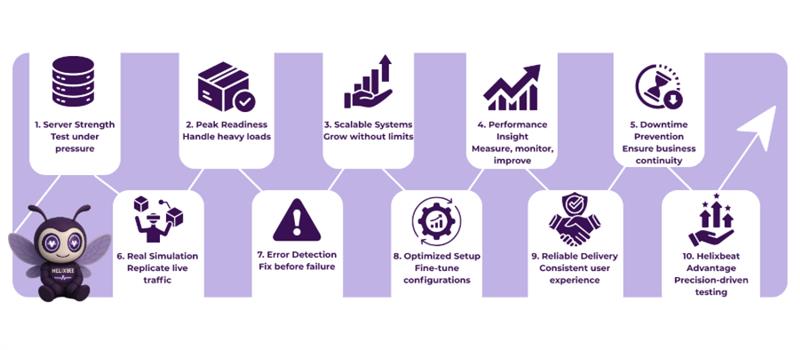
Short Note on Server Stress Testing?
Server Stress Testing is the process of testing a server’s performance by simulating high levels of traffic and workload to assess how it responds under pressure. It helps identify potential issues such as slow response times, crashes, or system failures that could occur during peak usage.
By pushing the server to its limits, stress testing ensures that it can handle large numbers of users or requests without compromising performance. This testing is crucial for businesses that want to maintain a seamless user experience, especially during high-demand periods like sales or product launches.
Why Server Stress Testing Is Essential for Reliable Performance
Server stress testing is a crucial process that helps businesses evaluate their server’s ability to handle high traffic and extreme conditions.
1. Understanding Server Stress Testing
Server stress testing involves simulating high traffic or load on a server to determine how it performs under extreme conditions. It helps identify the system’s breaking point, ensuring it can handle expected user loads and avoid crashes during peak periods.
By replicating real-world scenarios, businesses can pinpoint weaknesses that could impact user experience or cause service disruptions.
2. Identifying System Limitations
Stress testing uncovers the maximum capacity of your server infrastructure. By pushing the server beyond its normal operating conditions, it reveals performance bottlenecks, hardware failures, memory leaks, or database issues.
This helps IT teams optimize resources, plan for scalability, and address vulnerabilities before they affect end-users.
3. Ensuring Scalability and Reliability
Stress testing helps determine how well the server can scale when faced with increasing traffic. Understanding how the system behaves under load enables businesses to proactively adjust hardware, software, or configurations to ensure consistent and reliable performance, even as demands grow.
This is particularly crucial for businesses with fluctuating web traffic.
4. Preventing Downtime and Ensuring Business Continuity
Frequent and thorough server stress testing is key to preventing unexpected downtimes and performance degradation. It allows organizations to anticipate and resolve potential system failures, thus minimizing risk.
For businesses that rely on uninterrupted service, stress testing is an essential part of maintaining business continuity and user satisfaction.
By regularly performing server stress testing, businesses can ensure their servers remain reliable, scalable, and capable of delivering uninterrupted service during peak demand.
How Does Server Stress Testing Work?
Server stress testing involves simulating heavy traffic loads to assess how a server responds under stress. Here’s a step-by-step procedure for how it works:
1. Define Testing Objectives:
Start by defining the purpose of the server stress testing. Are you testing for traffic spikes, system limits, or performance under peak demand? Setting clear objectives helps determine the tools and testing scenarios to use.
2. Select the Right Tools:
Choose the appropriate web server stress test online or stress test tool for web applications to simulate the expected traffic. Online tools allow easy, scalable testing, while custom tools can offer deeper insights into specific server issues.
3. Simulate Traffic Loads:
Use the chosen tool to generate a high number of requests to the server, mimicking real-world user behavior. This step helps determine how much load the server can handle before it starts to degrade.
4. Monitor Server Performance:
During testing, monitor key metrics such as response times, server crashes, CPU usage, and memory consumption. This data helps identify weaknesses in the server’s infrastructure.
5. Analyze Results and Identify Issues:
After completing the test, analyze the results to uncover any performance bottlenecks, failures, or slowdowns. If you’re using a web server stress test tool open source, you can customize tests and adjust configurations to get a more accurate assessment.
6. Implement Improvements:
Based on the findings, implement changes to improve server performance, such as upgrading hardware, optimizing code, or adjusting server configurations.
By following these steps, server stress testing ensures that your server is prepared to handle high traffic and perform well during peak demand.
The Best Server Stress Testing Tools for Testers
Here are five top server stress testing tools to ensure your web applications perform under heavy traffic:
1. Apache JMeter
An open-source tool for server stress testing, JMeter simulates multiple users and tests performance across various protocols like HTTP and HTTPS, helping you assess web application reliability. It is highly customizable and supports both functional and load testing.
2. Gatling
A high-performance open-source tool, Gatling provides detailed reports and supports web server stress test online, making it ideal for testing web application performance under stress. Its lightweight design ensures efficient execution even with complex test scenarios.
3. Tsung
Tsung is a distributed, open-source load testing tool that simulates thousands of users and supports multiple protocols, making it a great web server stress test tool open source for scalability testing. It’s highly efficient for long-duration testing with real-time monitoring.
4. Locust
A Python-based tool, Locust allows customizable user behavior and can simulate millions of users, making it a powerful stress test tool for web application testing. Its easy-to-read syntax and scalability make it popular for large-scale load testing.
5. Webserver Stress Tool
A Windows-based tool, it simulates multiple users accessing your server simultaneously, identifying performance issues and ensuring your web server can handle heavy traffic. It provides real-time performance data and detailed error reporting for quick analysis.
These tools help you conduct effective server stress testing, ensuring your web application can handle high traffic without crashing.
Best Practices for Effective Server Stress Testing
Postman is a powerful tool for performance testing, but to ensure your API remains robust under all conditions, continuous testing and optimization are essential. At Helixbeat, we specialize in Postman performance testing and provide tailored solutions to help businesses optimize their APIs for high traffic and peak loads. With our expertise, we ensure your APIs perform seamlessly, even in the most demanding environments.
- Helixbeat offers complete API performance testing services.
- We integrate Postman into your testing pipeline for ongoing monitoring.
- Our team provides actionable insights to enhance your API’s efficiency.
Work with Helixbeat for your API performance needs and ensure a flawless user experience. Contact us now.
Common Issues Detected During Server Stress Testing
During server stress testing, various performance issues can be identified that may affect the reliability and scalability of your web server. Some of the common issues include:
- Server Timeouts: The server fails to respond within a set time, often due to overload or inefficient resource allocation.
- Slow Response Times: Delays in loading pages or processing requests, which can negatively impact user experience.
- Memory Leaks: The server consumes increasing amounts of memory under load, eventually leading to crashes or slowdowns.
- Database Bottlenecks: Poorly optimized database queries or configurations cause slowdowns when handling high numbers of requests.
- Application Crashes: The server or application crashes under heavy load, often due to improper resource handling or code inefficiencies.
By using a web server stress test tool open source or a stress test tool for web application, these issues can be detected early, allowing for timely resolution before they impact real users.
Why Choose Helixbeat for Server Stress Testing
When it comes to server stress testing, Helixbeat stands out by offering personalized, high-quality testing that ensures your server can handle high traffic and performance demands.
Here’s why businesses choose Helixbeat:
- Customized Testing: We don’t just run generic tests. We customize stress tests based on your business type and specific challenges, ensuring that the results are relevant to your needs.
- Clear, Actionable Insights: We provide you with easy-to-understand reports, highlighting performance issues, bottlenecks, and suggestions for improvement.
- Expert Support: Our team of professionals doesn’t just run tests, they offer hands-on guidance and recommendations to help you fix any issues, optimizing your server performance for the long term.
- Top-Notch Tools: We use advanced web server stress test tool open source solutions, ensuring you get the most accurate results and insights possible.
- Seamless Integration: We ensure that our stress testing services integrate smoothly with your existing systems, minimizing disruptions and optimizing performance.
With Helixbeat, you can rest easy knowing your server will perform reliably, even under the most demanding traffic loads. Book a free consultation with our experts now.
FAQs
1. What does server stress testing involve?
Server stress testing involves simulating high levels of traffic to test the server’s ability to handle large volumes of requests without slowing down or crashing. Using a web server stress test online helps you identify weaknesses by mimicking real-world user traffic in a controlled environment.
2. Why should I use a stress test tool for my web application?
A stress test tool for web application helps simulate extreme conditions, enabling you to assess how your application handles traffic spikes. This ensures that your web app can stay up and running, even during peak usage periods like sales or product launches.
3. Can I find an open-source solution for server stress testing?
Yes, there are several web server stress test tool open source options, like Apache JMeter and Gatling, that are free to use. These tools allow you to conduct in-depth stress testing and are customizable to fit your specific server testing needs.
4. What are the key benefits of using a web server stress test online?
Using a web server stress test online tool allows you to easily simulate traffic from different locations and analyze how your server performs under varying conditions. This is ideal for identifying potential performance issues that could affect your user experience.
5. How do I know if my server is ready after stress testing?
Once you’ve completed server stress testing, look for signs like acceptable response times, low CPU usage, and stable memory consumption under load. If these metrics meet your standards, then your server is ready to handle real traffic effectively.