


Complete Guide to Restaurant Management System
Get Started with a Free Demo
New Lead: Ravzora
Synergy Landing Page Form, connected with the Mailchimp.
"*" indicates required fields
Did you know that 60% of restaurant owners cite inefficient management as a top challenge? From inventory shortages to misplaced orders, the daily operational hurdles can lead to wasted resources, lost revenue, and frustrated customers. This is where a restaurant management system (RMS) steps in as the ultimate solution.
By integrating essential functions like order management, inventory tracking, and reservation handling into one seamless platform, an RMS helps streamline operations, increase efficiency, and ultimately boost your bottom line.
Here, we’ll explain how adopting the best restaurant management software can transform your restaurant, solving your operational challenges while enhancing customer experience.
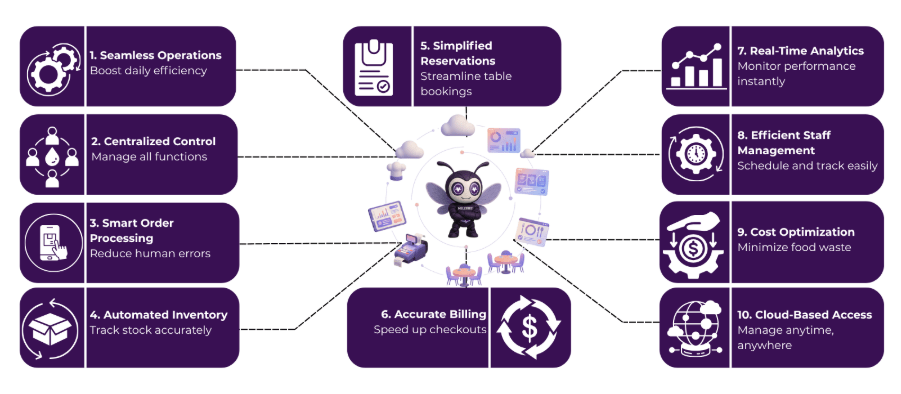
Short Note on Restaurant Management System?
A restaurant management system (RMS) is a comprehensive software solution designed to streamline and automate various aspects of restaurant operations. It integrates key functions like inventory management, order processing, reservation systems, and customer relationship management into a single platform.
This system helps restaurant owners and managers optimize workflows, reduce errors, and enhance efficiency. By automating daily tasks such as tracking inventory levels, processing customer orders, and managing reservations, an RMS saves time, reduces operational costs, and improves the overall customer experience, ultimately contributing to higher profitability.
How a Restaurant Management System Works
Running a restaurant efficiently requires seamless coordination across different functions, and a restaurant management system (RMS) makes this possible.
1. Order Taking and Processing
When a customer places an order, the server enters it into the restaurant management system. This information is instantly sent to the kitchen, ensuring the kitchen staff prepares the right items without delay.
2. Inventory Tracking
The system automatically tracks the ingredients used for each order. It updates the inventory in real-time, alerting managers when supplies are running low, reducing waste, and avoiding stockouts.
3. Reservation Management
Customers can make reservations through the system, which organizes bookings and assigns tables efficiently. The system notifies staff of any special requests, ensuring smooth service.
4. Billing and Payments
The RMS generates accurate bills for customers, including taxes, tips, and discounts. Payments can be processed through various methods, such as cash, credit cards, or mobile payments, directly through the system.
5. Reporting and Analytics
The system generates reports on sales, inventory levels, customer preferences, and employee performance. This helps restaurant owners make informed decisions to improve efficiency and profitability.
By automating these critical processes, a restaurant management system not only saves time but also enhances accuracy and customer satisfaction, making restaurant operations run smoother than ever.
Use Cases of Restaurant Management Systems
The restaurant management system is a versatile tool that can enhance multiple aspects of restaurant operations, making daily tasks more efficient.
1. Inventory Management
A restaurant management system helps track inventory levels in real-time, reducing the risk of overstocking or running out of essential ingredients. It also automates reordering, ensuring you never face shortages.
2. Order Management
The system streamlines the order-taking process by sending customer orders directly to the kitchen. This reduces errors, speeds up service, and improves overall order accuracy.
3. Reservation Management
Restaurant reservation management systems allow customers to book tables online, which helps in efficient table allocation and minimizes wait times, enhancing the customer experience.
4. Employee Scheduling and Payroll
RMS helps manage staff schedules, track working hours, and calculate payroll, ensuring optimal staffing levels and accurate pay, reducing administrative work for managers.
By integrating these functions into one platform, a restaurant management system makes operations smoother and more efficient, ultimately leading to better service and increased profitability.
Important Terms in Restaurant Management System
To fully understand how a restaurant management system works, it’s important to be familiar with some key terms that drive its functionality.
- POS (Point of Sale): The system where customer orders are processed and payments are made.
- Inventory Management: Tracking and managing ingredients and supplies to prevent shortages and waste.
- Order Management: Handling and processing customer orders from entry to kitchen preparation.
- Reservation System: A tool for managing customer bookings, table assignments, and waitlists.
- CRM (Customer Relationship Management): Software for tracking customer data, preferences, and interactions to improve service.
- Employee Scheduling: Managing staff shifts and ensuring optimal coverage during peak hours.
- Analytics & Reporting: Tools that provide insights into sales, customer behavior, and operational performance to help with decision-making.
These terms are essential to mastering the functions of a restaurant management system, enabling restaurant owners and managers to streamline their operations and boost efficiency.
How To Install Restaurant Management System (Step-by-step Process)
Installing a restaurant management system (RMS) can be a straightforward process if you follow these simple steps:
Step 1: Assess Your Restaurant’s Needs
Before choosing a system, identify the specific areas you need help with, such as inventory management, reservations, or order processing. Understanding your needs will help you choose the right RMS for your business.
Step 2: Select the Right Software
Research and choose the best restaurant management software that fits your restaurant’s requirements. Look for features like order management, reservation handling, inventory tracking, and customer service tools.
Step 3: Prepare Your Infrastructure
Ensure your restaurant has the necessary hardware, such as computers, tablets, or POS systems, to support the RMS. You may need to upgrade your current systems or purchase new equipment.
Step 4: Install the Software
Follow the software provider’s installation guide. This typically involves downloading the software (for cloud-based solutions) or installing it on local servers (for on-premise systems). Most modern RMS systems come with easy-to-follow installation wizards.
Step 5: Integrate With Existing Tools
If you’re using other software for accounting, payroll, or employee scheduling, integrate the RMS with these tools to streamline your processes. Integration ensures seamless data flow between systems, minimizing errors and duplication.
Step 6: Train Your Staff
Once the system is installed, provide training to your staff. This will help them become familiar with using the restaurant management system, from taking orders and managing reservations to tracking inventory.
Step 7: Go Live and Monitor Performance
After training, start using the RMS in real-time operations. Monitor its performance closely and ensure everything is running smoothly. Collect feedback from your staff to make adjustments if needed.
By following these steps, you can easily install and begin benefiting from a restaurant management system that simplifies operations, enhances efficiency, and improves customer satisfaction.
5 Main Advantages of Using a Restaurant Management System
Adopting a restaurant management system (RMS) can greatly improve your restaurant’s operations, offering numerous benefits that save time and enhance efficiency.
- Improved Efficiency: RMS automates tasks like order taking, inventory tracking, and reservation management, reducing manual errors and speeding up processes.
- Cost Savings: By optimizing inventory and reducing waste, an RMS helps manage food costs more effectively, leading to significant savings.
- Better Customer Experience: The system ensures accurate orders, quicker service, and easy reservations, all of which contribute to a better overall experience for your customers.
- Real-time Data and Reporting: RMS provides real-time insights into sales, inventory, and performance, enabling restaurant owners to make informed decisions.
- Streamlined Staff Management: Employee scheduling, payroll, and task management become much easier with an RMS, ensuring the right staff is in place at the right time.
By leveraging these advantages, a restaurant management system can help streamline operations, reduce costs, and boost both customer satisfaction and profitability.
Case Study: How a Restaurant Management System Increase Profit
Five Guys, a well-known burger chain, started using a restaurant management system called Restaurant365 in its New York locations. This system helped them track inventory automatically, manage their accounting better, and get real-time data on their operations. As a result, they reduced food costs by 2.5% and saved time on accounting tasks, which led to a 6% increase in profit for each location.
Similarly, Dave’s Hot Chicken faced higher labor costs due to rising wages in California. To tackle this, they introduced automation, like self-ordering kiosks and dishwashing machines, and added high-margin items to their menu, such as large drinks and frozen slushes. These changes helped them save around $100,000 per restaurant each year, even after raising prices by 8%.
These examples show how using a restaurant management system can help restaurants save money, work more efficiently, and boost their profits.
Why Most Restaurant Owners Choose RavZora Restaurant Management System
Restaurant owners choose RavZora because it is easy to use and has all the features they need to manage their business effectively. With its cloud-based system, RavZora keeps everything in sync across multiple locations, allowing restaurant managers to manage operations from anywhere.
It combines essential tools like POS, inventory management, employee scheduling, and customer management into one system, making daily tasks simpler and more efficient.
RavZora is also highly scalable, meaning it works well for both small restaurants and large chains. Its simple, intuitive design makes it easy for staff to learn, reducing the need for extensive training.
FAQs
1. Can a restaurant management system integrate with other software?
Yes, many restaurant management systems offer integrations with other software like accounting tools, payroll systems, and loyalty programs to create a seamless workflow across all operations.
2. What is a restaurant management system (RMS)?
A restaurant management system is a software solution that helps restaurants streamline and automate various operations, including order processing, inventory management, reservation handling, and staff scheduling.
3. How can a restaurant management system help improve efficiency?
By automating repetitive tasks like inventory tracking and order management, an RMS reduces human error, speeds up service, and improves overall workflow, allowing staff to focus on customer satisfaction.
4. Is a restaurant management system easy to use?
Most modern RMS platforms are designed to be user-friendly, with intuitive interfaces that require minimal training, making them accessible for restaurant staff of all skill levels.
5. Can a restaurant management system handle multiple locations?
Yes, many restaurant management systems are cloud-based, allowing restaurant owners and managers to monitor and control multiple locations from a single platform in real-time.