Healthcare organizations worldwide are investing heavily in digital transformation. At the center of this shift is the electronic patient record (EPR). However, simply implementing an electronic patient record system does not automatically improve care delivery. The real value emerges when the EPR is seamlessly integrated into clinical workflows. Without proper alignment, clinicians may experience documentation fatigue, inefficiencies, and reduced productivity.
In this blog, we explore best practices for integrating electronic patient record systems with clinical workflows, based on widely accepted healthcare IT standards, implementation research, and real-world hospital experiences.
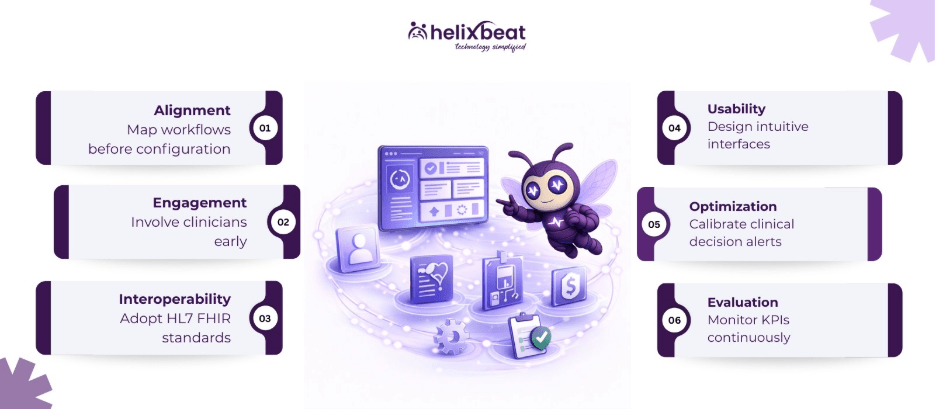
Table of Contents
What Is an Electronic Patient Record?
An electronic patient record is a digital version of a patient’s medical history maintained within a single healthcare organization. It typically includes:
- Demographics
- Diagnoses
- Medications
- Allergies
- Laboratory results
- Imaging reports
- Clinical notes
- Treatment plans
Unlike paper records, an electronic patient record allows real-time access to patient data, supports clinical decision-making, and facilitates coordination among healthcare teams.
While the terms EPR and EHR (Electronic Health Record) are sometimes used interchangeably, EPR often refers to records within a specific organization, whereas EHRs may extend across multiple care providers.
Why Workflow Integration Matters?
Clinical workflows represent the sequence of tasks performed by healthcare professionals during patient care. These workflows include:
- Patient registration
- Triage
- Diagnosis
- Treatment planning
- Documentation
- Medication administration
- Discharge
When an electronic patient record system aligns with these workflows:
- Documentation becomes more accurate
- Information retrieval is faster
- Communication improves
- Clinical errors are reduced
- Staff satisfaction increases
According to research published in peer-reviewed healthcare informatics journals, workflow misalignment is one of the most common causes of dissatisfaction with EPR systems.
Common Challenges in EPR Integration
Before discussing best practices, it’s important to understand typical integration barriers.
1. Resistance to Change
Clinicians accustomed to paper-based systems may resist digital workflows, especially if usability is poor.
2. Poor System Configuration
Out-of-the-box configurations rarely match existing hospital processes.
3. Interoperability Gaps
If the electronic patient record does not integrate with laboratory, radiology, pharmacy, and billing systems, clinicians may need to switch platforms.
4. Alert Fatigue
Excessive clinical decision support alerts can overwhelm providers.
5. Inadequate Training
Insufficient onboarding often results in inefficient usage.
Recognizing these challenges helps organizations design better integration strategies.
Best Practices for Integrating EPR With Clinical Workflows
Below are evidence-based best practices for aligning an electronic patient record with real-world clinical operations.
1. Conduct Comprehensive Workflow Mapping
Before configuring the electronic patient record, organizations should document existing workflows in detail.
Steps to Take:
- Observe clinical processes in real time
- Interview physicians, nurses, and administrative staff
- Identify bottlenecks
- Document task sequences
- Map handoff points
Workflow mapping clarifies how care is actually delivered, not how leadership assumes it happens.
After mapping current processes, teams can determine:
- Which workflows should remain
- Which needs redesign
- Where automation can help
This prevents digital systems from replicating inefficient manual processes.
2. Involve Clinicians From the Beginning
Successful electronic patient record integration depends heavily on clinician engagement.
Physicians, nurses, pharmacists, and allied health professionals should participate in:
- System selection
- Template design
- Alert configuration
- Usability testing
- Go-live planning
When clinicians contribute to system design:
- Adoption rates increase
- Resistance decreases
- Documentation reflects real-world care
Clinical champions can also serve as peer trainers during rollout.
3. Configure Role-Based Access and Interfaces
Not every clinician needs access to the same data fields.
Customizing dashboards by role improves efficiency.
Examples:
- Nurses: Medication administration records and vital signs
- Physicians: Diagnostic results and clinical notes
- Pharmacists: Medication reconciliation and order verification
- Administrative staff: Scheduling and billing modules
A well-configured electronic patient record reduces unnecessary clicks and information overload.
4. Use Interoperability Standards
Interoperability allows different healthcare systems to communicate effectively.
Widely adopted standards include:
- HL7 (Health Level Seven)
- FHIR (Fast Healthcare Interoperability Resources)
- DICOM for imaging
- ICD-10 for diagnosis coding
Using standardized protocols allows the electronic patient record to connect with:
- Laboratory information systems
- Radiology systems
- Pharmacy systems
- Insurance platforms
Without interoperability, clinicians may rely on manual data entry, increasing error risk.
5. Optimize Clinical Decision Support (CDS)
Clinical decision support tools embedded in the electronic patient record can improve patient safety.
Common CDS functions include:
- Drug-drug interaction alerts
- Allergy warnings
- Duplicate therapy alerts
- Evidence-based treatment suggestions
However, excessive alerts reduce effectiveness.
Best practice includes:
- Prioritizing high-risk alerts
- Customizing thresholds
- Monitoring override rates
- Updating rules regularly
Well-calibrated CDS supports clinicians without overwhelming them.
6. Prioritize Usability and Human-Centered Design
Usability directly impacts workflow integration.
Human-centered design principles include:
- Logical screen layouts
- Minimal data redundancy
- Intuitive navigation
- Clear labeling
- Limited scrolling
Healthcare IT research shows that poor interface design contributes to clinician fatigue.
Usability testing with real clinical scenarios before go-live helps identify issues early.
7. Develop Structured Templates for Documentation
Structured documentation improves:
- Data consistency
- Billing accuracy
- Clinical reporting
- Quality measurement
Templates for:
- Admission notes
- Progress notes
- Discharge summaries
- Surgical documentation
Standardized templates reduce variation and save time.
However, templates should remain flexible to allow narrative entries when necessary.
8. Integrate EPR With Ancillary Systems
A standalone electronic patient record limits efficiency.
Integration with ancillary systems includes:
- Laboratory systems
- Radiology systems
- PACS (Picture Archiving and Communication Systems)
- Pharmacy systems
- Revenue cycle systems
Bidirectional integration allows:
- Automatic result posting
- Order tracking
- Real-time medication updates
This reduces duplicate entries and improves data accuracy.
9. Provide Comprehensive Training and Ongoing Support
Training should go beyond basic system navigation.
Effective programs include:
- Role-based training
- Simulation-based learning
- Scenario walkthroughs
- Super-user programs
- Post-go-live support
Ongoing refresher sessions help clinicians adapt to system updates.
Organizations that invest in structured training report smoother adoption and fewer workflow disruptions.
10. Pilot Before Full Deployment
Instead of hospital-wide implementation at once, pilot testing in one department allows refinement.
Benefits of pilot programs:
- Identifies configuration gaps
- Collects user feedback
- Detects workflow inefficiencies
- Minimizes large-scale disruption
Lessons learned during the pilot phase inform broader rollout.
11. Monitor Key Performance Indicators (KPIs)
Post-implementation evaluation is critical.
Important metrics include:
- Documentation time per patient
- Medication error rates
- Order turnaround times
- Readmission rates
- Staff satisfaction scores
- Alert override rates
Data-driven evaluation allows iterative improvements.
An electronic patient record should evolve alongside clinical practice.
12. Support Multidisciplinary Collaboration
Modern healthcare involves collaborative care models.
An electronic patient record should:
- Facilitate shared care plans
- Enable secure messaging
- Support multidisciplinary notes
- Display unified patient summaries
Improved communication reduces fragmentation of care.
How FUSION Strengthens Electronic Patient Record Integration?
Built by Helixbeat, the FHIR server FUSION plays a key role in modern electronic patient record integrations. When an electronic patient record connects to FUSION:
- Data becomes interoperable across laboratory, pharmacy, imaging, and billing systems
- Real-time updates allow clinicians to access the latest patient information
- Third-party apps (such as clinical decision support tools or patient engagement platforms) can integrate seamlessly
- Mobile access becomes easier through secure RESTful APIs
Instead of relying on rigid point-to-point integrations, organizations can use FUSION to create a scalable, modular ecosystem around the electronic patient record.
In short, FUSION acts as the interoperability engine that strengthens electronic patient record integration, enhances clinical workflows, and supports scalable digital transformation in healthcare.
Final Thoughts
When hospitals align system configuration with real-world processes, involve clinicians in design decisions, prioritize usability, and adopt interoperability standards, the electronic patient record becomes a powerful clinical asset rather than a documentation burden.
From workflow mapping and structured templates to clinical decision support and KPI monitoring, each step plays a role in building a system that supports safer care, stronger collaboration, and improved operational performance. The addition of a robust FHIR server like FUSION further strengthens this foundation by enabling scalable, standards-based interoperability across departments and external systems.
Book a demo with Helixbeat today and discover how seamless integration can elevate your clinical workflows.
FAQs
1. Why is workflow integration important for an electronic patient record?
Workflow integration allows clinicians to document, access, and act on patient information within their normal care processes, reducing inefficiencies and improving care coordination.
2. What are common challenges during EPR implementation?
Common challenges include resistance to change, poor configuration, interoperability gaps, alert fatigue, and limited user training.
3. What role does interoperability play in electronic patient record integration?
Interoperability allows the electronic patient record to exchange data with laboratory, pharmacy, radiology, and billing systems using standards such as HL7, FHIR, DICOM, and ICD-10.
4. How does clinical decision support improve patient safety?
Clinical decision support tools provide alerts for drug interactions, allergies, and duplicate therapies, helping clinicians make safer treatment decisions.
5. Why is workflow mapping important before EPR deployment?
Workflow mapping identifies bottlenecks and inefficiencies in existing processes so the electronic patient record can be configured to support actual clinical operations.