Enterprise applications are the backbone of modern businesses, managing critical operations like finance, HR, supply chain, and customer relations. Unlike simple software, these applications handle massive data volumes, integrate with multiple systems, and serve numerous users simultaneously.
Even a small defect can disrupt workflows, compromise data integrity, or impact business continuity. That’s why enterprise application testing isn’t just a step in the development process – it’s a strategic necessity to ensure your systems run smoothly under real-world conditions.
A structured testing checklist guides teams through every stage, from planning to deployment, covering functional, performance, security, and integration aspects. It helps identify risks early, prioritize testing efforts, and align QA activities with business goals
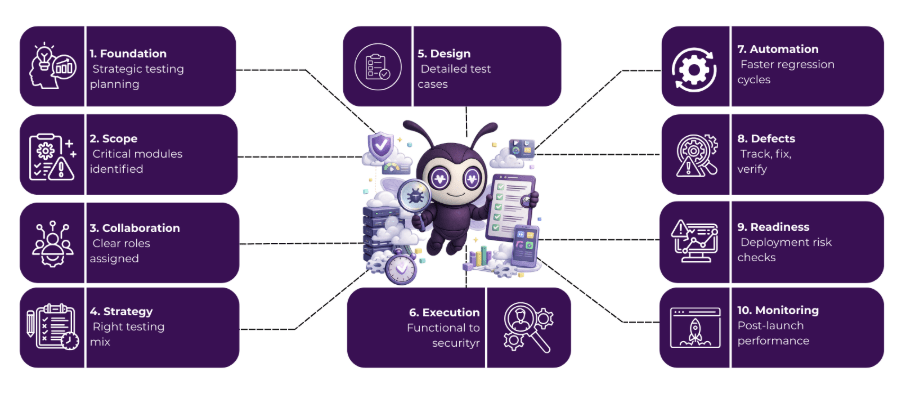
Table of Contents
What is Enterprise Application Testing?
Enterprise Application Testing (EAT) is the process of evaluating large-scale business software to ensure it performs as expected, meets user requirements, and integrates smoothly with other systems. Unlike standard application testing, enterprise applications often involve multiple modules, complex workflows, and large datasets, making thorough testing essential to prevent downtime, data loss, or operational disruptions.
This testing covers a variety of checks, including functional testing to validate features, performance testing to handle high loads, security testing to protect sensitive information, and integration testing to ensure seamless communication between systems. By conducting enterprise application testing, organizations can deliver reliable, efficient, and secure applications that support critical business operations and enhance overall productivity.
A Step-by-Step Enterprise Application Testing Checklist for Live Software
Use this enterprise application testing checklist to make sure your apps work smoothly from planning all the way to deployment.
1. Planning Phase: Setting the Foundation
(A) Define Scope and Objectives
The first step in enterprise application testing is to clearly define what needs to be tested. Identify all modules, functionalities, and workflows within the application. Focus on areas that are high-risk or critical to business operations to prioritize your enterprise app testing efforts effectively.
(B) Identify Stakeholders and Roles
Successful testing requires collaboration. Define the key stakeholders, including QA teams, developers, business analysts, and project managers. Clearly assigning roles ensures accountability and smooth communication throughout the enterprise software testing process.
(C) Prepare Test Strategy
A solid test strategy guides the entire process. Decide the types of testing required – functional testing to check features, performance testing for speed and scalability, security testing to protect sensitive data, and integration testing to verify system interactions. Enterprise test automation can be incorporated at this stage to streamline repetitive tests and improve efficiency.
(D) Resource and Environment Planning
Determine the tools, environments, and test data needed before execution begins. This includes selecting testing tools, preparing staging or production-like environments, and ensuring realistic data is available for accurate results in enterprise application testing.
2. Test Case Design and Documentation
(A) Creating Detailed Test Cases
Each test case should include clear inputs, expected outputs, and specific conditions. Well-documented test cases help testers follow a structured approach and ensure nothing is missed during enterprise app testing.
(B) Using Test Management Tools
Tools like JIRA, TestRail, and Zephyr help organize, track, and manage test cases efficiently. They also improve communication between QA teams and developers, making enterprise software testing more effective.
(C) Mapping Test Cases to Requirements
Every business requirement should have corresponding test cases. This ensures that all functionalities are tested and nothing critical is overlooked in your enterprise application testing process.
(D) Preparing Test Data
Use realistic data sets that mimic real-world scenarios. Proper test data is essential for accuracy, performance testing, and simulating actual user behavior, especially when using enterprise test automation tools.
3. Execution Phase: Running the Tests
(A) Functional Testing
Check if all features and workflows perform as intended. Functional testing is the core of enterprise app testing to ensure the application works correctly for end-users.
(B) Integration Testing
Verify that different modules and systems communicate seamlessly. Integration testing prevents failures in workflows that span multiple components in enterprise software testing.
(C) Performance and Load Testing
Test the application under heavy loads to measure scalability, speed, and stability. This ensures smooth performance during peak usage in enterprise application testing.
(D) Security Testing
Identify vulnerabilities and protect sensitive business data. Security testing reduces risks of data breaches and compliance violations in your enterprise software testing strategy.
(E) Regression Testing
Whenever updates or fixes are applied, regression testing confirms that existing functionalities remain intact and no new issues are introduced. Enterprise test automation is particularly effective here, as it allows repeated testing quickly and reliably.
4. Defect Tracking and Management
(A) Logging Bugs Effectively
Record defects with clear details, including severity, priority, and steps to reproduce. This makes it easier for developers to fix issues quickly during enterprise app testing.
(B) Collaboration Between QA and Dev Teams
Close collaboration ensures timely resolution of defects. Regular meetings and clear communication help prevent bottlenecks in enterprise software testing projects.
(C) Retesting and Verification
After bugs are fixed, retest to verify that the defects are resolved and the application works as expected in enterprise application testing.
5. Deployment Readiness Checklist
(A) Pre-Deployment Validation
Before going live, confirm that all critical tests have passed. This reduces the risk of post-deployment failures in enterprise app testing.
(B) Backup and Rollback Plans
Always have backup systems and a rollback plan ready in case of emergencies. This safeguards your data and minimizes downtime in enterprise software testing.
(C) User Acceptance Testing (UAT)
Involve end-users to validate workflows and ensure the application meets business requirements. UAT is the final approval before deployment of enterprise applications.
(D) Deployment Approval and Sign-off
Obtain formal approval from stakeholders before launching. Sign-off ensures accountability and confirms that all requirements have been met in your enterprise application testing process.
6. Post-Deployment Monitoring
After deployment, continuously monitor system performance, error logs, and user feedback. Address issues quickly and implement patches or updates as needed.
Regular monitoring maintains SLA compliance, data integrity, and a smooth user experience for enterprise software testing.
Enterprise test automation can also support continuous monitoring and ongoing updates to keep your applications reliable.
With this step-by-step checklist, you can deliver secure, high-performing enterprise applications every time.
Bonus: Tools for Enterprise Application Testing
Choosing the right tools is key for effective enterprise application testing and enterprise test automation.
- Functional Testing: Selenium, QTP – automate workflows and feature checks for enterprise app testing.
- Performance Testing: JMeter, LoadRunner – measure speed, scalability, and reliability for enterprise software testing.
- Security Testing: OWASP ZAP, Burp Suite – identify vulnerabilities and protect sensitive data.
- Test Management: Jira, TestRail – organize test cases, track defects, and streamline collaboration.
Using these tools ensures faster, accurate, and secure testing throughout the application lifecycle.
For businesses looking to optimize performance testing further, check out our detailed guide: Cloud Performance Testing in 2026: Best Practices Every Business Must Adopt
Why Choose Helixbeat for Enterprise Application Testing Service?
At HelixBeat, we approach enterprise application testing with a deep understanding of complex architectures, multi-system integrations, and high-volume data environments.
We don’t just test features – we assess scalability, security, and real-world performance to ensure your applications run reliably under business-critical conditions
Here’s why leading organizations choose HelixBeat for enterprise software testing:
- Domain-Specific Expertise: QA professionals with experience in ERP, CRM, HRMS, and finance systems
- End-to-End Testing Coverage: Functional, integration, performance, security, and compliance testing in one solution
- Advanced Tools & Frameworks: Leverage Selenium, JMeter, OWASP ZAP, and industry-standard test management platforms
With HelixBeat, you gain more than bug detection – you get a strategic partner who ensures your enterprise applications are secure, scalable, and optimized for peak performance, reducing risk and boosting ROI. Book a free consultation now.
FAQ
1. What types of enterprise applications require specialized testing?
Enterprise applications like ERP, CRM, HRMS, finance, and supply chain systems need specialized testing because they handle complex workflows, integrate with multiple systems, and process large volumes of data.
2. How does enterprise test automation improve efficiency?
Automation reduces manual effort, accelerates regression and performance testing, and ensures consistent test coverage. It helps teams identify issues faster while maintaining high accuracy in complex enterprise environments.
3. What are the common challenges in enterprise app testing?
Challenges include handling large datasets, testing across multiple integrated systems, ensuring security compliance, maintaining performance under heavy loads, and managing frequent updates without introducing new defects.
4. How often should enterprise software testing be performed?
Testing should be continuous during development, before deployment, and post-deployment – to catch defects early, validate new updates, and maintain system performance and security over time.
5. Can enterprise application testing reduce operational risks?
Yes. Thorough testing identifies bugs, performance issues, and security vulnerabilities before they impact business operations, helping reduce downtime, prevent data loss, and protect sensitive information.