In today’s modern workplace, the application of visitor management is no longer limited to the front desk. It plays a critical role in how HR and IT teams operate every single day. From managing candidate visits to tracking employee attendance and controlling system access, a smart visitor management application connects people, processes, and security seamlessly.
Most HR teams today are under pressure to streamline employee attendance, manage interviews efficiently, and maintain compliance—while IT teams are focused on access control, data security, and system integrity. What if one solution could support both? That’s exactly what Vista does.
In this blog, we’ll walk you through how a visitor management application integrates with HR and IT systems, why it matters for US organizations, and how Vista helps businesses operate smarter, safer, and faster.
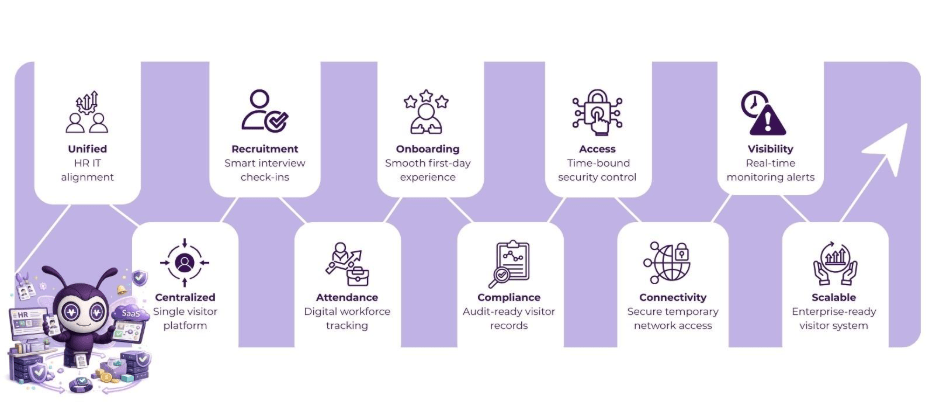
Table of Contents
Why HR and IT Need a Unified Visitor Management Approach
In many organizations, HR and IT operate in silos. HR handles people and processes, while IT manages systems and security. Visitors—whether candidates, contractors, or vendors—sit right at the intersection of both.
Without integration:
- HR manually tracks attendance and interviews
- IT manually provisions access
- Security relies on incomplete data
- Visitors face delays and confusion
A modern visitor management application bridges this gap by acting as a centralized platform that feeds real-time visitor data into HR and IT workflows.
How HR Teams Use Visitor Management Applications
1. Streamlining Interview and Candidate Visits
Recruitment is one of HR’s most visitor-heavy processes. Candidates arrive throughout the day for interviews, assessments, and onboarding sessions.
With Vista’s visitor management application, HR teams can:
- Pre-register candidates directly from HR systems
- Send automated email invitations with QR codes
- Instantly notify interviewers upon arrival
- Track candidate attendance digitally
This eliminates manual registers and ensures a professional first impression—something US candidates increasingly expect.
2. Attendance Tracking for Employees and Contractors
HR teams often struggle to track attendance for:
- Contract workers
- Temporary staff
- Consultants
- Interns
Vista allows HR to use the visitor management application as a lightweight attendance layer, especially for non-permanent staff.
HR benefits include:
- Digital check-in and check-out records
- Time-stamped attendance logs
- Department-wise reporting
- Compliance-ready records
This is especially useful for organizations with hybrid work models or rotating contractors.
3. Seamless Onboarding and Orientation
For new hires, first-day experiences matter. A visitor management application can be integrated with HR onboarding workflows to:
- Pre-register new employees
- Assign temporary access badges
- Guide them through orientation schedules
- Notify HR and team leads automatically
Instead of juggling emails, spreadsheets, and manual approvals, HR gets a smooth, automated process.
4. Compliance, Audits, and Reporting
US businesses must comply with workplace safety, security, and employment regulations. HR teams need accurate visitor records for:
- Audit trails
- Compliance reporting
- Incident investigations
Vista’s visitor management application automatically stores:
- Visitor identity details
- Visit purpose and duration
- Host and department information
This removes the risk of missing or inaccurate records.
How IT Teams Benefit from Visitor Management Applications
While HR focuses on people, IT focuses on access and security. A visitor’s physical presence often translates into potential digital access—and that’s where IT integration becomes critical.
5. Physical Access Control Integration
IT teams manage access to:
- Doors
- Elevators
- Secure floors
- Data centers
When integrated with access control systems, a visitor management application ensures:
- Access is granted only for approved areas
- Permissions are time-bound
- Access is revoked automatically at check-out
This reduces the risk of unauthorized access and tailgating—an essential requirement for US enterprises.
6. Temporary Network and Wi-Fi Access
Visitors often need internet access—but granting it manually is risky and time-consuming.
With Vista:
- IT can link visitor check-in to temporary Wi-Fi credentials
- Network access expires automatically
- Access policies vary by visitor type
This ensures security without slowing down business operations, making the visitor management application an extension of IT security strategy.
7. Device and System Access for Contractors
For vendors or technical contractors:
- Temporary system logins may be required
- Devices may need provisioning
- Access must be tightly controlled
Integration allows IT teams to:
- Trigger access provisioning based on visitor type
- Monitor access duration
- Automatically deactivate credentials
This level of control is nearly impossible without a centralized visitor management application.
8. Real-Time Alerts and Monitoring
IT teams need visibility. Vista enables:
- Real-time alerts when high-risk visitors check in
- Logs of access attempts
- Centralized dashboards for audits
This helps IT teams respond faster and maintain system integrity across locations.
How HR + IT Integration Works Together in Real Life
Example: A US Corporate Office Scenario
A mid-sized consulting firm in Boston hosts:
- Daily client meetings
- Frequent interviews
- Regular vendor visits
Before Vista:
- HR manually tracked interview attendance
- IT issued Wi-Fi access on request
- Reception handled paper logs
- Security audits were time-consuming
After Implementing Vista’s Visitor Management Application:
- HR pre-registers candidates via calendar integration
- Interview attendance is logged automatically
- IT policies assign temporary network access
- Access is revoked at exit
- Compliance reports are generated instantly
The result? Faster operations, better security, and a polished visitor experience.
Why Vista Stands Out for US Businesses
Vista is not just another visitor management application—it’s designed to integrate deeply with enterprise workflows.
Key Advantages:
- HR-friendly dashboards for attendance and onboarding
- IT-ready integrations for access and network control
- Cloud-based scalability for multi-location offices
- Compliance-ready reporting for US regulations
Whether you’re a tech company in Silicon Valley or a healthcare provider in Texas, Vista adapts to your needs.
Business Benefits of HR & IT Integration
When HR and IT work through a unified visitor management application, organizations gain:
- Operational Efficiency – Less manual work for both teams
- Improved Security – Controlled physical and digital access
- Better Compliance – Accurate, centralized visitor records
- Enhanced Experience – Faster, smoother visitor journeys
- Scalability – Easy expansion across locations
The Future of Visitor Management in the US
As workplaces evolve with hybrid work, increased security requirements, and digital-first expectations, the role of the visitor management application will continue to grow.
Future-ready organizations are already:
- Using visitor data to improve HR insights
- Aligning physical access with IT security policies
- Automating compliance and audits
Vista helps businesses stay ahead of this curve.
Conclusion
The application of visitor management is no longer optional—it’s essential. By integrating HR and IT workflows, a modern visitor management application transforms how organizations manage people, access, and security.
Vista enables US businesses to:
- Streamline HR attendance and onboarding
- Strengthen IT access control
- Enhance security and compliance
- Deliver a seamless visitor experience
When HR and IT work together through Vista, visitor management becomes a strategic advantage—not just a front-desk task.
FAQs
1. What is a visitor management application?
A visitor management application is a digital system that manages visitor check-ins, access control, notifications, and reporting, replacing manual logs.
2. How does it help HR teams?
It streamlines interviews, onboarding, attendance tracking, and compliance reporting.
3. How does IT benefit from integration?
IT gains control over physical access, network permissions, and real-time monitoring.
4. Is this suitable for mid-sized US businesses?
Yes. Vista is designed to scale for both mid-sized and enterprise organizations.
5. Can it support compliance audits?
Absolutely. Vista provides audit-ready logs and reports for security and HR compliance.