It’s a busy Monday morning. Vendors are arriving, interview candidates are lining up, and a client delegation is scheduled to walk in any minute. Suddenly, the internet goes down.
The receptionist freezes.
The check-in tablet stops syncing.
Manual registers come out from a drawer no one remembers using.
This is exactly where a visitor management app proves its real value—or exposes its biggest weakness.
In today’s connected workplaces, we assume constant internet access. But outages still happen. And when they do, organizations that rely on cloud-only systems without offline support face delays, security gaps, and compliance risks.
That’s why offline functionality in a visitor management app isn’t a “nice-to-have” feature anymore. It’s essential.
In this blog, we’ll break down why offline functionality matters, how modern visitor management apps handle outages, and how VISTA Visitor Management ensures uninterrupted visitor operations—even when connectivity fails.
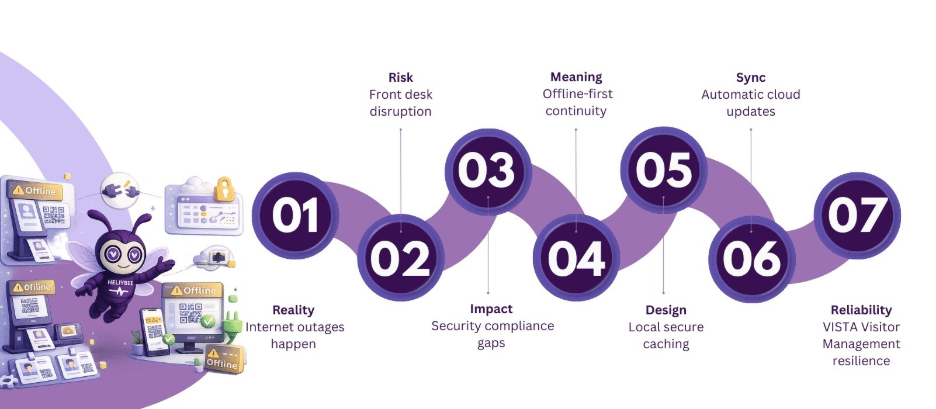
Table of Contents
Why Internet Outages Are a Bigger Risk Than You Think
In the US, organizations depend heavily on SaaS platforms for daily operations. But even with advanced infrastructure, outages are unavoidable due to:
- ISP failures
- Power disruptions
- Network maintenance
- Firewall or security misconfigurations
- High traffic loads
When a visitor management app stops working during these moments, the front desk becomes a bottleneck instantly.
And the impact isn’t just inconvenience.
The Real Consequences of Downtime
Without offline support, organizations face:
- Visitors waiting longer at reception
- Inaccurate or missing visitor logs
- Security teams losing visibility
- Compliance records becoming incomplete
- Hosts missing visitor notifications
- Manual processes increasing human error
For industries like healthcare, corporate offices, manufacturing plants, data centers, and government facilities, these risks are unacceptable.
That’s where offline-first visitor management apps step in.
What Offline Functionality Really Means in a Visitor Management App
Let’s clarify a common misconception.
Offline functionality does not mean a stripped-down or broken system. A well-designed visitor management app continues essential operations locally when the internet is unavailable.
This includes:
- Capturing visitor details
- Logging check-ins and check-outs
- Storing records securely on the device
- Maintaining continuity until connectivity is restored
Once the system reconnects, everything syncs automatically to the cloud.
This approach is often called offline-first architecture—and it’s exactly how VISTA is built.
Why Offline-First Design Is Critical for Modern Workplaces
A modern visitor management app is no longer just a digital replacement for a paper register. It’s part of a broader security and compliance ecosystem.
Offline-first design ensures:
- Zero disruption at entry points
- No data loss during outages
- Continuous audit trails
- Consistent visitor experience
- Reduced dependency on manual processes
Precisely, business continuity doesn’t stop at your IT department—it starts at your front door.
Discover how VISTA’s offline-ready visitor management app ensures uninterrupted visitor check-ins, even during internet outages.
How VISTA Handles Offline Functionality Seamlessly
VISTA Visitor Management is designed with real-world operational challenges in mind. Internet instability should never stop visitor flow, and VISTA ensures that.
Here’s how.
1. Offline Visitor Check-In and Check-Out
Even when the network goes down, VISTA allows staff to continue using the visitor management app without interruption.
Reception teams can:
- Register new visitors
- Log entry and exit times
- Capture required visitor information
- Maintain orderly visitor flow
This ensures that no visitor is turned away simply because the internet isn’t available.
2. Local Data Storage with Secure Caching
During an outage, VISTA securely stores visitor data locally on the device.
This means:
- No data is lost
- No visitor logs go missing
- Information remains protected
Once connectivity is restored, all cached data syncs automatically to the central system—without manual uploads or IT intervention.
For organizations handling sensitive visitor information, this is a major advantage of a reliable visitor management app.
3. Automatic Cloud Sync When Connectivity Returns
One of the biggest risks with offline systems is forgetting to upload data later.
VISTA eliminates that risk.
As soon as the internet is restored:
- Visitor records sync automatically
- Logs are updated in real time
- Audit trails remain complete
- Reports reflect accurate visitor history
This ensures continuity without adding extra work for staff.
4. Business Continuity for Multi-Site Organizations
Many US organizations operate across multiple locations. If one site experiences an outage, operations shouldn’t grind to a halt.
With VISTA:
- Each location continues visitor operations independently
- Offline data syncs once online
- Centralized reporting remains accurate
This makes VISTA an ideal visitor management app for enterprises, campuses, healthcare networks, and distributed offices.
5. Reduced Dependence on Manual Backup Processes
Manual visitor logs introduce:
- Human error
- Illegible handwriting
- Missing timestamps
- Compliance gaps
By supporting offline operations digitally, VISTA reduces the need to fall back on paper processes, even during outages.
That’s a major upgrade in reliability and professionalism.
Talk to our experts and see how VISTA maintains accurate visitor logs and compliance—even when the network goes down.
Industries Where Offline Functionality Is Non-Negotiable
Not every workplace can afford downtime at the front desk.
Here’s where offline-capable visitor management apps matter most:
Corporate Offices
Client meetings, interviews, and vendor visits can’t pause because of a Wi-Fi issue.
Healthcare Facilities
Visitor tracking must continue even during network disruptions to maintain safety and compliance.
Manufacturing & Industrial Sites
Remote locations often experience unstable connectivity, making offline support essential.
Government & Public Sector
Security, audits, and compliance demand uninterrupted visitor logs.
Data Centers & Secure Facilities
Visitor records are part of security protocols that cannot fail.
In all these environments, a dependable visitor management app with offline functionality is critical.
Why Offline Capability Improves Security and Compliance
Security teams rely on visitor data for audits, investigations, and compliance reporting.
Offline functionality ensures:
- Continuous logging of all entries and exits
- No blind spots during outages
- Complete historical records
- Reliable compliance documentation
For US organizations operating under strict regulatory standards, this is a must-have feature in any visitor management app.
Visitor Experience Matters—Even During Outages
From a visitor’s perspective, downtime at reception feels disorganized and unprofessional.
Offline-enabled visitor management apps:
- Reduce wait times
- Maintain a smooth check-in process
- Create confidence in your operations
A seamless experience—even during technical issues—reflects operational maturity and trustworthiness.
Why VISTA Stands Out Among Visitor Management Apps
Many platforms claim to be cloud-based and modern. Fewer are built to handle real-world challenges like network outages.
VISTA combines:
- Offline-first architecture
- Secure local data handling
- Automatic syncing
- Enterprise-grade reliability
This makes it more than just a visitor management app—it’s a resilience tool for your front desk operations.
Final Thoughts
Internet outages are inevitable. Operational downtime doesn’t have to be.
A modern visitor management app must be built for continuity, not just convenience. With offline functionality at its core, VISTA ensures your visitor operations remain secure, compliant, and professional—regardless of connectivity challenges.
Because your front door should always stay open, organized, and in control.
Book a demo of VISTA today and experience a visitor management app designed for real-world reliability.
FAQs
1. Does VISTA work without an internet connection?
Yes. VISTA is designed with offline functionality, allowing visitor check-ins and check-outs to continue even during internet outages. Visitor data is securely stored locally and automatically syncs to the cloud once connectivity is restored.
2. Will visitor data be lost if the network goes down?
No. VISTA securely caches all visitor information on the device during outages. Once the internet is back, the system automatically syncs all records, ensuring complete and accurate visitor logs with no data loss.
3. Can reception teams continue normal operations during outages?
Absolutely. Reception and security teams can continue using VISTA as usual to register visitors, manage entries and exits, and maintain visitor flow—without switching to manual logs or paper registers.
4. How does VISTA ensure security and compliance during offline mode?
VISTA maintains continuous visitor logging even when offline, ensuring audit trails remain intact. This helps organizations meet security, compliance, and reporting requirements without gaps caused by connectivity issues.
5. Which industries benefit most from VISTA’s offline functionality?
VISTA’s offline-ready visitor management app is ideal for corporate offices, healthcare facilities, manufacturing plants, government buildings, data centers, and multi-location enterprises where uninterrupted visitor tracking is critical.