


Employee time management software
Get Started with a Free Demo
New Keyword Page
New Keyword Page
"*" indicates required fields
More than $400 billion is lost annually by US businesses due to low productivity, manual time tracking, payroll errors, and inaccurate employee work reporting. As teams grow, shifts expand, and remote work becomes the norm, managing time effectively becomes one of the toughest operational challenges for employers across the United States.
If you want to run smarter operations, protect your bottom line, improve payroll accuracy, and eliminate manual tracking, then choosing the right employee time management software is crucial for long-term efficiency—and that’s where Synergy by Helixbeat gives you a real advantage.
Synergy combines automated time tracking, productivity insights, labor compliance, scheduling, centralized data, and real-time visibility, offering everything US employers need to build an accountable and high-performing workforce.
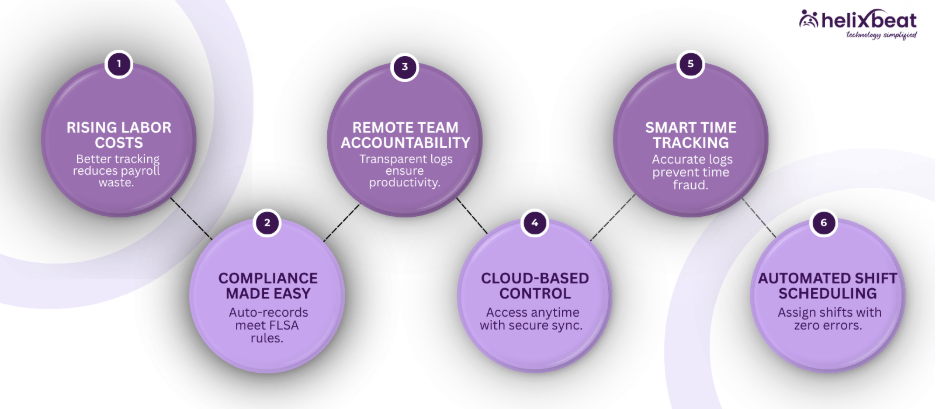
Time Management Matters for US Businesses Today- Here's Why
Time management is no longer optional—it’s critical for US businesses aiming to optimize productivity and reduce costs. Accurate tracking ensures that teams work efficiently and resources are allocated wisely.
Rising Labor Costs Demand Better Tracking
Labor accounts for nearly 70% of operational expenses in US service-based industries. Without accurate tracking, businesses face unnecessary overtime payouts, compliance risks, and thousands of dollars lost in avoidable payroll mistakes. Synergy, a leading employee time tracking and scheduling software USA, helps employers capture real working hours automatically, reducing payroll errors by over 90%.
Remote and Hybrid Teams Need Accountability
With nearly 30% of US employees working remotely, businesses require tools that offer transparent time logs, activity monitoring, and location-based tracking. Synergy’s mobile and web-based cloud-based time management and productivity software USA ensures clarity across distributed teams.
Compliance and Recordkeeping Are Non-Negotiable
The Fair Labor Standards Act (FLSA) requires accurate timekeeping and overtime tracking. Non-compliance leads to penalties averaging $2,000–$5,000 per employee. Synergy maintains complete digital logs that help businesses stay compliant effortlessly.
Cloud-Based Time Management and Productivity Software USA
Cloud-based solutions make it easier for US businesses to track time, monitor productivity, and manage remote teams efficiently. Synergy’s platform provides flexibility and secure access for managers and employees alike.
Cloud-Based Tools Are Becoming a Standard
More than 94% of US enterprises rely on cloud solutions today. Synergy being cloud-based time management and productivity software USA provides automatic updates, secure backups, remote access, and enterprise-grade security—all through a lightweight, user-friendly interface.
Zero Hardware, Zero Maintenance
One of the biggest advantages for US businesses is eliminating hardware costs. With Synergy, you don’t need servers, biometric machines, or physical punch devices—everything runs digitally and updates automatically.
Perfect for Multi-Location and Remote Teams
Whether managing multiple sites in different states or remote employees nationwide, Synergy syncs time data instantly across devices and branches, giving HR teams complete visibility.
Complete Features of Synergy’s Employee Time Management Software
Synergy offers a comprehensive employee time tracking and scheduling software USA to simplify workforce management and boost productivity. Here’s an overview of what makes it powerful.
Smart Time Tracking
mployees can clock in/out using mobile, web, or kiosk. Synergy records timestamps accurately, applies rules automatically, and prevents time fraud.
Automated Scheduling and Shift Management
US businesses with rotating or overnight shifts benefit from automated scheduling. Managers can assign shifts, track real-time availability, avoid overlaps, and receive alerts when employees exceed limits.
Productivity Monitoring and Activity Reports
Synergy provides activity logs, idle time data, task performance metrics, and productivity summaries, helping employers optimize workflows efficiently.
Breaks, Overtime, and Compliance Tracking
Overtime calculations follow state-specific rules, and break durations are recorded precisely, ensuring compliance and reducing administrative work.
Choosing Employee Time Management Software for Startups USA
Startups need tools that are simple, scalable, and cost-effective. Synergy is a perfect solution for emerging businesses seeking streamlined workforce management.
Startups Need Lean Operations
Small teams often juggle multiple roles, making manual tracking inefficient. Synergy ensures founders and managers get accurate time logs without additional overhead.
Growth-Ready Infrastructure
Whether your team grows from 5 to 500 employees, Synergy scales effortlessly without added complexity.
Budget-Friendly Yet Powerful
Most startups seek maximum value at accessible pricing. Synergy offers enterprise-grade features while remaining startup-friendly.
Synergy vs Other Employee Time Management Software
Attribute | Synergy by Helixbeat | Other Tools |
Accuracy | 99.5% accuracy with automated logs | Often relies on manual entries and corrections |
Payroll Integration | Reduces payroll errors by 90%+ | Limited sync; high manual adjustments |
Remote Tracking | GPS-based tracking with real-time sync | GPS features may lag or lack precision |
Compliance | State-wise overtime rules auto-applied | Mostly generic, manual rule setting |
Scalability | Used by fast-growing US teams; handles 500+ employees | Scaling leads to errors or system delays |
Reporting | 15+ productivity and timesheet reports | Basic downloadable spreadsheets |
Cost Efficiency | Saves 20–30 hours monthly in admin work | Higher time cost and dependency on HR teams |
Why Synergy by Helixbeat Wins Over Others
Here’s a quick look at why Synergy, a leading employee time tracking and scheduling software USA, consistently outperforms competitors.
Built for Real US Workflows
Whether it’s construction, staffing, healthcare, logistics, or retail, Synergy fits American work patterns and compliance needs. Its adaptability makes it far more effective than generic software.
Faster Adoption Across Teams
The clean, intuitive UI requires minimal training. Employees onboard themselves in minutes, which is crucial for large US teams and shift workers.
Live Support That Understands Business Needs
Synergy provides human customer support—not automated bots—helping HR teams resolve issues instantly, so operations never stall.
Testimonials from US Businesses Using Synergy
We struggled with chaotic schedules and manual timecards for years. After switching to Synergy, payroll processing time dropped by 70%, and our remote crews finally have a consistent system. – Jason Miller, Ohio Construction Firm
Synergy made staffing and shift planning simple for our 12-store chain. The automated time tracking and clean dashboard save us hours every week. – Alicia Ramirez, Los Angeles Retail Chain
Managing multiple shifts across states was overwhelming. Synergy’s cloud-based time management and productivity software USA made tracking seamless, reducing errors and improving team accountability. – Robert Thompson, Texas Logistics Company
Synergy’s employee time tracking and scheduling software USA has transformed how we monitor staff hours. Overtime is minimized, compliance is easier, and the team appreciates the mobile app for remote check-ins. – Emily Carter, New York Healthcare Agency
What American Businesses Achieve with Synergy
With Synergy, a trusted cloud-based time management and productivity software USA, companies experience measurable improvements.
Higher Productivity and Accountability
Teams remain consistent, transparent, and aligned because every hour is recorded and visible, enabling better workforce management.
Improved Payroll Accuracy
Synergy eliminates rounding errors, incorrect manual entries, and incomplete logs—leading to precise salary calculations every pay cycle.
Reduction in Time Theft and Buddy Punching
Through mobile verification and digital attendance tracking, Synergy dramatically reduces unfair practices that cost US businesses billions annually.
Experience Automated Time Tracking in Minutes
Synergy provides American businesses with a reliable way to track employee hours, automate payroll, eliminate errors, and build a more productive workforce—without unnecessary complexity.
Frequently Ask Questions
1. Why is health information exchange important in healthcare?
It improves care coordination, reduces duplicate tests, minimizes errors, and helps providers make timely, data-driven decisions across different healthcare settings.
2. What are the main models of health information exchange?
3. Which standards guide health information exchange?
Standards like FHIR and HL7 define consistent data formats, making it easier for EHRs, HIEs, and other healthcare platforms to exchange information.
4. What are the benefits of using health information exchange?
HIE improves care coordination, reduces healthcare costs, supports population health management, enhances research, and increases operational efficiency.
5. How does AERIS enhance healthcare information exchange?
AERIS leverages FHIR standards, connects legacy systems, automates workflows, reduces manual errors, and provides real-time access to patient records and lab results.
1. Does Synergy help with state-wise overtime rules?
Yes, the platform supports compliance through cloud-based time management and productivity software USA capabilities.
2. Is Synergy suitable for small teams and new businesses?
Synergy works perfectly as employee time management software for startups USA and helps them grow efficiently.
3. What makes Synergy better than traditional time tracking tools?
Synergy offers automated logs and advanced features ideal for employee time management software for startups USA, making it more efficient than traditional tools.
4. Can Synergy’s software support multi-location US businesses?
Yes, Synergy operates as cloud-based time management and productivity software USA, making it perfect for multi-site organizations.
5. How does Synergy help prevent buddy punching?
Synergy uses secure digital check-ins in cloud-based time management and productivity software USA to eliminate buddy punching and fraudulent logs.
6. Can I generate payroll reports directly from Synergy?
Absolutely, automated reporting features make Synergy ideal employee time management software for startups USA, reducing payroll errors instantly.
7. Does Synergy integrate with popular US payroll systems?
Yes, Synergy integrates seamlessly with ADP, Gusto, QuickBooks, and more as cloud-based time management and productivity software USA.