Running a medical practice in today’s fast-paced healthcare environment is more than just treating patients—it’s also about managing the business side efficiently. One critical aspect that often gets overlooked is how your office handles payments. According to a 2025 survey by the American Medical Association, over 70% of patients prefer to pay medical bills using credit or debit cards, and practices that offer multiple payment options see faster collections and improved cash flow. If you’re still manually processing payments or relying on outdated systems, you might be missing out on revenue while creating a frustrating experience for your patients. That’s where choosing the best credit card processing for medical office becomes essential.
In this guide, we’ll walk you through what a credit card processor is, why it matters for medical offices, and why PayNova stands out as the ultimate choice for healthcare providers.
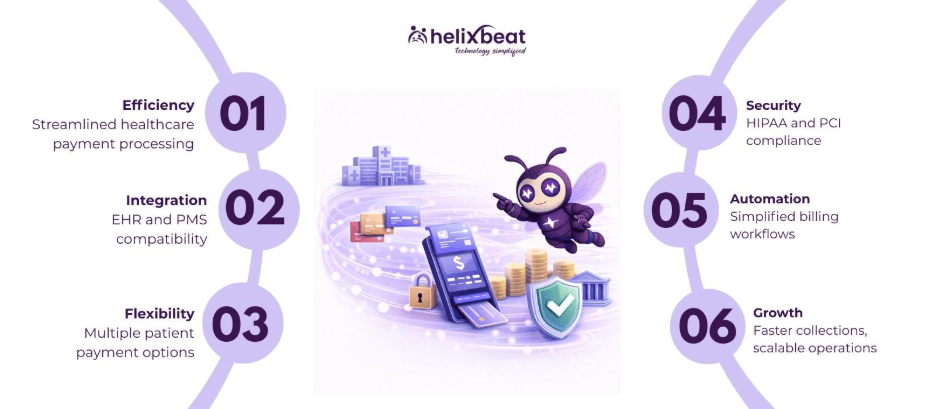
Table of Contents
What Is a Credit Card Processor in a Medical Office?
Before diving into the features and benefits, it’s important to understand what a credit card processor does. In simple terms, a credit card processor in a medical office is a system that allows patients to pay for their healthcare services electronically using credit, debit, or digital payment methods.
Here’s how it works:
- Payment Authorization: When a patient swipes, taps, or enters their card information, the processor checks with the bank or card issuer to verify funds.
- Transaction Approval: Once approved, the amount is reserved for transfer.
- Fund Transfer: The money moves from the patient’s account to your practice’s account, usually within a few business days.
- Record-Keeping: The processor provides detailed reports for reconciliation, insurance claims, and financial reporting.
For medical offices, this process isn’t just about convenience—it’s about efficiency, compliance, and patient satisfaction. Traditional manual methods or outdated systems can lead to delayed payments, administrative headaches, and even billing errors that frustrate patients.
Why Choosing the Right Credit Card Processor Matters
Healthcare payments are complicated. Unlike retail transactions, medical billing often involves co-pays, deductibles, insurance adjustments, and multiple revenue streams. This complexity makes choosing the best credit card processing for medical office even more crucial.
Here’s why:
- Improved Cash Flow: Faster processing means your practice receives payments quickly, reducing the risk of delayed reimbursements.
- Reduced Administrative Burden: Automated systems cut down on paperwork, letting your staff focus more on patient care.
- Enhanced Patient Experience: Patients expect convenience. Accepting multiple payment methods makes it easier for them to pay on time.
- Compliance and Security: Medical offices must comply with HIPAA regulations and PCI-DSS standards to protect patient and payment data.
Failing to choose the right system can lead to costly mistakes, frustrated staff, and unsatisfied patients.
Key Features to Look for in the Best Credit Card Processing for Medical Office
Not all credit card processors are created equal, especially in the medical field. Here’s what you should look for when choosing a system:
1. Integration With Existing Systems
Your processor should integrate seamlessly with your Electronic Health Records (EHR) and Practice Management Systems (PMS). This reduces double entry, ensures accurate billing, and streamlines claims management.
2. Multiple Payment Options
Patients want flexibility. The best credit card processing for medical office supports:
- Credit and debit cards
- ACH transfers and direct bank payments
- Digital wallets such as Apple Pay, Google Pay, and PayPal
- Recurring payment plans for patients with large deductibles
3. Security and Compliance
Protecting sensitive patient and financial data is non-negotiable. Look for processors that are HIPAA and PCI-DSS compliant, using encryption and tokenization to prevent data breaches.
4. Transparent Fees
Hidden fees can eat into your revenue. The right processor should offer clear, predictable pricing, including per-transaction fees, monthly charges, and any setup costs.
5. Reporting and Analytics
A good processor provides real-time reporting and analytics, giving you insights into payment trends, outstanding balances, and overall financial health.
6. Customer Support
Reliable, 24/7 support is essential for resolving payment issues quickly, ensuring your practice doesn’t experience downtime or lost revenue.
How PayNova Is the Best Credit Card Processor for Medical Offices
Among the many options available, PayNova stands out as the premier choice for healthcare providers. Here’s why it’s recognized as the best credit card processing for medical office:
1. Seamless Integration
PayNova integrates effortlessly with major EHR and PMS systems, enabling your staff to automatically process patient payments, co-pays, and insurance adjustments without switching platforms. This reduces errors and saves time.
2. Multiple Payment Options
PayNova supports a wide range of payment methods, including:
- Credit and debit cards
- ACH and direct bank transfers
- Digital wallets
- Flexible payment plans and recurring billing
This ensures that patients have convenient options, improving timely collections and patient satisfaction.
3. HIPAA and PCI-DSS Compliance
Security is a top priority for PayNova. The system is fully compliant with HIPAA and PCI-DSS standards, encrypting sensitive patient data and protecting against fraud. Your practice can confidently accept payments without worrying about data breaches.
4. Simplified Billing
With PayNova, complex billing becomes simple. Automated workflows handle:
- Insurance claim reimbursements
- Deductible and co-pay calculations
- Out-of-pocket balances
This automation reduces manual work and minimizes claim denials or errors.
5. Real-Time Reporting and Analytics
PayNova provides detailed reporting dashboards, allowing medical offices to:
- Track outstanding balances
- Monitor revenue cycles
- Generate financial forecasts
- Identify trends in patient payment behavior
This transparency helps in making informed financial decisions.
6. Exceptional Support
PayNova’s dedicated support team ensures that any issues are resolved quickly, minimizing downtime and keeping your practice running smoothly.
The Benefits of Using PayNova for Your Medical Practice
By choosing PayNova, your practice can enjoy several key advantages:
Faster Cash Flow
Automated processing reduces payment delays, helping your office maintain a steady cash flow even with complex insurance reimbursements.
Reduced Administrative Burden
Staff spend less time on manual billing, follow-ups, and claims processing, freeing them to focus on patient care.
Better Patient Experience
With multiple payment options, patient portals, and transparent billing, your patients experience convenience and clarity, reducing disputes and late payments.
Compliance and Security
PayNova ensures your practice remains compliant with HIPAA and PCI-DSS, protecting both patient data and your practice’s reputation.
Scalability
Whether you run a small clinic or a large multi-specialty practice, PayNova scales with your needs, supporting multiple locations and a growing patient base.
Real-World Impact: PayNova in Action
Consider a medium-sized family practice in Chicago. Before switching to PayNova, staff spent hours reconciling payments and calling patients about unpaid bills. Insurance claims were often delayed due to errors, creating cash flow problems.
After implementing PayNova, the practice experienced:
- 30% faster payment collection
- 50% reduction in administrative time spent on billing
- Improved patient satisfaction scores due to clear, itemized billing and multiple payment options
This demonstrates how the best credit card processing for medical office can transform operations, improving both financial health and patient experience.
Tips for Choosing the Right Credit Card Processor
When evaluating options, keep these tips in mind:
- Assess Your Practice Needs: Consider your patient volume, payment complexity, and integration requirements.
- Check Security and Compliance: Ensure any processor is HIPAA and PCI-DSS compliant.
- Compare Fees: Look beyond transaction fees—consider monthly costs, setup fees, and hidden charges.
- Evaluate Customer Support: A responsive support team can save your practice time and money.
- Request a Demo: Testing the system in real-world scenarios helps identify potential issues before committing.
Conclusion
Choosing the best credit card processing for medical office is no longer optional—it’s a necessity in today’s healthcare environment. A reliable processor improves cash flow, reduces administrative headaches, ensures compliance, and enhances the patient experience.
PayNova combines all these features into a single, secure, and user-friendly platform, making it the top choice for medical practices looking to streamline payments and simplify billing. With seamless integration, multiple payment options, advanced security, and real-time reporting, PayNova empowers healthcare providers to focus on what matters most: delivering exceptional patient care.
If your practice is still relying on outdated systems or struggling with payment delays, now is the perfect time to explore PayNova and experience how the best credit card processing for medical office can revolutionize your operations.
FAQs
1. What makes PayNova the best credit card processor for medical offices?
PayNova integrates with EHR/PMS systems, supports multiple payment methods, automates billing, and ensures HIPAA & PCI-DSS compliance.
2. Can PayNova handle insurance payments and patient co-pays?
Yes, PayNova automates co-pays, deductibles, and insurance reimbursements, reducing errors and speeding up collections.
3. What payment methods does PayNova support for patients?
PayNova accepts credit/debit cards, ACH transfers, digital wallets, and supports recurring payments and flexible payment plans.
4. Is PayNova secure for handling patient payment data?
Absolutely. PayNova uses encryption, fraud detection, and complies with HIPAA and PCI-DSS standards to protect sensitive information.