Why do many BI initiatives fail to deliver fast, reliable insights—even after investing in premium tools?
The gap usually isn’t the BI layer; it’s the data foundation. Advanced BI and reporting depend on how well your data is collected, modeled, governed, and delivered.
Enterprise cloud data management closes this gap by transforming fragmented, slow-moving data into a high-performance, analytics-ready foundation. At Helixbeat, we design DaaS environments where data pipelines, models, and governance are purpose-built for BI—ensuring dashboards load faster, reports remain consistent, and decisions happen in real time.
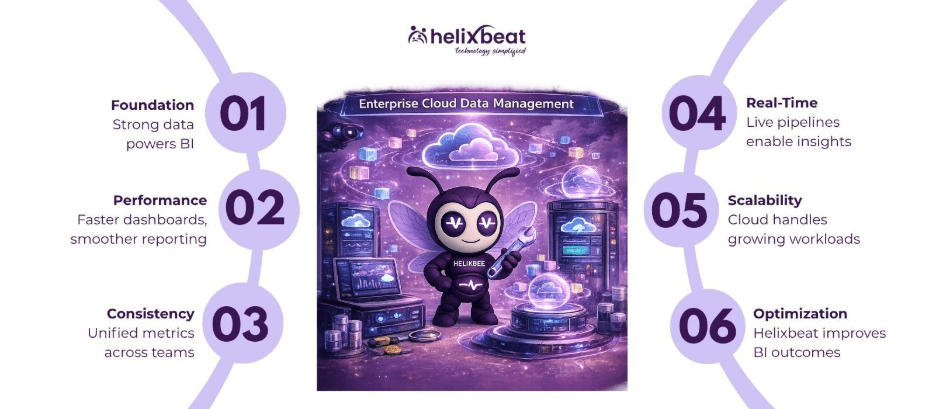
Table of Contents
What is Enterprise Cloud Data Management?
Enterprise cloud data management is a cloud-based framework that ingests, transforms, stores, and governs enterprise data to power analytics, BI, and reporting at scale.
In advanced BI environments, it’s more than storage—it’s the performance engine behind dashboards. This system ensures that BI tools receive clean, well-modeled, and query-optimized data, enabling fast, accurate, and reliable reporting across your organization.
Why is Enterprise Cloud Data Management Important?
Advanced BI and reporting are only as strong as the underlying data layer. Implementing enterprise cloud data management ensures that your business intelligence systems operate efficiently and deliver actionable insights.
Key Benefits
1. Faster BI Dashboards and Reports
Optimized cloud based database management systems reduce query complexity, enabling dashboards to load quickly and reports to run smoothly.
2. Consistent Metrics Across the Organization
A unified enterprise data management system guarantees all teams use consistent definitions, eliminating conflicting analytics and reports.
3. Real-Time and Near Real-Time Analytics
Enterprise cloud data management solutions enable streaming and incremental updates, ensuring BI tools reflect live business performance.
4. Scalable Reporting Infrastructure
Cloud based database management systems handle growing data volumes without affecting BI performance, supporting your enterprise as it scales.
How Does Enterprise Cloud Data Management Work?
This approach transforms raw enterprise data into BI-ready datasets through structured pipelines, modeling, and cloud storage.
Step-by-Step Process
Step 1: Data Ingestion (Multi-Source Capture)
Collect data from CRMs, ERPs, marketing platforms, and operational systems.
Step 2: Data Transformation (ETL/ELT)
Clean, standardize, and enrich data to ensure accuracy, usability, and reporting readiness.
Step 3: Data Modeling for BI
Organize data into fact and dimension tables, aggregates, and semantic layers optimized for enterprise data management solutions and BI queries.
Step 4: Cloud Data Storage (Warehousing/Lakehouse)
Store data in scalable cloud environments designed for analytical workloads, ensuring high performance for BI dashboards.
Step 5: BI Integration and Optimization
Connect BI tools to optimized datasets, leveraging caching, indexing, and query tuning for the best reporting experience.
See how your enterprise data management system can streamline reporting—get a free consultation!
Key Features / Components of Enterprise Cloud Data Management
| Feature | What It Does | Why It Matters for BI & Reporting |
| Data Integration Layer | Consolidates data from multiple systems | Provides a single source of truth for reporting |
| BI-Oriented Data Modeling | Structures data into analytics-ready formats | Improves query performance and report accuracy |
| Real-Time Data Pipelines | Enables streaming and incremental updates | Powers live dashboards and real-time insights |
| Data Governance Framework | Ensures data quality, access control, and compliance | Builds trust in reports and prevents inconsistencies |
| Query Optimization & Caching | Enhances performance of analytical queries | Reduces dashboard latency and improves user experience |
Common Challenges Without Enterprise Cloud Data Management
When BI is not supported by robust enterprise cloud data management, performance, reliability, and trust break down.
Problems Businesses Face
Slow Dashboards and Report Lag
Unoptimized queries, poorly structured data models, and inefficient pipelines lead to delays, frustrating decision-makers.
Conflicting Reports Across Teams
Without a unified enterprise data management tool, departments rely on different datasets, producing inconsistent reports.
Limited Real-Time Visibility
Traditional systems cannot support live analytics, leaving teams with outdated insights and slow decision-making.
High Maintenance and Manual Effort
Data preparation becomes time-consuming, lowering the ROI of BI investments and cloud data management solutions.
How to Choose the Right Enterprise Cloud Data Management Solution
To unlock advanced BI capabilities, your enterprise data management solutions must go beyond storage—they need to be BI-ready by design.
Things to Consider
- BI Performance Focus- Choose solutions that emphasize modeling, indexing, and query optimization to maximize dashboard speed.
- Seamless BI Tool Integration- Ensure your enterprise cloud data management system integrates with Power BI, Tableau, and other business intelligence tools for smooth reporting.
- Real-Time Data Capabilities- Support for streaming pipelines and incremental refresh is critical for modern, actionable reporting.
- Scalable Cloud Architecture- Cloud data management solutions should handle growing workloads efficiently without compromising performance.
- Strong Governance and Data Quality Controls- Reliable BI depends on clean, consistent, and governed data to produce trustworthy insights.
Helixbeat DaaS as the Right Solution
At Helixbeat, we deliver enterprise cloud data management systems purpose-built for advanced BI and reporting—not just data storage.
We align your enterprise data management tools and architecture with BI objectives, ensuring that every dataset, pipeline, and model is optimized for performance, usability, and real-time insights.
What We Solve
- Slow and underperforming BI dashboards
- Inconsistent reporting across departments
- Lack of real-time analytics capabilities
How We Enable Advanced BI
- BI-optimized data modeling and semantic layers
- High-performance cloud warehousing and query tuning
- Real-time and batch data pipeline orchestration
- Seamless integration with leading BI tools for faster reporting
Wrapping Up
Advanced BI is more than visualizations—it’s powered by the underlying data layer. Enterprise cloud data management ensures your reporting is fast, consistent, and scalable, enabling better decisions and stronger business outcomes.
Key Takeaways
- BI performance depends on a strong enterprise data management tool
- Cloud pipelines provide real-time reporting and actionable insights
- Optimized data models drive faster decision-making across teams
Upgrade your BI performance with Helixbeat DaaS today – Transform Your Data into Decisions!
FAQs
1. How does enterprise cloud data management support advanced BI?
It structures and optimizes data pipelines and models so BI tools can deliver faster, accurate, and real-time insights.
2. Why are my BI dashboards slow without proper data management?
Poor data modeling, unoptimized queries, and fragmented data sources increase processing time and reduce performance.
3. What is the role of data modeling in BI reporting?
Data modeling organizes data into efficient structures, enabling faster queries and more accurate reporting.
4. Can cloud-based database management systems improve reporting speed?
Yes, they provide scalable compute power, caching, and optimization features that enhance BI performance.
5. Who needs enterprise data management solutions for BI?
Enterprises handling large datasets, complex reporting, or real-time analytics benefit the most.
6. What are enterprise data management tools used for in BI?
They are used to integrate, clean, structure, and deliver data in a format optimized for analytics and reporting.