How to Turn Simple Ideas into Stunning AI Images Using ChatGPT
Visual content has become the backbone of modern digital marketing. From social media campaigns to product advertisements, businesses constantly need fresh, engaging visuals. Traditionally, this required professional designers, expensive software, and significant time investment. Today, artificial intelligence has rewritten the rules — and learning how to create images using ChatGPT is one of the most valuable skills a marketer, creator, or business owner can develop in 2024.
According to a 2024 HubSpot Marketing Report, 63% of marketers say AI tools have significantly improved their content production speed, and visual content generates 94% more views than text-only posts (Venngage, 2024). ChatGPT, once known purely as a text assistant, has evolved into a powerful creative platform — and creating images using ChatGPT is now a mainstream strategy for teams of every size.
Whether you’re a content creator, digital marketer, social media manager, designer, or entrepreneur, this guide will walk you through everything you need to know — from first prompt to final image.
Table of Contents
What Are AI Images and Why Are They Transforming Content Creation?
AI-generated images are visuals produced by artificial intelligence models based on text descriptions. Instead of manually designing graphics from scratch, users describe what they want and the AI delivers a corresponding image within seconds. AI Images Using ChatGPT have become a cornerstone of modern content strategy for one simple reason: they dramatically lower the barrier between an idea and a finished visual.
The transformation is happening across four dimensions:
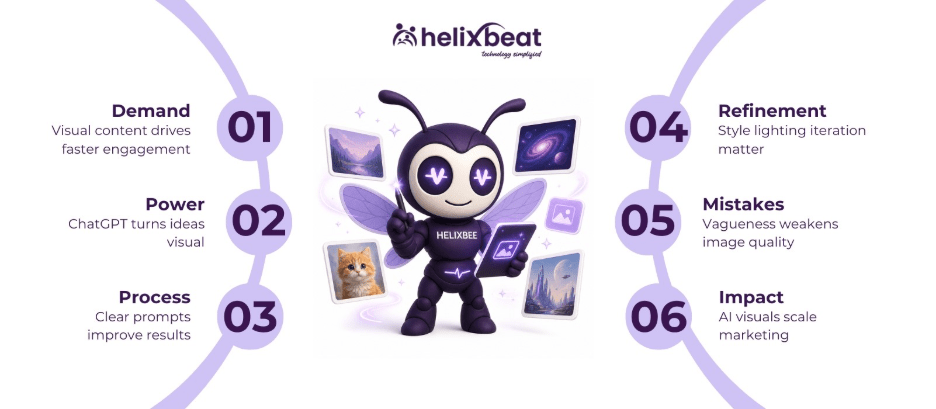
- Faster production: Chat GPT image generation compresses what used to take days — brief, design, revise, approve — into minutes.
- Reduced costs: Businesses no longer need to outsource every design task. AI Images Using ChatGPT replace a meaningful portion of routine creative work.
- Creative freedom: AI surfaces concepts, styles, and ideas that designers or marketers may never have explored otherwise.
- Scalability: Teams can produce hundreds of variations — for A/B tests, regional campaigns, or seasonal promotions — without hiring additional designers.
Understanding ChatGPT’s Image Generation Capabilities
ChatGPT’s image generation works through DALL-E 3, OpenAI’s advanced text-to-image model, integrated directly into the ChatGPT interface. When you describe a scene, product, or concept in plain English, the model interprets your intent and renders a corresponding image. The chat gpt picture generator goes far beyond simple illustrations — here is what it can do:
Natural language prompting
No technical knowledge is required. You describe your desired image in conversational language and the chat gpt text to image system interprets your intent. For example: “Create a minimalist product photo of a white ceramic coffee mug on a marble surface with soft morning light.”
Image editing and enhancement
Beyond creating new visuals, the platform allows you to refine and modify outputs — adjust colors, remove objects, change backgrounds, or apply different artistic styles, all through conversational follow-up prompts.
Visual concept development
The chat gpt create images feature is invaluable for visualizing campaign ideas, moodboards, or product concepts before committing to expensive production. Teams use it to present visual directions to clients without a single design file being opened.
Step-by-Step Guide to Creating Stunning Images Using ChatGPT
Getting great results from images using ChatGPT is a skill — and like any skill, it follows a repeatable process. Here is the workflow that consistently produces professional-quality outputs:
Step 1: Define your idea clearly
Before typing a prompt, answer four questions: What is the purpose of this image? Who is the target audience? What emotion should it convey? What platform will it appear on? Clarity of intent is the single biggest predictor of quality when creating images using ChatGPT.
Example: “Create an Instagram advertisement promoting eco-friendly skincare products targeting women aged 25-35, using a clean, natural aesthetic.”
Step 2: Write detailed prompts
The more specific your description, the better your images using ChatGPT will be. Vague prompts produce generic results. Detailed prompts produce remarkable ones.
- Weak prompt: “Create a dog.”
- Strong prompt: “Create a golden retriever sitting in a sunlit flower garden during golden hour, with a shallow depth of field, realistic fur texture, and a warm, joyful mood.”
Step 3: Add style references
Specify the visual style that fits your brand: realistic photography, watercolor, minimalist design, 3D rendering, flat illustration, or corporate branding. Example: “in the style of Apple product photography” or “editorial style, Vogue magazine aesthetic.”
Step 4: Specify lighting and colors
Lighting is the single most underused lever in AI image prompting. Including terms like “soft natural daylight,” “golden hour illumination,” “studio lighting with soft shadows,” or “dramatic cinematic lighting” dramatically changes the mood and professionalism of your output.
Step 5: Refine and iterate
The first result is rarely the final result — and that is by design. Use conversational follow-ups to refine: “Make the background blurred,” “Shift the color palette to muted earth tones,” or “Change the angle to a bird’s-eye view.” Iterating is what separates average images using ChatGPT from genuinely stunning ones.
Step 6: Download and deploy
Once satisfied, download your image and optimize it for the intended platform — compress for web, resize for social media dimensions, or export in high resolution for print or digital advertising. Always check brand alignment before publishing.
Best Prompt Examples for AI Images Using ChatGPT
Here are ready-to-use prompt templates across the most common content use cases for AI Images Using ChatGPT:
Marketing creatives
- “Create a modern digital marketing campaign banner featuring analytics dashboards, upward-trending charts, and a clean blue-and-white corporate color palette.”
Product advertisements
- “Generate a luxury skincare product advertisement with soft studio lighting, elegant packaging on a white marble surface, and a premium, minimalist aesthetic.”
Blog featured images
- “Create a professional technology illustration showing AI-powered workflow automation — abstract, clean, suitable for a business blog header.”
Social media graphics
- “Design a vibrant Instagram post promoting a summer sale — bold typography, coral and yellow color palette, energetic and eye-catching composition.”
Realistic portraits
- “Generate a photorealistic portrait of a confident professional woman in her 30s in a modern office, natural window lighting, sharp focus, neutral background.”
Corporate branding visuals
- “Create a futuristic corporate branding hero image representing innovation, digital transformation, and AI — deep navy and electric blue tones, abstract geometric forms.”
Tips for Generating Realistic Images Using ChatGPT
Photorealism is one of the most sought-after qualities in AI Images Using ChatGPT. These techniques make the biggest difference:
- Use photorealistic trigger phrases: Include terms like “ultra-realistic,” “DSLR photography,” “shot on Canon EOS R5,” “8K resolution,” or “photorealistic render” at the start of your prompt.
- Specify camera angles precisely: “Close-up macro shot,” “wide-angle environmental portrait,” “aerial drone perspective,” or “product-focused 45-degree angle” all produce very different results.
- Describe textures in detail: For chat gpt text to image realism, mention fabric weaves, skin pores, surface reflections, material finishes (matte, glossy, brushed metal), and environmental details like dust or water droplets.
- Guide facial realism carefully: For portrait work, include “symmetrical facial features,” “natural skin texture with subtle imperfections,” “catchlights in the eyes,” and “natural, relaxed expression.”
- Request high resolution explicitly: Ending prompts with “high-resolution, print-quality, sharp throughout” consistently improves output fidelity across images using ChatGPT.
Common Mistakes to Avoid During Chat GPT Image Generation
Even experienced users make these mistakes in chat gpt image generation. Avoid them to save time and get better results:
- Vague prompts: “Create a marketing image” gives the chat gpt picture generator almost nothing to work with. Always include subject, style, mood, lighting, and platform context.
- Conflicting instructions: Asking for “minimalist yet highly detailed” or “dark and bright simultaneously” confuses the model. Pick a clear direction.
- Expecting perfection immediately: Chat GPT image generation is iterative by nature. Plan for 2-3 rounds of refinement on any high-stakes visual.
- Skipping style specifications: Without a defined style, the chat gpt picture generator defaults to a generic aesthetic. Always specify photographic, illustrative, or branded style.
- Ignoring platform dimensions: Mention the target format early in your prompt — “16:9 landscape for YouTube thumbnail” or “square 1:1 format for Instagram” — to avoid awkward cropping.
- Not refining outputs: Every follow-up instruction you give teaches the system more about what you want. Stopping after the first result almost always leaves quality on the table when creating images using ChatGPT.
Business Applications of Images Using ChatGPT
The practical applications of images using ChatGPT span every major area of digital marketing and business communication:
- Social media marketing: Generate branded graphics, promotional visuals, story templates, and carousel content — each customized by campaign, audience, and platform.
- Digital advertising: Create multiple ad creative variants for split testing across Google Display, Meta Ads, and LinkedIn — without a design team bottleneck.
- E-commerce product promotion: Produce lifestyle imagery, product-on-background shots, and catalog visuals at a fraction of traditional photoshoot costs.
- Email marketing: Add personalized, campaign-specific header images and banners that increase open rates and click-throughs.
- Website design: Develop hero banners, landing page visuals, feature section illustrations, and blog featured images that align with brand guidelines.
- Product mockups: Visualize new products, packaging designs, or service offerings before committing to physical production.
At Helixbeat Marketing Services, we help businesses integrate AI-powered visual content into complete digital marketing strategies. Our team combines the creative potential of images using ChatGPT with data-driven campaign planning, brand strategy, and performance optimization — so your AI-generated visuals don’t just look great, they convert.
Learn more about our AI content marketing services at Helixbeat AI Marketing Services.
Why Businesses Are Choosing AI Images Using ChatGPT
The adoption of AI Images Using ChatGPT is accelerating fast — and the data backs it up. According to Adobe’s 2024 Digital Trends Report, 58% of creative teams are already using generative AI tools in their workflows, and 76% plan to increase usage in the next 12 months. Here is why:
- Scalability: AI Images Using ChatGPT allow brands to produce hundreds of visual variations — for every product, market, season, and audience segment — without expanding headcount.
- Faster production: Turnaround times shrink from days to minutes, enabling marketing teams to respond to trends, news, and campaign opportunities in real time.
- Lower design costs: Teams report reducing routine design costs by 40-60% by handling standard creative work with AI and reserving human designers for high-complexity, high-stakes projects.
- Personalized content at scale: Images using ChatGPT can be tailored for specific demographics, geographies, or behavioral segments — giving brands the personalization capabilities previously reserved for enterprise budgets.
- Continuous creative experimentation: Marketers can now test 10 visual concepts in the time it previously took to produce one, accelerating the optimization cycle for every campaign.
Conclusion
The future of visual content creation is being reshaped by artificial intelligence, and creating images using ChatGPT is no longer a niche skill — it is a core marketing competency. Whether you are producing social media graphics, product advertisements, email banners, or full brand campaigns, images using ChatGPT offer a scalable, cost-effective path to professional-quality visuals that actually drive results.
The key is to approach it strategically: define your intent clearly, write detailed prompts, specify style and lighting, and refine iteratively. Businesses that build this capability into their workflows — treating images using ChatGPT as a core production tool rather than a novelty — will gain a meaningful competitive advantage in content quality, speed, and cost efficiency.
At Helixbeat Marketing Services, we combine the creative power of AI image tools with full-service digital marketing expertise — helping businesses turn ideas into impact.
Ready to transform your content strategy? Get in touch with Helixbeat today and discover how AI-powered marketing can accelerate your growth.
People Also Ask
How do you create stunning AI images?
To create stunning images using ChatGPT, start with a clear concept and write a highly detailed prompt that includes subject, style, lighting, color palette, camera angle, and mood. Specify photorealistic or artistic style preferences, then refine your output through conversational follow-ups until the result matches your vision.
How do you generate images with AI ChatGPT?
Generating images using ChatGPT requires a ChatGPT Plus subscription, which gives you access to DALL-E 3 directly within the chat interface. Simply describe your desired image in natural language — include the subject, environment, style, and any specific details — and ChatGPT will generate a corresponding visual. You can then refine it through follow-up instructions.
How do you create a realistic image using ChatGPT?
For realistic images using ChatGPT, use photorealistic trigger phrases like “ultra-realistic,” “DSLR photography,” or “shot on professional camera.” Describe lighting (“soft natural daylight”), texture (“realistic skin with natural imperfections”), and camera angle (“close-up portrait, shallow depth of field”). Request high resolution and iterate until facial features, textures, and lighting all look natural.
How do I make my photo beautiful with AI?
You can enhance photos using ChatGPT by uploading your existing image and using conversational prompts to request specific improvements — adjusting brightness and color balance, removing background distractions, sharpening key details, improving skin tones, or applying a specific artistic style. The result can be downloaded and used across any digital channel.
How do I generate realistic AI images?
Generating realistic AI images requires detailed, specific prompts. Include photographic terminology, camera and lens specifications, lighting conditions, texture descriptions, and environmental context. Use iterative refinement — each follow-up prompt moves the output closer to photorealism. The more context you give images using ChatGPT, the more realistic the output.
Can ChatGPT enhance photos?
Yes — ChatGPT with DALL-E 3 integration can edit and enhance existing photos. You can upload an image and ask it to adjust colors, remove or replace backgrounds, improve lighting, apply creative filters, or recompose the scene. This makes it a practical tool not just for creating images using ChatGPT from scratch, but for upgrading existing visual assets as well.