
Instagram is changing faster than ever.
A few years ago, creators needed expensive cameras, advanced editing skills, and huge production teams to create eye-catching content. Today, a single creator with the right AI tools can generate viral visuals in minutes. That’s why ai generated art is exploding across Instagram right now.
If you’ve been scrolling through Instagram lately, you’ve probably noticed futuristic portraits, anime-style selfies, cinematic fantasy edits, surreal fashion campaigns, and dreamy landscapes getting thousands — sometimes millions — of likes. Many influencers are earning real profits from pages built entirely around ai generated art.
And here’s the interesting part:
Most people still don’t know how easy it is to create this content.
According to Statista, Instagram has over 2 billion monthly active users, making it one of the most competitive visual platforms in the world. Content creators are constantly searching for ways to stand out, and ai generated art has become one of the fastest-growing engagement strategies.
For graphic designers working in marketing service teams like Helixbeat, this creates a massive opportunity.
Instead of spending days creating concepts manually, designers can now use AI-powered workflows to generate campaign visuals faster, test multiple creative directions, and produce scroll-stopping content for brands.
In this blog, you’ll learn it
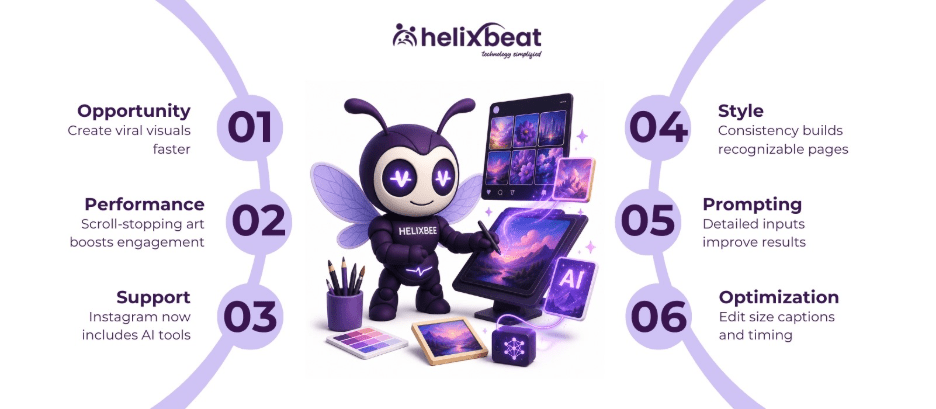
Table of Contents
Why AI Generated Art Performs So Well on Instagram
Instagram is a visual-first platform.
The content that wins is the content that stops users from scrolling.
That’s exactly why ai generated art works so well.
AI visuals often look surreal, hyper-realistic, cinematic, or emotionally dramatic. These styles instantly trigger curiosity. When users pause longer on a post, Instagram’s algorithm notices that engagement signal and pushes the content to more people.
This is why many creators focused on ai generated art are growing faster than traditional content creators.
Popular niches include:
- AI fashion photography
- Anime transformations
- Fantasy storytelling
- Cyberpunk edits
- AI-generated influencers
- Sci-fi landscapes
- Dreamcore aesthetics
One famous example is the Instagram AI artist page created by Karen X. Cheng. Her AI-generated visual experiments regularly attract millions of views because they combine storytelling with highly stylized AI visuals.
Another viral creator is Benny Productions, whose cinematic AI-powered artwork receives massive engagement from creative communities worldwide.
According to HubSpot AI Marketing Statistics, over 72% of marketers say AI-generated content improves engagement and reduces content production time. That’s a huge advantage for marketing teams managing multiple campaigns simultaneously.
How Instagram Supports AI Generated Art
Instagram itself is now investing heavily in AI features.
Meta has integrated AI image generation directly inside Instagram, making ai generated art more accessible than ever.
Generate AI Images Inside Instagram
You can create ai generated art without leaving the app.
In Instagram DMs
- Open any direct message
- Tap the “+” icon
- Select “Imagine”
- Type a prompt like:
“A futuristic café in watercolor style with neon lighting”
- Generate the image instantly
In Instagram Stories
Instagram Stories now include AI image generation tools.
You can:
- Generate fantasy backgrounds
- Create stylized AI scenes
- Use pre-built templates
- Customize prompts for unique visuals
These tools help creators produce fast content for Stories and Reels.
But for professional campaigns, most designers still prefer dedicated platforms.
Step-by-Step Guide to Creating AI Generated Art for Instagram
Creating viral-worthy ai generated art for Instagram is easier than ever — if you follow the right process. Whether you are a beginner creator or a graphic designer working in a marketing service team, this workflow helps you create professional-looking visuals that attract attention, engagement, and followers.
Step 1: Decide Your Instagram Art Style
Before opening any ai art generator, decide the visual identity of your Instagram content.
Ask yourself:
- Do you want cinematic visuals?
- Anime-inspired portraits?
- Futuristic cyberpunk art?
- Soft pastel aesthetics?
- Luxury fashion edits?
Your style matters because successful Instagram pages maintain a consistent look.
Popular ai generated art styles include:
- Cyberpunk
- Dreamcore
- Anime
- Fantasy realism
- Vintage cinematic
- 3D surreal art
Consistency helps audiences recognize your content instantly.
Step 2: Choose the Right AI Art Generator
The quality of your content depends heavily on the tool you use.
Here are the best platforms for creating ai generated art:
Canva
Perfect for beginners and social media creators.
Adobe Firefly
Great for professional branding campaigns.
Leonardo.Ai
A powerful ai art generator free option for creators experimenting with different styles.
Midjourney
One of the best ai art generator platforms for cinematic visuals.
If you are just starting, Leonardo.Ai and Canva are excellent beginner-friendly options.
Step 3: Write a Detailed Prompt
This is the most important step.
Your prompt tells the AI exactly what to create.
Weak prompt:
“Girl in city”
Strong prompt:
“A futuristic woman wearing neon streetwear walking through rainy Tokyo streets at night, cyberpunk style, cinematic lighting, ultra realistic”
A good prompt usually includes:
Subject
Who or what is in the image?
Background
Where is the scene happening?
Art Style
Anime, realistic, watercolor, cyberpunk, 3D render, etc.
Lighting
Golden hour, cinematic lighting, neon glow, sunset, moody shadows.
Mood
Dreamy, dark, emotional, futuristic, luxury.
The more specific your prompt, the better your ai generated art will look.
Step 4: Use AI Art Generator From Photo Tools
Want more realistic results?
Use an ai art generator from photo feature.
Platforms like Leonardo.Ai and Adobe Firefly allow you to upload a real image and transform it into artistic visuals.
You can convert:
- Selfies into anime portraits
- Product photos into cinematic ads
- Fashion photography into fantasy edits
- Landscapes into digital paintings
This is especially useful for brands and influencers who want personalized ai generated art instead of random AI images.
Step 5: Generate Multiple Variations
Never stop at the first result.
Professional designers usually generate:
- 4–10 versions
- Different lighting styles
- Multiple camera angles
- Different facial expressions
- Various color palettes
This helps you choose the strongest visual for Instagram.
Most best ai art generator tools offer variation and remix options.
Use them.
Step 6: Refine and Edit the Artwork
AI generates the base image.
But human editing makes it look premium.
After generating your ai generated art, refine it using:
- Photoshop
- Canva
- Lightroom
- Snapseed
Improve:
- Brightness
- Color grading
- Skin tones
- Sharpness
- Typography
- Background cleanup
Professional editing helps the artwork feel polished and Instagram-ready.
Step 7: Optimize the Image Size for Instagram
Instagram favors properly formatted images.
Use these dimensions:
- Feed Post: 1080 × 1350
- Square Post: 1080 × 1080
- Story/Reels: 1080 × 1920
Portrait images usually perform better because they take up more screen space.
When using an ai art generator, always export high-resolution files to maintain clarity.
Step 8: Add Captions and Hashtags
A great image alone is not enough.
Your caption should support the visual story.
Example:
“What if the future looked like this?”
Use relevant hashtags like:
- #AIArt
- #AIGeneratedArt
- #DigitalArt
- #AIArtist
- #CyberpunkArt
- #InstagramArt
Good captions increase engagement and help your ai generated art reach more people.
Step 9: Post at the Right Time
Timing matters on Instagram.
Best posting times are usually:
- 9 AM – 11 AM
- 6 PM – 9 PM
Use Instagram Insights to analyze audience activity.
Consistent posting improves visibility.
Many successful AI creators post:
- 1 feed post daily
- 3–5 stories
- 2–3 reels weekly
Step 10: Turn Your AI Art Into Reels
Static posts are great.
But reels perform even better.
You can convert ai generated art into short cinematic reels using:
- Zoom effects
- Motion animations
- AI transitions
- Music synchronization
Apps like CapCut and After Effects help transform still AI images into engaging video content.
Instagram currently prioritizes reels heavily in its algorithm.
Best Tools to Create AI Generated Art
The quality of your AI visuals depends heavily on the tool you choose.
Here are the most effective platforms used by designers and marketers today.
Canva
Canva is one of the easiest platforms for beginners and marketing teams.
It combines:
- AI image generation
- Instagram templates
- Typography tools
- Brand kits
- Social media editing
Because Canva is simple to use, many designers rely on it as an ai art generator for fast campaign creation.
It’s especially useful when creating:
- Instagram carousels
- Story graphics
- AI-based advertisements
- Promotional posts
For brands managing multiple social platforms, Canva helps speed up production workflows significantly.
Adobe Firefly
Adobe Firefly is considered one of the best ai art generator platforms for commercial design work.
Why?
Because it focuses heavily on professional-quality output and brand-safe AI visuals.
Graphic designers use it for:
- Marketing campaigns
- Product visuals
- AI illustrations
- Concept art
- Storyboard generation
One major advantage is that Adobe Firefly integrates smoothly with Photoshop workflows.
That makes editing and refining ai generated art much easier.
Leonardo.Ai
Leonardo.Ai is becoming extremely popular among Instagram creators.
Many people consider it an excellent ai art generator free option because it offers powerful features without requiring expensive subscriptions.
It supports:
- Fantasy artwork
- Anime styles
- Cinematic visuals
- Character creation
- High-resolution rendering
For beginners experimenting with ai generated art, Leonardo.Ai is one of the strongest free platforms available today.
Midjourney
Midjourney is famous for cinematic AI visuals.
It’s widely used for:
- Luxury aesthetics
- Fashion campaigns
- Dark fantasy artwork
- Sci-fi storytelling
- High-end Instagram visuals
Many viral AI pages rely heavily on Midjourney because its outputs feel emotional and visually polished.
This is why designers often consider it the best ai art generator for artistic storytelling.
How to Write Better AI Prompts
Most people fail at ai generated art because they write weak prompts.
A simple prompt creates average visuals.
A detailed prompt creates viral-worthy content.
Here’s a proven formula professional designers use:
Subject + Environment + Style + Lighting + Mood
Example:
“A futuristic woman wearing cyberpunk streetwear walking through rainy Tokyo streets at night, neon lighting, cinematic atmosphere, ultra realistic”
This produces far stronger results than:
“Cyberpunk girl”
When using an ai art generator, specificity matters.
Use AI Art Generator From Photo Tools
One of the most exciting features in modern AI platforms is ai art generator from photo technology.
This allows users to upload real photos and transform them into artistic visuals.
You can convert:
- Selfies into anime art
- Product photos into cinematic ads
- Portraits into fantasy scenes
- Landscapes into digital paintings
For brands, this is incredibly powerful.
Imagine a fashion company uploading a regular product photo and transforming it into a luxury editorial campaign within minutes.
That’s the power of ai art generator from photo tools.
Graphic designers working in marketing services can use this workflow to create highly customized brand visuals without expensive photoshoots.
Best Prompt Styles for Instagram
Different Instagram audiences respond to different aesthetics.
Here are some popular ai generated art styles performing well right now:
Cyberpunk
Neon lights, futuristic cities, dark atmospheres.
Dreamcore
Soft surreal visuals with emotional storytelling.
Anime
One of the most viral AI niches on Instagram.
Luxury Cinematic
Fashion-style visuals with premium aesthetics.
Retro Vintage
Old-film inspired visuals with nostalgic tones.
Using the right style helps your ai generated art connect emotionally with viewers.
Optimize AI Art for Instagram
Even the best visuals can fail if they are poorly optimized.
When posting ai generated art, always use proper dimensions:
- Square Post: 1080 × 1080
- Portrait Post: 1080 × 1350
- Reels/Stories: 1080 × 1920
Portrait posts usually perform best because they occupy more screen space.
Marketing teams should also:
- Add compelling captions
- Use relevant hashtags
- Maintain consistent color palettes
- Follow a recognizable aesthetic
Consistency builds stronger brand identity.
Common Mistakes Designers Make
Many beginners misuse AI tools.
Here are the biggest mistakes to avoid when creating ai generated art:
Overloading Prompts
Too many keywords confuse the AI.
Ignoring Human Editing
Raw AI outputs still need refinement.
Inconsistent Branding
Random styles make pages look messy.
Poor Image Quality
Always export high-resolution visuals.
Following Trends Blindly
Use trends for inspiration, not imitation.
The best creators combine AI efficiency with human creativity.
Why Marketing Teams Need AI Art Skills
For companies like Helixbeat, learning ai generated art workflows is becoming essential.
AI helps marketing teams:
- Produce content faster
- Reduce creative turnaround time
- Test multiple campaign ideas quickly
- Improve engagement rates
- Create visually unique branding
Graphic designers who understand AI workflows will become far more valuable in modern marketing environments.
The future of content creation is not AI replacing designers.
It’s designers using AI to work smarter.
Final call
Instagram is getting more competitive every day. Static content alone is no longer enough to grab attention. That’s why ai generated art is becoming a game-changer for creators and brands. With tools like Canva, Leonardo.Ai, and Adobe Firefly, designers can create stunning visuals in minutes instead of spending hours on manual edits.
The best part?
You don’t need a huge production team to create content that looks premium. At Helixbeat, marketing teams use AI-powered creativity to build faster campaigns, improve engagement, and create visually memorable Instagram content that connects with modern audiences and drives stronger brand visibility.
FAQs
How to create AI art in Instagram?
You can create ai generated art directly inside Instagram using Meta AI tools. Open a DM, tap the “+” icon, select “Imagine,” and enter a text prompt to generate custom visuals instantly. Instagram Stories also support AI-generated backgrounds and creative templates.
Can I use AI-generated images on Instagram?
Yes, you can use ai generated art on Instagram for posts, reels, stories, branding, and marketing campaigns. Many influencers and businesses use an ai art generator to create eye-catching visuals that improve engagement and reach.
How do I create AI-generated art?
To create ai generated art, use platforms like Canva, Leonardo.Ai, or Adobe Firefly. Enter a detailed prompt describing the subject, style, lighting, and mood. You can also use an ai art generator from photo tool to transform real images into artistic visuals.
Can you create your own AI on Instagram?
Instagram currently allows users to create AI-powered content using Meta AI tools, but building a custom AI requires external platforms. Many creators use the best ai art generator tools to design personalized AI visuals and unique Instagram aesthetics.