Running a restaurant isn’t easy, especially in the U.S., where customers expect fast, accurate service. If you’re still relying on old-school cash registers or juggling orders on paper, mistakes happen, orders get delayed, and customers get frustrated.
That’s where the right POS software for restaurant comes in; it makes managing orders, payments, and inventory way easier, so your team can focus on what really matters: great food and happy guests.
The best restaurant point of sale systems let you track inventory, handle payments smoothly, and keep your whole operation organized from one platform. Whether you’re looking for the best pos system for small restaurant or checking out top pos systems for restaurants, a modern POS keeps things running smoothly, cuts errors, and saves you time, so you can serve more guests and grow your business without the stress.
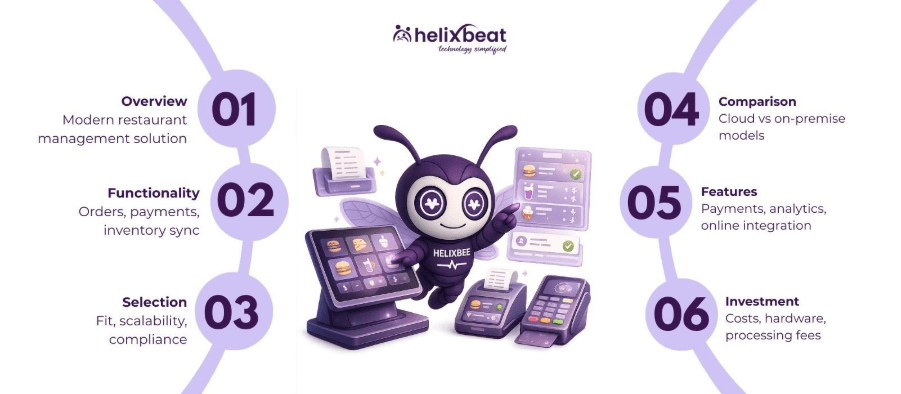
Table of Contents
What Is Restaurant POS Software & How Does It Actually Work?
At its core, a restaurant POS (point of sale) system is more than just a fancy cash register; it’s the hub that keeps your entire restaurant running smoothly. It handles everything from taking orders and processing payments to tracking inventory and generating sales reports. Think of it as the brain of your operation, making sure your staff, kitchen, and front-of-house all stay on the same page.
Modern POS software for restaurant lets you do all this from one easy-to-use platform. Orders go straight from the server’s tablet to the kitchen, payments are processed securely, and inventory updates automatically as dishes are sold. Whether you’re running a small café with the best pos system for small restaurant or managing multiple locations with top pos systems for restaurants, a good POS saves time, reduces mistakes, and helps your business run like a well-oiled machine.
Key Questions to Ask Before Choosing a POS System
Choosing the right POS system for your restaurant isn’t just about picking the newest or cheapest option. You want a system that fits your specific needs and makes day-to-day operations easier. Here are five practical questions every U.S. restaurant owner should ask:
- Is it designed for your type of restaurant?
Fast-casual, fine dining, food trucks – they all have different needs. Make sure the POS can handle your menu, order flow, and peak-hour demands.
- Does it handle U.S.-specific payment methods?
Your POS should accept credit/debit cards, contactless payments, and digital wallets like Apple Pay or Google Wallet. EMV chip support is a must for compliance.
- Can it track inventory and reduce waste?
A good system updates stock in real time, helps you reorder on time, and prevents costly mistakes like running out of popular items.
- Is it scalable for growth?
Whether you’re opening a second location or adding online ordering, your POS should grow with your business without costly replacements.
- What kind of support and training is available?
U.S. restaurants need fast, reliable support, ideally 24/7 – plus training for staff so you can get up and running quickly without service disruptions.
Answering these questions upfront helps you narrow down your options and pick a POS software for restaurant that truly fits your U.S. business needs.
Cloud-Based POS vs On-Premise POS: Which Is Better for You?
| Feature / Factor | Cloud-Based POS | On-Premise POS | Notes for U.S. Restaurants |
| Cost | Usually subscription-based with lower upfront costs | One-time purchase, often higher upfront cost | Cloud POS is easier for small restaurants or startups; on-premise may be better for long-term ownership |
| Updates & Maintenance | Automatic updates handled by provider | Manual updates and IT support required | Cloud POS reduces downtime and IT hassle, which is great for busy U.S. restaurants |
| Accessibility | Access from anywhere with internet | Only accessible on-site | Cloud POS is ideal for owners managing multiple locations or online orders |
| Hardware Needs | Works on tablets, smartphones, or POS terminals | Requires dedicated hardware | Cloud POS is flexible and scalable, while on-premise may need extra investment in equipment |
| Reliability & Security | Depends on internet connection; data is stored securely in the cloud | Works offline; data stored locally | Cloud POS offers remote backups and easier compliance with PCI standards; on-premise gives full control over sensitive data |
5 Must-Have POS Features for U.S. Restaurants
When choosing POS software for restaurant operations in the U.S., it’s not just about taking orders, it’s about running your business efficiently, staying compliant, and keeping customers happy. Here are five features every U.S. restaurant should look for:
1. Inventory Management & Real-Time Tracking
U.S. restaurants face high food costs and strict regulations. A POS system that tracks inventory in real time helps you prevent stockouts, minimize waste, and keep your menu running smoothly. This feature is especially important for small restaurants looking for the best pos system for small restaurant.
2. Integrated Payment Processing
Your POS should accept all major U.S. payment methods – credit/debit cards, EMV chip cards, Apple Pay, Google Wallet, and even gift cards. Secure, fast payments not only improve customer experience but also keep your restaurant PCI-compliant.
3. Employee Management & Scheduling
A POS with built-in staff management tools lets you track hours, schedule shifts, and monitor performance. For U.S. restaurants dealing with labor laws and overtime rules, this feature reduces headaches and payroll errors.
4. Reporting & Analytics
Detailed sales reports, menu performance tracking, and customer insights are critical for making informed business decisions. Modern restaurant point of sale systems give you dashboards to monitor trends, profit margins, and peak hours – all in real time.
5. Online Ordering & Delivery Integration
With the rise of delivery and takeout in the U.S., a POS that connects to online ordering platforms is essential. Whether it’s a small café or a multi-location chain, integrating orders from DoorDash, Uber Eats, or your website ensures faster service and fewer errors.
By choosing a POS system with these essential features, your U.S. restaurant can run smoother, serve customers faster, and stay ahead of the competition.
How Much Does Restaurant POS Software Cost in the U.S.?
In the U.S., the cost of POS software for restaurant varies based on features, size of your operation, and whether you choose cloud‑based or on‑premise systems. Most modern cloud‑based systems charge a monthly subscription of roughly $50 to $300+ per terminal, depending on features like inventory tracking, reporting, or online ordering integration, while free basic plans also exist with limited functions.
Hardware, such as touchscreen terminals, card readers, printers, and kitchen displays, can add a one‑time cost of about $1,000 to $3,000+ for a small to mid‑sized restaurant setup. On‑premise systems with lifetime licenses may cost more upfront (often $500 to $5,000) but don’t require monthly fees for the software itself.
In addition to these costs, most restaurants must budget for payment processing fees (typically around 2.4%–3.5% per transaction) on top of software and hardware costs.
5 Best POS Software Options for U.S. Restaurants
When it comes to running a U.S. restaurant efficiently, choosing the right POS system can make all the difference, here are three top options to consider.
1. RavZora
A next‑generation pos software for restaurant that combines ease of use, powerful analytics, and seamless integrations designed specifically for U.S. restaurants.
RavZora simplifies order management, inventory tracking, payment processing, and customer insights all in one platform, making it an excellent choice whether you run a small café or a multi‑location operation.
Book a free demo and see how effortless running your restaurant can be!
2. Toast POS
Built exclusively for restaurants and bars, Toast continues to be one of the top pos systems for restaurants in the U.S. It offers robust features including tableside ordering, kitchen display systems, and strong back‑of‑house tools that help streamline operations and boost profitability.
3. Square for Restaurants
A very popular choice for small to mid‑sized eateries, food trucks, and quick‑service spots. Square combines intuitive hardware, flexible payment processing, and easy setup, making it ideal for businesses seeking the best pos system for small restaurant without high upfront investment.
These systems cover a range of needs, from affordable solutions for startups and small restaurants to full‑featured platforms for larger operations, helping you choose the best pos system for restaurant based on your business size, budget, and goals.
Fina Words
Choosing the right POS software for restaurant can make or break your daily operations. From managing orders and payments to tracking inventory and analyzing sales, the right system keeps your restaurant running smoothly and your customers happy.
If you’re ready to simplify operations and boost efficiency, now’s the time to take action. Platforms like RavZora give you everything you need in one place – from online ordering and employee management to real-time reporting.
FAQ
1. How do I choose the right POS system for my U.S. restaurant?
Focus on your restaurant size, type, and workflow. Look for a system that handles orders, payments, inventory, and reporting efficiently while supporting U.S. payment methods like EMV chip cards and digital wallets.
2. Can small restaurants benefit from advanced POS features?
Absolutely. Even small restaurants can use cloud-based POS systems to manage inventory, track sales, and accept online orders without overspending. Scalable options let your system grow with your business.
3. Are there POS systems designed specifically for U.S. compliance?
Yes. The right POS should follow U.S. regulations, including PCI compliance, EMV payments, and state-specific tax handling, ensuring secure transactions and legal adherence.
4. What makes a POS system cost-effective for restaurants?
A cost-effective POS balances essential features with subscription or upfront pricing. Cloud-based systems often offer lower initial costs, while also including updates, support, and remote access – saving time and money.
5. How can a POS system improve customer experience in U.S. restaurants?
Modern POS systems speed up order processing, reduce errors, enable mobile or tableside payments, and integrate online ordering. Faster service and accurate billing create a smoother, more satisfying customer experience.