In 2026, investing in a visitor management system is no longer optional—it’s a necessity. Across the U.S., organizations are moving away from paper logbooks toward digital platforms that enhance security, streamline operations, and improve visitor experience.
But here’s the challenge most decision-makers face:
What is the real visitor management software price—and what should you actually budget for?
If you’ve started researching, you’ve probably seen a wide range of pricing. Some tools advertise Visitor management software price usa free, while others fall into premium enterprise tiers. The reality lies somewhere in between—and understanding that difference is what helps you make the right decision.
This guide will walk you through everything you need to know, using real-world scenarios, simple explanations, and a practical budgeting framework.
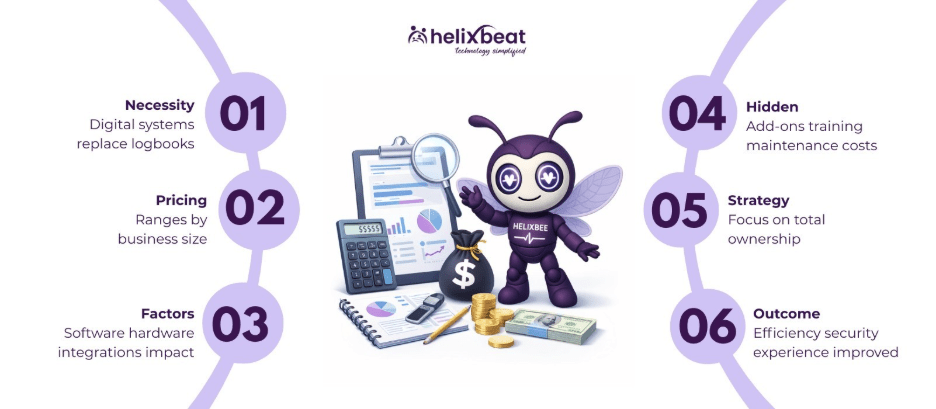
Table of Contents
Why Budgeting for VMS Is Different in 2026
Let’s picture your front desk again.
A visitor walks in. Your receptionist greets them, asks for details, checks ID, calls the host, and logs everything manually.
Now imagine doing this hundreds of times a week, while also handling calls, emails, and compliance requirements.
That’s where modern visitor management solutions come in—but budgeting for them in 2026 requires thinking beyond just the subscription.
The visitor management software price today includes:
- Software
- Hardware
- Integration
- Security compliance
This is why smart organizations now calculate Total Cost of Ownership (TCO) instead of just monthly fees.
Understanding the Visitor Management Software Price in 2026
Before diving into details, let’s break down the typical visitor management software price usa:
- Small office: $0–$100/month
- Mid-tier organizations: $100–$300/month per location
- Enterprise setups: $300+ or custom pricing
You may find Visitor management software price usa free tools at the lower end, but these are often limited in scalability and security.
The key takeaway:
The best visitor management software price usa is not about spending less—it’s about spending smart.
1. Key Factors Affecting Visitor Management Software Price
Understanding what drives cost helps you avoid surprises.
Subscription Model (SaaS)
Most visitor management system vendors operate on a subscription model.
- Monthly or annual billing
- Scales based on features and locations
For most mid-sized organizations, the visitor management software price falls between $100–$300/month per location.
Hardware Essentials
Here’s where many budgets fall short.
To run modern visitor management solutions, you’ll likely need:
- Tablets/iPads: $200–$800
- Badge printers: $100–$500
- Kiosk stands: $100–$300
- Supplies (badges, labels)
If your front desk is still manual, this initial investment significantly impacts your visitor management software price.
Integration Complexity
Let’s say your system needs to connect with:
- Access control systems
- HR platforms
- Slack or Microsoft Teams
Integration increases the visitor management software price, especially if you need enterprise-level features.
But in real terms?
It eliminates repetitive manual tasks and improves efficiency.
Visitor Volume & Security Needs
A small office with 20 visitors a day has very different needs compared to a hospital handling hundreds.
Higher visitor volume means:
- Faster systems required
- Stronger verification processes
- Advanced features like facial recognition
All of this impacts your visitor management software price usa.
Multi-Location Support
If your organization operates across multiple sites, centralized monitoring becomes essential.
Most visitor management system vendors offer this only in premium tiers—affecting your overall visitor management software price.
2. Hidden Costs You Should Include
This is where budgeting often goes wrong.
You may think you’ve found the best visitor management software price usa, but hidden costs can add up quickly.
Add-Ons and Extra Features
Many visitor management solutions charge extra for:
- Advanced analytics
- SMS notifications
- Custom branding
- Contractor management
These can add $30–$500+ per month to your visitor management software price.
Implementation and Training
For smaller teams, setup might be simple.
But for larger organizations:
- Deployment can cost up to $5,000
- Staff training becomes necessary
A poorly trained team reduces system effectiveness.
Hardware Maintenance
Hardware isn’t a one-time expense.
Plan for:
- Repairs
- Replacements
- Consumables (labels, badges)
A good rule: budget 20% of hardware cost annually.
Overages and Usage Limits
Some plans cap the number of visitors.
If exceeded:
You pay extra per visitor.
This is common in Visitor management software price usa free or entry-level plans.
Data Export and Exit Costs
Switching vendors?
Some visitor management system vendors charge fees for exporting your data.
Always read the contract carefully.
3. Smart Budgeting Tips for 2026
Now let’s focus on what you should do.
Calculate Total Cost of Ownership (TCO)
Instead of just looking at monthly fees, calculate:
(Monthly Subscription × 12) + Hardware + Setup Costs
This gives you a realistic view of your visitor management software price.
Start with a Pilot Program
Before rolling out across all locations:
- Test in one office
- Evaluate performance
- Gather staff feedback
This reduces risk and ensures you choose the best visitor management system.
Choose Hardware-Agnostic Vendors
Some vendors force you to buy their hardware.
Instead, choose visitor management solutions that:
- Work with your existing devices
- Offer flexibility
This lowers your visitor management software price usa significantly.
Prioritize Security and Compliance
Especially for healthcare or enterprise setups.
Look for:
- Data privacy compliance
- Digital NDAs
- Audit trails
The best visitor management system always balances usability with security.
Measure ROI (Hard and Soft)
Hard ROI:
- Time saved at reception
- Reduced paperwork
- Fewer manual errors
Soft ROI:
- Better visitor experience
- Stronger brand perception
- Improved security
This helps justify your visitor management software price to stakeholders.
4. Budgeting Tiers Explained
Let’s simplify this with real-world use cases.
Small Office (<50 Visitors/Month)
- Budget: $0–$100/month
- Often uses Visitor management software price usa free tools
- Basic check-in functionality
Works for startups, but limited scalability.
Mid-Tier Organizations (50–500 Visitors/Month)
- Budget: $100–$300/month
- Requires branding, analytics, badge printing
This is where most businesses find the best visitor management software price usa balance.
Enterprise Organizations (500+ Visitors)
- Budget: $300+
- Includes:
- Multi-location support
- Access control integration
- SSO (Single Sign-On)
Ideal for hospitals, logistics hubs, large offices.
Real-World Impact: What Happens When You Budget Right
Let’s go back to your front desk.
With the best visitor management system in place:
- Visitors check in within seconds
- Staff focus on meaningful tasks
- Security is automated and reliable
No confusion. No delays. No compliance risks.
That’s the real value behind the visitor management software price.
Where VISTA Fits Into Your Budget
When evaluating visitor management system vendors, VISTA is designed to align with modern budgeting needs.
It offers:
- Contactless check-ins
- Real-time tracking
- Scalable pricing
- Strong compliance features
For organizations looking for visitor management solutions that balance cost and performance, VISTA stands out as a practical choice.
It helps you achieve the best visitor management software price usa without compromising on essential features.
Final Thoughts
Budgeting for a VMS in 2026 is not just about cost—it’s about making a strategic investment.
The right system will:
- Reduce administrative workload
- Improve security
- Enhance visitor experience
And most importantly, deliver ROI within months.
Ready to Plan Smarter?
If you’re currently evaluating the visitor management software price usa, take a step back and look at the bigger picture.
Focus on value, scalability, and long-term impact.
VISTA can help you simplify visitor management while staying within budget—without sacrificing performance or security.
Start with a pilot, explore the features, and see how it fits into your organization’s future.
FAQs
1. What is the average visitor management software price in the USA?
The average visitor management software price in the USA ranges from $100 to $300 per month for mid-tier plans, depending on features, users, and locations.
2. Are there any Visitor management software price usa free options available?
Yes, some platforms offer Visitor management software price usa free plans, but they usually include limited features and are best suited for small offices.
3. How do I find the best visitor management software price usa?
To find the best visitor management software price usa, compare features, scalability, integrations, and long-term value instead of choosing the cheapest option.
4. Which visitor management system vendors are popular in the USA?
Top visitor management system vendors offer cloud-based platforms with features like contactless check-in, compliance tools, and real-time tracking.
5. What features should I expect from modern visitor management solutions?
Modern visitor management solutions include QR check-in, visitor tracking, badge printing, analytics, and integration with existing systems.
6. What makes the best visitor management system in 2026?
The best visitor management system in 2026 offers scalability, strong security, seamless integrations, and a balance between cost and functionality.