Are your BI and data warehousing dashboards running slowly, or do your data warehouse queries take too long to execute?
Inefficient BI and data warehousing systems can hinder decision-making, frustrate users, and increase operational costs. Performance tuning ensures that your data pipelines, queries, and analytics tools operate efficiently, delivering actionable insights quickly.
In this guide, we’ll explore proven strategies for performance tuning in BI and data warehousing environments, covering optimization techniques, best practices, and real-world scenarios.
With the right approach, your organization can achieve faster reporting, enhanced analytics, and a more reliable Power BI and data warehousing experience.
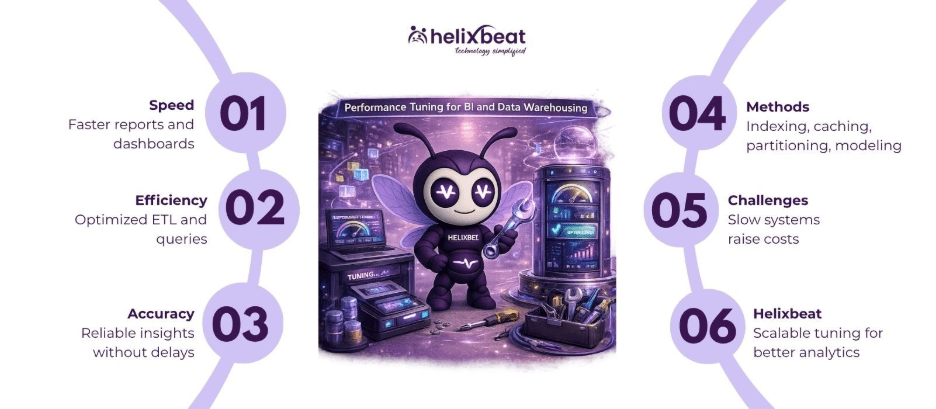
Table of Contents
What is Performance Tuning in BI and Data Warehousing?
Performance tuning for BI and data warehousing systems is the process of optimizing your business intelligence data warehouse architecture, queries, and analytics tools to ensure fast, reliable, and accurate reporting.
At its core, performance tuning involves:
- Reducing query execution times
- Optimizing ETL (Extract, Transform, Load) processes
- Efficiently managing storage and indexes
- Improving dashboard responsiveness in tools like Power BI
For example, a retail company using a business intelligence data warehouse can reduce daily report generation from hours to minutes through proper tuning, enabling managers to make timely inventory and sales decisions.
Why is Performance Tuning Important?
Performance tuning ensures your Power BI data warehouse delivers actionable insights without delays, improving productivity and decision-making.
Key Benefits
1. Faster Reporting and Analytics
Optimized queries and dashboards reduce wait times, allowing stakeholders to access critical business insights instantly.
2. Cost Efficiency
Efficient resource utilization minimizes cloud compute and storage costs, especially in cloud data warehousing environments.
3. Improved User Experience
A tuned Power BI data warehouse ensures dashboards load quickly, encouraging adoption and engagement among employees.
4. Accurate and Reliable Insights
Tuning reduces errors and inconsistencies caused by inefficient ETL processes, maintaining trust in your data.
How Does Performance Tuning Work?
Performance tuning involves analyzing your BI and data warehousing environment, identifying bottlenecks, and implementing strategies to optimize performance.
Step-by-Step Process
Step 1: Monitor Current Performance
Measure query times, ETL durations, dashboard load times, and resource usage. Tools like SQL Server Profiler or Power BI Performance Analyzer can help.
Step 2: Identify Bottlenecks
Determine slow queries, inefficient ETL processes, or poorly designed schemas that hinder performance.
Step 3: Optimize Queries
Use indexing, partitioning, and query rewriting to reduce execution time. Aggregating historical data in a summary table can significantly reduce query load.
Step 4: Optimize ETL Processes
Implement incremental loading instead of full table loads, parallel processing, and optimized transformation logic.
Step 5: Optimize Data Modeling
Adopt star or snowflake schemas to simplify joins and improve query speed. Ensure data types are appropriate, and redundant data is minimized.
Step 6: Leverage Caching and In-Memory Storage
Use BI tool caching, materialized views, or in-memory tables to accelerate frequently accessed queries and dashboards.
Step 7: Test and Iterate
Monitor improvements, tweak performance parameters, and validate that reports and analytics meet SLAs.
Transform your business intelligence data warehouse performance—Get Started Today.
Key Features / Components of Performance-Tuned BI and Data Warehousing
| Feature | What It Does | Why It Matters |
| Indexing | Creates quick access paths for tables | Reduces query execution time |
| Partitioning | Divides tables into smaller, manageable pieces | Improves read/write performance |
| Aggregated Tables | Precomputes summaries of large datasets | Reduces query complexity |
| ETL Optimization | Streamlines data transformation and loading | Reduces latency in reports |
| Data Modeling (Star/Snowflake) | Organizes data efficiently | Simplifies queries, reduces joins |
| Caching | Stores frequently accessed results in memory | Speeds up dashboards and reports |
| Query Rewriting | Simplifies or rewrites complex queries | Improves execution efficiency |
| Cloud Resource Tuning | Adjusts compute and storage dynamically | Ensures cost-effective scalability |
Common Challenges Without Performance Tuning
Without proper tuning, BI and data warehousing systems can become slow, costly, and unreliable, directly impacting business performance.
Problems Businesses Face
1. Slow Queries and Reports – Managers wait hours for dashboards, delaying critical decisions, and reduce efficiency.
2. ETL Bottlenecks – Long-running ETL jobs delay data availability, limiting the effectiveness of real-time analytics in bi tools data warehouse environments.
3. Resource Overuse – Inefficient queries and storage structures increase cloud costs and reduce overall system performance.
4. Low User Adoption – Frustrated employees may stop using data warehouse business intelligence tools, reducing return on investment.
5. Data Inconsistencies – Poorly tuned systems create inaccurate reports, weakening trust in insights that business intelligence and data warehouse is used for.
Eliminate performance bottlenecks—Talk to Helixbeat Experts Today.
How to Choose the Right Performance-Tuning Approach
Things to Consider
1. System Size and Complexity
Larger datasets require advanced optimization techniques such as partitioning, indexing, and aggregation.
2. BI Tool Integration
Ensure tuning strategies align with your analytics platforms, including Power BI data warehouse best practices, for seamless performance.
3. Real-Time Requirements
High-frequency reporting demands in-memory caching, optimized queries, and incremental ETL processes.
4. Cloud vs On-Premises
Cloud environments offer dynamic scalability, while on-premises systems require efficient hardware and query optimization strategies.
Helixbeat DaaS as the Right Solution
At Helixbeat, we specialize in optimizing BI and data warehousing systems to deliver faster, more reliable analytics. Our Data-as-a-Service (DaaS) platform enhances queries, ETL processes, data models, and dashboards for maximum performance.
Key Advantages
End-to-End Optimization: From ETL pipelines to dashboard performance, every layer of your bi tools data warehouse is optimized.
Scalable and Flexible: Our solutions adapt to growing datasets across cloud and hybrid environments.
Power BI Integration: Built around Power BI data warehouse best practices, ensuring responsive and high-performing dashboards.
Proactive Monitoring: Continuous performance tracking helps prevent bottlenecks before they impact users.
Wrapping Up
Performance tuning is essential for maximizing the efficiency and ROI of BI and data warehousing systems.
Key Takeaways
- Optimize ETL, queries, and data models for faster reporting
- Use caching, in-memory storage, and aggregation to improve dashboard speed
- Monitor system performance continuously to prevent bottlenecks
- Proper tuning ensures accurate, timely insights that drive business growth
With Helixbeat DaaS, your data warehouse business intelligence tools are always optimized, delivering high-speed analytics and reliable reporting aligned with what business intelligence and data warehouse is used for.
Start optimizing your BI performance today—Book your consultation with Helixbeat now.
FAQs
1. How do I optimize a Power BI data warehouse?
Use indexing, caching, aggregations, efficient data models, and incremental ETL to improve performance.
2. Who benefits from performance tuning?
Business analysts, data engineers, executives, and any organization relying on timely, accurate BI insights.
3. What are common performance tuning techniques?
Query optimization, partitioning, caching, in-memory storage, ETL streamlining, and proper schema design.
4. Why is performance tuning critical for cloud data warehousing?
Cloud resources are billed by usage; optimized performance reduces costs while ensuring fast analytics.
5. How can Helixbeat help with performance tuning?
We provide end-to-end tuning of BI and data warehouse systems, ensuring scalable, fast, and reliable analytics.