

On paper, the FHIR Bulk Data specification looks straightforward enough. Kick off a job. Poll a status URL. Download NDJSON files. Done.
In production, that tidy workflow often falls apart the moment real volume hits it. A payer moving two million member records for a Payer-to-Payer transfer runs into different problems than a pilot that worked fine with 500 test patients. Most teams only realize there’s an issue when a 20-minute job in staging hits production and immediately stalls, times out, or drops records without a peep.
Here’s why FHIR bulk data breaks down at scale, and where the fixes actually belong.
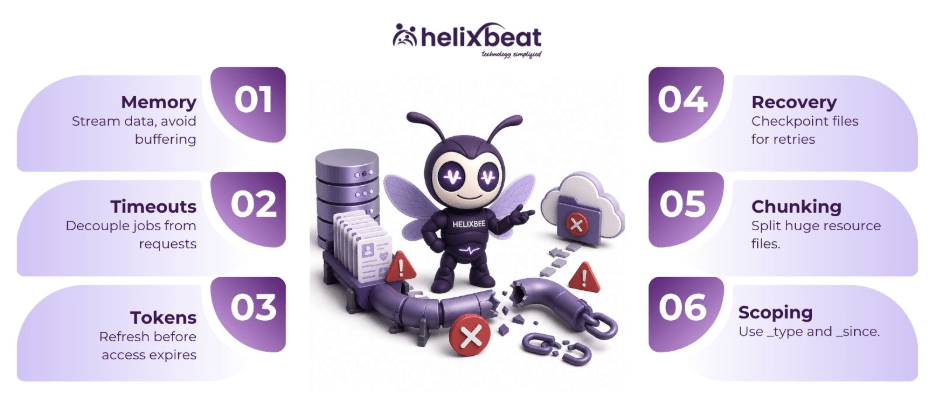
Table of Contents
This Isn’t a Specification Problem
We’ve covered the mechanics of the FHIR bulk data API elsewhere. The specification itself holds up well. Most major EHR vendors support it. CMS-0057-F makes it close to mandatory for payers moving healthcare bulk data between plans.
But a correct spec doesn’t mean a correct implementation scales. Small pilots rarely trigger these errors. They only show up once you start pushing the limits on file sizes, long-running jobs, or simultaneous exports.
-
Servers That Buffer Instead of Stream
Memory is the single biggest cause of failed FHIR bulk data export jobs. A system-level export from a large health system can generate NDJSON files running into tens of gigabytes per resource type.
Therefore, servers that assemble the full resource set in memory before writing it out run out of headroom long before the job finishes. This is an architecture problem, not a tuning problem.
The fix: export workers should stream each resource straight to disk or object storage as it’s queried. Write NDJSON line by line. Don’t hold it all in memory.
Chunking helps too. The Bulk Data spec authorizes more than one file per resource type. Thus, splitting a huge Observation.ndjson into several smaller parts keeps individual files manageable and lets downstream systems start processing before the whole job finishes.
-
Timeouts Nobody Accounted For
FHIR bulk data export jobs run asynchronously by design. The infrastructure sitting around them often isn’t built for that.
Load balancers and API gateways commonly enforce idle timeouts of 30 to 60 seconds. Without solid keep-alive handling, a status-polling endpoint behind one of those gets cut off mid-poll, even while the backend export is still running smoothly.
Client-side timeouts cause the same failure in reverse. A script written to assume exports finish in minutes breaks the first time a system-level pull takes three hours instead.
The fix is decoupling the job’s runtime from any single request’s lifetime. That means background workers, a message queue, and a status endpoint that stays cheap and fast to poll, no matter how long the underlying export takes.
-
Tokens That Expire Mid-Job
SMART Backend Services uses short-lived JWTs for authentication, typically a window of five minutes to an hour. That’s fine for a quick query. It’s a real problem for a large healthcare bulk data pull that runs for several hours.
If nothing refreshes the token before it expires, the export stalls partway through with an authentication error. There’s usually no clean way to resume from that point either.
Therefore, clients built for bulk export need to track token expiry against expected job duration. They should request a new access token well before the old one lapses.
-
No Way to Resume a Failed Job
Many FHIR bulk data export clients treat any failure as a full restart. That’s expensive. A system-level export that ran six hours before failing on file 40 of 60 just wasted six hours of compute and network egress for nothing.
For real resilience, checkpoint your progress file by file. If a job fails while downloading part 12 of Observation.ndjson, only that file needs a retry. Patient, Condition, and everything already pulled cleanly stays put.
This matters more as export volume grows.
-
One Giant File, One Point of Failure
Teams that pull every resource type by default end up with unnecessarily large files and slower downstream ingestion. Therefore, using _type to scope the export — Observation and Condition for a quality-measure calculation cuts file size and processing time substantially.
Pairing that with _since for incremental pulls turns a repeated full reload into a lighter sync. Neither of these is a workaround. Both are built into the FHIR bulk data API by design.
Building for Scale, Not Just for the Pilot
Fixing each issue individually helps. The more durable answer is treating FHIR bulk data export as production infrastructure, not a batch script. That’s especially true as the volume of healthcare bulk data moving through payer and provider systems keeps climbing.
That starts with monitoring job health and duration, not just server uptime. A FHIR server can stay up and green on every dashboard while still silently failing every export job it starts.
Ready to treat FHIR bulk data export like the production system it needs to be? Get in touch with us!
FAQs
- What’s the most common reason FHIR bulk data exports fail at scale?
Memory. Servers that build the full resource set in memory instead of streaming it to disk run out of headroom on any export that produces multi-gigabyte NDJSON files.
- How long should a system-level FHIR bulk data export take?
There’s no fixed number. It depends on patient volume, resource types requested, and server capacity. What matters more is that the pipeline expects long-running jobs, measured in hours, instead of assuming a fixed short window.
- Why does my export status endpoint time out even though the job is still running?
Load balancers and API gateways typically kill idle connections after 30 to 60 seconds. A poorly configured status-polling setup gets caught by that limit even when the export itself is progressing normally on the server.
- Can a failed FHIR bulk data export resume, or does it restart from zero?
That depends on the client design. Without checkpointing per resource-type file, most clients restart the whole job. However, building in per-file progress tracking lets a failed job retry only the piece that broke.
- Why does my export fail partwaythrough withan authentication error?
SMART Backend Services tokens are short-lived, often five minutes to an hour. A long export can outlast the token unless the client refreshes it proactively before it expires.