Your front desk uses one process, security uses another, employees approve guests through calls or messages, and visitor records sit in a spreadsheet nobody checks until something goes wrong. Each step may look manageable. Together, they create delays, weak visibility, and avoidable risk for Indian offices.
Disconnected workplace tools are separate systems for visitor check-in, access approvals, attendance, meeting rooms, deliveries, and reports that do not share data. The hidden cost is the time lost between systems, the records copied twice, and the security questions that take too long to answer.
The guide explains where that cost hides and why a visitor management system for office should connect with the wider workplace instead of working alone.
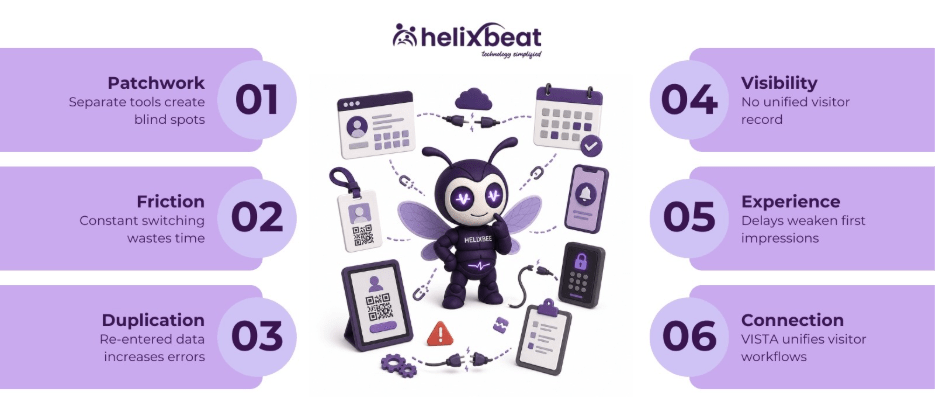
Table of Contents
How Offices End Up with a Patchwork
Office tool sprawl starts with sensible decisions. A paper register looks outdated, so the office adds a digital sign-in app. Meeting rooms become difficult to manage, so another tool enters the stack. Security wants access logs, HR wants attendance data, and admin teams keep a spreadsheet to fill the gaps.
The problem appears when every tool knows only one part of the workplace. Reception knows who arrived. Security knows who entered a gate. Employees know who they expected. Management still does not have one clear view.
A visitor management system for office becomes less effective when it sits apart from host approvals, access control, and reporting. The business gets digital check-in, but the work still depends on manual follow-ups.
The Hidden Costs, Named
The cost of disconnected tools is hard to see because it is spread across people, departments, and small daily tasks.
1. The Context-Switching Tax
Reception and admin teams lose time when they move between visitor logs, phone calls, employee directories, access systems, and spreadsheets. A separate Qatalog and Cornell University study put the cost of resuming work after toggling to a different app at roughly 9.5 minutes. For a busy Indian office, that can mean delayed check-ins during interviews, vendor visits, client meetings, or audits.
A visitor management system for office should reduce screen-switching, not add another dashboard to watch.
2. The Manual Re-Entry Tax
When systems do not share data, people become the connector. A visitor enters details at reception, then the same information gets copied into a security sheet, audit file, or access approval list.
A connected visitor management system for office removes repeated data entry and reduces mistakes in names, numbers, and check-out times.
3. The No-Single-Source-of-Truth Tax
Ask a fragmented office one simple question: who was inside the workplace at 3 PM yesterday? Reception may check visitor logs. Security may check gate records. Admin may check a spreadsheet.
A visitor management system for office should give teams one reliable record of visitor movement. Without that record, every incident, audit, or emergency becomes slower to manage.
4. The Compliance and Security Blind Spot
A scattered stack creates a scattered audit trail. Visitor records may sit in one system, approvals in another, and access logs somewhere else. If a contractor enters a restricted floor or a visitor leaves without check-out, the gap may not be noticed quickly.
A visitor management system for office should support security teams with traceable data, not disconnected fragments.
5. The Visitor Experience Tax
Visitors feel the gaps too. They wait while reception calls the host. They repeat details they already shared. They stand at the desk while someone checks a register or searches for approval.
Poor entry experience affects how clients, candidates, vendors, and partners see your workplace.
6. The Overlap-and-License Tax
Disconnected tools often repeat the same features. Two systems may store employee details. Two may send alerts. One may track visitors, while another keeps approval records.
The “cheap” stack becomes expensive when admin time, renewals, support tickets, and manual corrections are included.
How to Estimate Your Own Hidden Cost
You do not need a long audit to spot the first signs. Start with this simple estimate:
Weekly hours lost = app switches per person per day × minutes lost per switch × people affected × working days ÷ 60
Then map your workplace stack. List every tool used by reception, security, admin, HR, and facilities. Mark where the same data is entered twice. Circle every manual handoff between teams.
Those overlaps and handoffs are the real cost. A visitor management system for office should reduce them by connecting visitor records, host approvals, check-in status, and reports in one flow.
The Fix Is Not Another Tool; It Is Connection
Many offices respond to friction by adding one more tool. A dashboard here, an integration there, and another app for approvals. That may help, but it can also add more work.
The better question is: what belongs together? Visitor check-in, host approval, access control, delivery entry, and reporting are connected parts of workplace movement.
A connected visitor management system for office makes one answer easier to find: who entered, why they came, who approved them, and whether they left.
When You Do Not Need to Consolidate
Consolidation is not always the right answer. If your current tools already share data smoothly, keep them. A strong connected stack can work well.
A standalone tool may also make sense when one workflow is highly specialized. A very small office with a few visitors a week may not need a larger platform.
The warning sign is simple: if your team is copying data between systems, your team has become the integration layer.
What a Connected VISTA Setup Looks Like
VISTA helps offices move from isolated visitor logs to connected visitor workflows. Visitors can be pre-registered, check in through a QR-based process, and trigger instant host notifications. Reception gets a smoother flow, security gets cleaner records, and admins get better visibility.
The value of VISTA is not just digital check-in. The value is the connection between visitor entry, approval, tracking, and reporting. With a visitor management system for office like VISTA, teams can reduce repeated calls, avoid messy records, and see visitor activity more clearly.
VISTA also supports role-based access, visitor analytics, emergency management, and cloud-based records. These capabilities help Indian offices manage daily entry without depending on paper registers or scattered spreadsheets.
How to Start This Week
Start with one workflow, not the whole office stack.
- Map your current visitor journey from arrival to check-out.
- Identify where reception, security, and hosts repeat the same work.
- Find where visitor data is stored more than once.
- Check which approvals still happen by phone or message.
- Pilot one connected workflow before expanding across locations.
The goal is one clear visitor record that helps the office move faster and operate with more control.
Conclusion
Your workplace tools probably did not become disconnected in one day. The stack grew one practical purchase at a time until reception, security, admin, and employees started working from different records.
The cost is quiet: a missed host call, a copied record, a visitor log that does not match, or a security question that takes too long to answer.
A visitor management system for office should not be another isolated tool. VISTA helps Indian businesses connect visitor entry with the workplace workflows around it, so teams can reduce manual work, improve visibility, and create a safer visitor experience.
Talk to the VISTA team to see how a connected visitor management workflow can work in your office.
Frequently Asked Questions
What are disconnected workplace tools?
Disconnected workplace tools are separate apps or processes that manage visitor entry, attendance, room booking, deliveries, and access records without sharing data.
Why should visitor management not work in isolation?
Visitor entry affects reception, security, host approvals, reporting, and emergency visibility. When the process is isolated, teams spend more time fixing gaps.
How does VISTA help Indian offices?
VISTA connects visitor check-in, host notifications, visitor logs, role-based access, analytics, and emergency visibility in a cleaner workflow.