Moving to the cloud sounds straightforward until you’re actually doing it. Servers that have run for years, applications glued together with legacy dependencies, and teams that aren’t quite sure what “cloud-native” means. These are the realities most businesses face when they decide it’s time to migrate.
However, a well-defined cloud migration strategy is what separates a smooth transition from a costly, chaotic one. In this guide, we break down exactly what that strategy looks like, what decisions you need to make before touching a single workload, and how to avoid the pitfalls that derail even well-funded migrations.
Table of Contents
Why Businesses Are Moving to the Cloud (and Why Timing Matters)
Today, maintaining physical servers, paying for data center floor space, and managing hardware refresh cycles every three to five years is no longer a competitive option for most organizations. Cloud infrastructure offers pay-as-you-go pricing, built-in redundancy, and global reach that no in-house data center can match at the same cost point.
But “moving to the cloud” is not a single action. It’s a program of work that can span months or years, depending on organizational complexity. Therefore, getting the sequencing right matters.
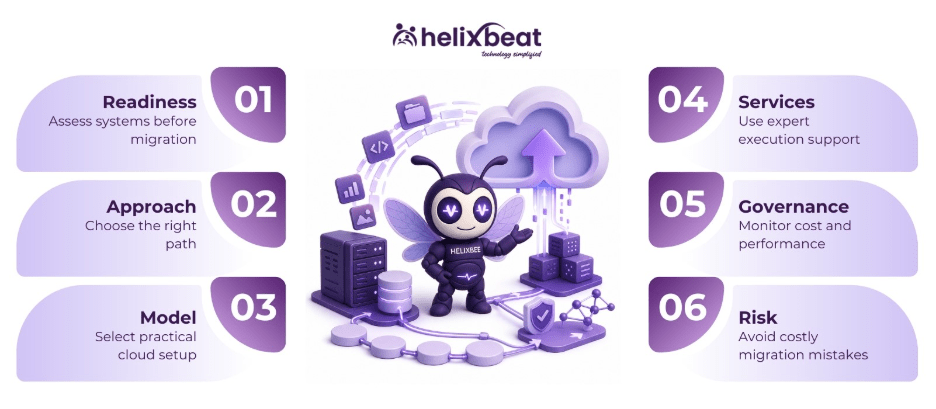
Step 1: Start With a Cloud Readiness Assessment
Before any workload moves anywhere, you need a factual picture of what you’re working with. A cloud readiness assessment catalogs your existing applications, data, infrastructure dependencies, and compliance obligations. It helps determine what can move to the cloud as-is, what needs re-architecting, and what should stay on-premise permanently.
This assessment covers four areas:
- Technical readiness – Are your applications architected in a way that works in cloud environments? Monolithic applications with tightly coupled components may need to be broken apart before migration.
- Security and compliance readiness – Strict compliance standards in sectors like finance and healthcare mandate rigorous audit tracking and localized data storage. Your assessment must map these requirements before you commit to a platform.
- Operational readiness – Do your teams have the skills to manage cloud infrastructure? Because gaps here need to be addressed through training or staff augmentation before you scale up cloud operations.
- Financial readiness – Cloud costs behave differently from on-premise costs. Understanding the total cost of ownership over three to five years prevents the “cloud bill shock” that catches many organizations off guard.
If your team has never done this before, partnering with experts offering cloud strategy consulting gives you an objective baseline.
Step 2: Choose the Right Migration Approach — The 6 Rs
Every application in your portfolio will follow one of six migration paths, commonly called the “6 Rs”:
- Rehost (Lift and Shift) – Moving an application to the cloud with no changes. Fast and low-risk, but it doesn’t capture the full performance or cost benefits of cloud-native architecture.
- Replatform (Lift and Optimize) – Minor optimizations during migration, such as moving to a managed database service without changing the core application.
- Repurchase – Replacing an existing application with a cloud-native SaaS alternative. A common example is moving from an on-premise CRM to Salesforce.
- Refactor/Re-architect – Rebuilding an application to take full advantage of cloud-native features like microservices, serverless functions, and auto-scaling. This delivers the biggest long-term performance and cost benefits but requires the most upfront investment.
- Retain – Keeping certain applications on-premise because migrating them would cost more than the benefit they’d receive. Legacy systems with deep hardware dependencies often fall here.
- Retire – Identifying applications that are no longer actively used and decommissioning them before migration.
A solid cloud migration strategy assigns each application to one of these paths early in the planning process.
Step 3: Decide on a Cloud Model — And Whether Multi-Cloud Makes Sense
The choice between public, private, hybrid, and multi-cloud deployment is not just a technical decision; it’s a business one. Most enterprises today operate under a multi-cloud strategy, distributing workloads across two or more cloud providers to avoid vendor lock-in, optimize costs, and meet geographic data residency requirements.
Multi-cloud is not inherently better than single-cloud, and it introduces its own operational complexity. Therefore, organizations that run multi-cloud well typically have mature DevOps practices and enterprise integration capabilities to help different cloud environments communicate and share data reliably.
For most mid-market businesses, starting with a primary cloud provider and adopting a second strategically, for backup, disaster recovery, or a specific workload, is more practical.
Step 4: Engage Professional Cloud Migration Services
Executing a migration at scale requires more than good planning documents. You need people who have done this before, tooling to automate discovery and dependency mapping, and a structured project management approach.
Professional cloud migration services handle the end-to-end execution: infrastructure provisioning, data migration, application testing in the new environment, cutover planning, and post-migration monitoring. They also manage the rollback plans that every responsible migration needs.
Working with an experienced provider also accelerates your digital transformation program overall, since cloud migration often serves as the foundation for downstream initiatives like AI/ML integration, advanced data analytics, and workflow automation.
Step 5: Govern Costs and Performance From Day One
One of the most common mistakes organizations make after a migration is treating cloud management as a “set it and forget it” activity. Cloud resources, if left untagged, unmonitored, and unoptimized, can accumulate costs rapidly. Therefore, an effective cloud migration strategy includes a governance framework that covers:
- Cost management – Tagging all resources by business unit or project, setting budget alerts, and reviewing spending weekly rather than monthly.
- Performance monitoring – Establishing baseline performance metrics before migration and tracking them continuously post-migration to catch regressions early.
- Security posture – Regularly auditing access controls, encryption settings, and network configurations against your defined security policies.
- Continuous optimization – Rightsizing instances, using reserved or spot pricing for predictable workloads, and identifying services that can be replaced with cheaper managed alternatives.
Teams that skip governance in the excitement of completing a migration often find themselves rebuilding it under pressure six months later.
Common Cloud Migration Mistakes Businesses Make
Understanding where migrations go wrong is as valuable as knowing where they go right:
- Skipping the readiness assessment and discovering dependency problems mid-migration adds weeks of unplanned work and cost.
- Migrating everything at once instead of in phased waves removes your ability to learn, adjust, and control risk.
- Ignoring team training – the cloud requires different operational skills. Teams that aren’t ready slow down progress and introduce errors that cost more to fix than the training cost.
- Not optimizing post-migration – Migrating to the cloud without subsequent optimization often leads to higher expenses than maintaining on-premise infrastructure, defeating one of the primary business cases for the move.
The Role of Cloud Strategy Consulting in Reducing Risk
Many businesses have the motivation to migrate but lack the internal expertise to sequence it correctly. This is where cloud strategy consulting delivers real value. They help you build the governance structures, team capabilities, and vendor relationships that make cloud operations sustainable post-migration.
Good consultants start from your business objectives, map them to technical decisions, and build a migration roadmap that accounts for your actual risk tolerance and operational constraints.
At Helixbeat, we help organizations build and execute a tailored cloud migration strategy. Get in touch with us!
FAQs
1. What is a cloud migration strategy?
A cloud migration strategy is a structured plan that outlines how an organization will move its applications, data, and workloads from on-premise infrastructure or another cloud environment to the cloud while minimizing risks and disruptions.
2. Why is a cloud readiness assessment important?
A cloud readiness assessment identifies application dependencies, security requirements, infrastructure limitations, and operational gaps before migration begins.
3. What are the 6 Rs of cloud migration?
The 6 Rs are:
- Rehost
- Replatform
- Repurchase
- Refactor/Re-architect
- Retain
- Retire
These approaches help determine the most suitable migration path for each application.
4. How long does a cloud migration take?
The timeline depends on factors such as the number of applications, data volume, system complexity, and regulatory requirements. Migrations can take anywhere from a few weeks to several months or even years for large enterprises.
5. What is the difference between single-cloud and multi-cloud strategies?
A single-cloud strategy relies on one cloud provider, while a multi-cloud strategy uses services from multiple providers. Multi-cloud can reduce vendor lock-in and improve resilience, but also increases management complexity.